Motion Trail
Stunning cursor trail effects with 8 unique animation styles
Overview
Stunning cursor trail effects with 8 unique animation styles
- 8 unique animation styles
- Custom image support
- Velocity-aware effects
- 3D perspective mode
- Blend mode support
Cursor image trails for Framer, in eight styles
Motion Trail drops a sequence of images behind the cursor as it moves. Depending on the style you pick, the images scale and fade, spin, rush upward, follow the mouse with filters, react to how fast the cursor moves, stay on screen with a blend mode, or move through 3D space. It turns an empty hero into something visitors play with for a few seconds before they scroll.
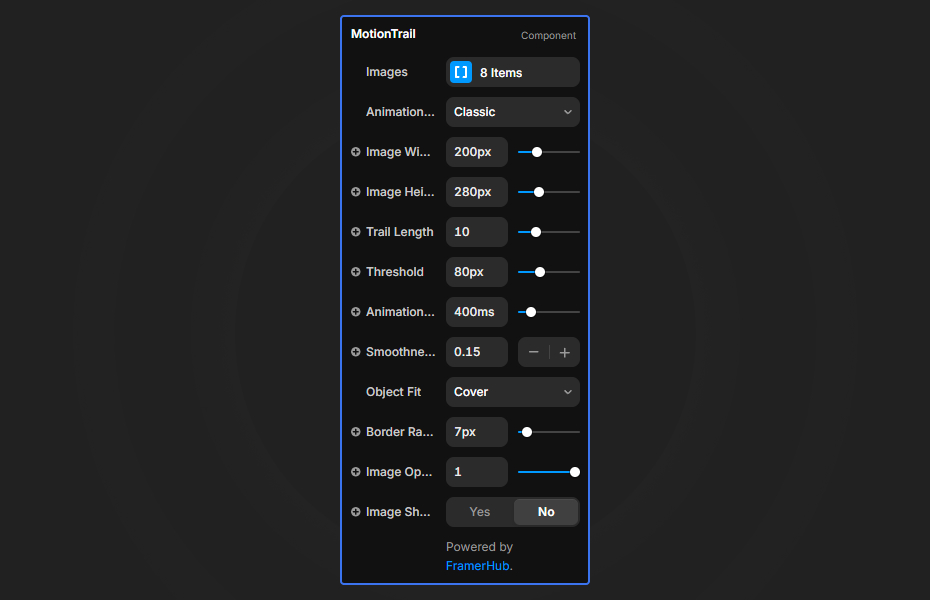
You supply the images, choose one of eight styles, and set the trail length, image size, fit and corner radius in Framer's properties panel.
Features
Eight animation styles. Classic, Innerscape, Exiting, Flow Follow, Spin Trail, Velocity, Persistence and Perspective.
Your own images. Use project shots, product photos or illustrations.
Speed awareness. The Velocity style changes image size and effects with cursor speed.
3D perspective. The Perspective style rotates and scales images in depth.
Blend modes. The Persistence style uses a screen blend so images layer into a collage.
Where Motion Trail works best
Photographer and designer portfolios. Put a name and a one-line intro in the center of the hero and load 10 project images into the Classic style. Visitors see the range of work before they reach the grid.
Creative studio homepages. Velocity or Spin Trail with bold, colorful images gives a studio site energy. Keep the headline large and high-contrast so it stays readable through the motion.
Exhibitions and galleries. Persistence slowly builds a collage of artwork as visitors move the mouse, which suits a show announcement or an artist page.
Product drops. Flow Follow with product photos on a plain background shows a whole collection in one hero without a carousel.
How to Use
Customization
Animation styles
- Classic: images appear, then scale and fade out
- Innerscape: inner image movement with brightness
- Exiting: images leave upward
- Flow Follow: images follow the mouse with filters
- Spin Trail: images rotate along the trail
- Velocity: size and effects respond to speed
- Persistence: images stay, blended together
- Perspective: images move through 3D space
Image settings
- Trail Length: number of images in the trail
- Image Size: width and height of each image
- Object Fit: how images fill their frame
- Border Radius: corner rounding
Starting settings
Portfolio. Classic style, 10 images, a threshold around 80 so images appear at a steady rhythm, smoothness around 0.05 to 0.1 for elegant movement.
Energetic. Velocity style, 12 images, square crops with a small radius.
Collage. Persistence style on a dark section, so the screen blend makes overlaps glow.
Performance and mobile
Keep the trail between 8 and 12 images and compress the images, because each one is drawn on screen while the cursor moves. Lower threshold values add images more often, which looks busier and costs more. There is no cursor on touch screens, so swap Motion Trail for a static image or gallery at the mobile breakpoint.
Compared with similar components
Mouse Image Trail is a simpler single-style image trail. Bouncing Image Trail uses GSAP to make images bounce as they drop. Motion Hover Trails creates WebGL trails inside an image on hover, not across the page. Fluid Trail draws a liquid trail instead of images. Choose Motion Trail when you want several image-trail styles in one component.
How to install Motion Trail in Framer
- Purchase Motion Trail above
- Open your FramerHub dashboard
- Find Motion Trail in Recent Purchases and click "Copy URL"
- Open your Framer project
- Paste it anywhere on the canvas (Cmd/Ctrl + V)
License
Single-use license: use it in one client project with full commercial rights. No redistribution. 1 license = 1 client.
Questions before buying? Read the refund policy or email hello@framerhub.io.
Motion Trail FAQ
Can I use my own images in the trail?
Yes. Add your own images in the properties panel and the trail cycles through them as the cursor moves.
How many images should the trail have?
Between 8 and 12 gives a smooth trail. Longer trails look denser but cost more performance.
Does Motion Trail work on phones?
The trail follows the mouse, so it is a desktop effect. On mobile breakpoints, replace it with a static image or a simple gallery.
Which style should I pick?
Classic is the safest for portfolios, Velocity feels energetic, Persistence leaves images layered on screen with a screen blend, and Perspective moves images through 3D space.
Motion Trail - $14
Stunning cursor trail effects with 8 unique animation styles
You might also like
Trusted by agencies and freelancers
2,000+ Framer users rely on FramerHub plugins and components to build serious client sites.
"The Best Framer CMS Filtering Plugin I've Found — Truly a Game-Changer. I've tested a lot of Framer CMS filtering and sorting components — both free and paid — and this is by far the best one I've come across."
- Pierre Azalbert · CMS Filter
"Excellent product and super speedy and helpful support from the team!"
- Chloe Dovey · CMS Masonry Lightbox
"We had tried a couple of other Framer CMS filter components but they were buggy, hard to use and support was slow or non-existent. CMSFilter is easier to use and has a lot of added functionality."
- Mark Williamson · CMS Filter
"CMS Masonry-Lightbox is a super flexible and polished CMS grid that makes any portfolio shine. I especially love the support for local videos and the great customer support behind it."
- Rick van der Wal · CMS Masonry Lightbox
"I got a CMS featuring setup from Shahul Hameed, and it works perfectly. He was super helpful, guided me through everything, and even stayed up late to make sure I had no issues. Great experience overall!"
- Amarachi · CMS Filter
"Very happy with this purchase. Also the creators are very helpful, can only recommend."
- Petia Dimitrova · CMS Masonry Lightbox
"He really helped me out when I needed assistance adding it to my Framer project. Super fast customer support highly recommend!"
- Salman Abdulrazaq Ali
Got questions? We've the answers
Got questions? We've the answers
Everything you need to know about FramerHub.