Ribbon Wave FREE
2D canvas-based confetti ribbon lines with smooth animation and gravity.
Overview
2D canvas-based confetti ribbon lines with smooth animation and gravity.
- Smooth confetti ribbon lines with customizable colors
- Gravity and turbulence effects for natural motion
- Canvas-based 2D animation for optimal performance
Create Playful Celebrations
A vibrant 2D canvas-based confetti lines component with smooth animation, customizable colors, and physics-based gravity effects.
Features
Smooth Ribbon Lines Elegant confetti ribbons that flow smoothly across your canvas with customizable colors and patterns.
Physics-Based Motion Optional gravity and turbulence effects create natural, organic movement that feels alive.
Customizable Colors Choose up to 5 vibrant colors for your confetti ribbons. Lines will randomly use these colors.
Performance Optimized Canvas-based 2D rendering ensures smooth performance across all devices.
Use Cases
Celebration Pages — Perfect for success pages, achievement unlocks, and special announcements
Hero Sections — Add playful energy to landing pages and marketing sites
Event Websites — Ideal for party invitations, festival sites, and celebration events
Interactive Backgrounds — Create dynamic backgrounds that add movement without distraction
How to Use
Installation
VIDEO PLACEHOLDER: Installation Tutorial
- Log in to your account at framerhub.io
- Navigate to framerhub.io/dashboard
- Find Ribbon Wave in your Recent Purchases
- Click the "Copy" button
- Open your Framer project
- Paste the component anywhere on your canvas (Cmd/Ctrl + V)
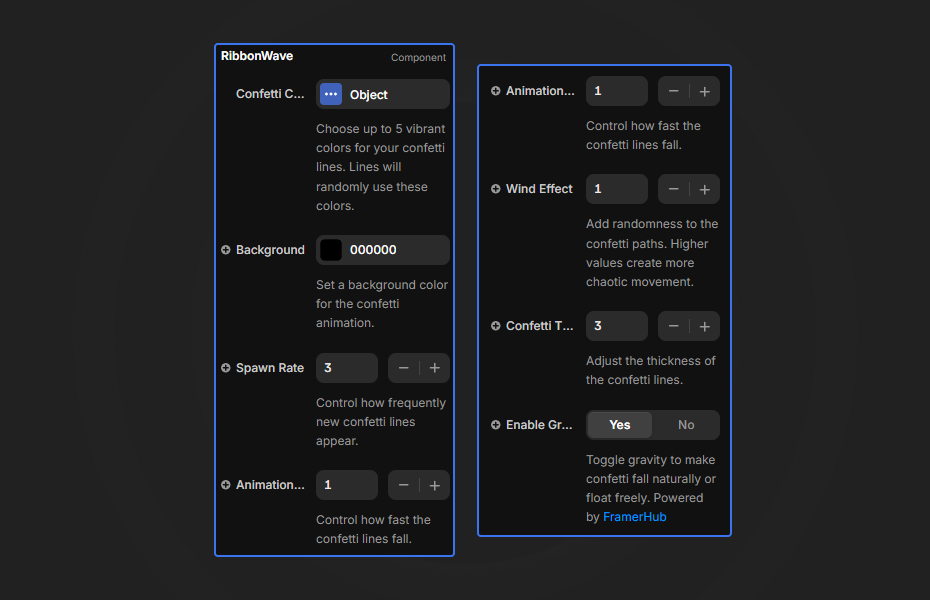
Use the property controls to customize your confetti effect.
Confetti Colors
- Color 1-5 — Choose up to 5 vibrant colors for your confetti ribbons
Background
- Background Color — Set a background color for the confetti animation
Animation
- Spawn Rate — Control how frequently new confetti ribbons appear (0-10)
- Speed — Animation speed multiplier (0.1-5)
- Turbulence — Wind/turbulence intensity for more chaotic motion (0-5)
- Line Width — Thickness of the confetti ribbons (1-10)
Physics
- Enable Gravity — Toggle gravity to make confetti fall naturally or float freely
Quick Tips
Best Colors — Use bright, contrasting colors for maximum visual impact. Try complementary color schemes for harmonious effects.
Gravity On/Off — Enable gravity for celebration effects (falling confetti). Disable for floating, dreamlike ribbons.
Spawn Rate — Lower spawn rates (1-3) feel elegant and subtle. Higher rates (5-10) create energetic, festive atmospheres.
Turbulence — Add turbulence for wind-blown effects. Combine with gravity for realistic confetti physics.
Credits
Built upon Animated Mesh Lines by Jeremboo for Codrops.
Why Designers Love This
Bring celebrations to life with vibrant, physics-based confetti ribbons. Canvas-optimized for smooth performance on all devices, this component adds joy and energy to any Framer project.
Need Help? Visit framerhub.io/support for documentation and video tutorials.
Ribbon Wave - FREE
2D canvas-based confetti ribbon lines with smooth animation and gravity.
You might also like
Why Choose Framer Hub Components
Loved by Framer teams
Used by Framer professionals who need premium, no-code experiences.
"The Best Framer CMS Filtering Plugin I've Found — Truly a Game-Changer. I've tested a lot of Framer CMS filtering and sorting components — both free and paid — and this is by far the best one I've come across."
"He really helped me out when I needed assistance adding it to my Framer project. Super fast customer support highly recommend!"
"We had tried a couple of other Framer CMS filter components but they were buggy, hard to use and support was slow or non-existent. FramerCMSFilter is easier to use and has a lot of added functionality."
Got questions? We've the answers
Got questions? We've the answers
Everything you need to know about FramerHub.