Random Letter Glitch
Matrix-style animated letter glitch effect
Overview
Matrix-style animated letter glitch effect
- Customizable glitch colors
- Smooth color transitions
- Vignette effects
- Custom character sets
- Adjustable speed and font size
Random Letter Glitch
Create mesmerizing Matrix-style animated backgrounds with randomly changing letters and smooth color transitions. Perfect for tech-themed hero sections and creative backgrounds.
Features
Multi-Color Support Add multiple glitch colors that randomly cycle through the letter grid.
Smooth Transitions Enable smooth color interpolation for elegant, flowing animations.
Vignette Effects Add center or outer vignette overlays for depth and focus.
Custom Characters Use any character set - letters, numbers, symbols, or custom glyphs.
Use Cases
Tech Landing Pages — Create futuristic, cyber-themed backgrounds.
Hero Sections — Add visual interest behind headlines and CTAs.
Loading Screens — Engaging animated backgrounds during transitions.
Creative Portfolios — Stand out with unique visual effects.
How to Use
Installation
VIDEO PLACEHOLDER: Installation Tutorial
- Log in to your account at framerhub.io
- Navigate to framerhub.io/dashboard
- Find Random Letter Glitch in your Recent Purchases
- Click the "Copy" button
- Open your Framer project
- Paste the component anywhere on your canvas (Cmd/Ctrl + V)
Customization
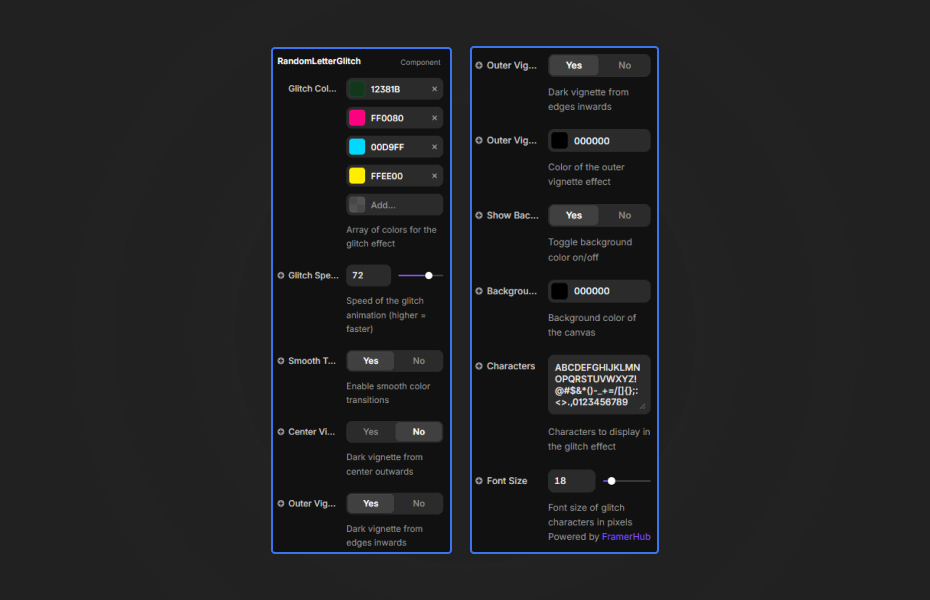
Glitch Colors Add multiple colors that randomly appear on letters.
Animation Settings
- Glitch Speed: Control animation frequency
- Smooth Transitions: Enable/disable color interpolation
- Font Size: Character size in pixels
Vignette Options
- Center Vignette: Dark overlay from center
- Outer Vignette: Dark overlay from edges
Quick Tips
Color Contrast — Use contrasting colors on dark backgrounds for best visibility.
Speed Settings — Lower speeds (20-40) feel elegant. Higher speeds (70-100) are more intense.
Character Sets — Try using only numbers or symbols for different visual styles.
Layering — Position text content above the component with higher z-index.
License
Single Use License — Use in one client project with full commercial rights. No redistribution. 1 license = 1 client.
Refund Policy
Due to the nature of our digital products, we are unable to offer refunds, but we're here to assist you with any questions or concerns!
Why Designers Love This
Instantly create a Matrix-inspired background that captivates visitors. The customizable colors and smooth animations make it versatile for any tech or creative project.
Random Letter Glitch - $5
Matrix-style animated letter glitch effect
You might also like
Why Choose Framer Hub Components
Loved by Framer teams
Used by Framer professionals who need premium, no-code experiences.
"The Best Framer CMS Filtering Plugin I've Found — Truly a Game-Changer. I've tested a lot of Framer CMS filtering and sorting components — both free and paid — and this is by far the best one I've come across."
"He really helped me out when I needed assistance adding it to my Framer project. Super fast customer support highly recommend!"
"We had tried a couple of other Framer CMS filter components but they were buggy, hard to use and support was slow or non-existent. FramerCMSFilter is easier to use and has a lot of added functionality."
Got questions? We've the answers
Got questions? We've the answers
Everything you need to know about FramerHub.