Mouse Image Trail
Leave a dynamic trail of images that follow your cursor.
Overview
Leave a dynamic trail of images that follow your cursor.
- Customizable Images
- Fluid Framer Motion Physics
- Adjustable Density and Lifespan
- Random Rotation Effect
- Fade Out Animation
Title/Headline
Create an engaging, playful interaction with the Mouse Image Trail component. As visitors move their cursor across your site, a vibrant sequence of images appears, trailing their path before smoothly fading away. Perfect for creative portfolios, photography sites, and modern landing pages.
Features
Customizable Imagery Easily add your own sequence of images to create a personalized trail effect.
Fluid Animations Powered by Framer Motion, images scale up beautifully on entrance and fade out smoothly as the mouse moves on.
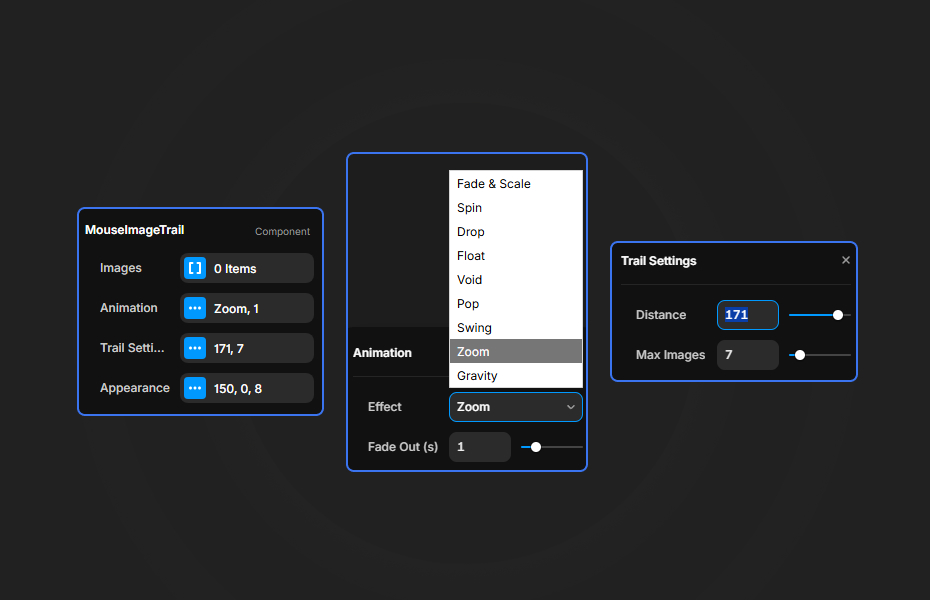
Fully Adjustable Settings Control the distance between spawned images, their size, fade duration, and random rotation for the perfect look.
Use Cases
Creative Portfolios — Showcase your best work in an unexpected, interactive way as users explore your site.
Photography Studios — Provide a sneak peek of photo sessions directly connected to the user's cursor.
Playful Landing Pages — Add a "wow" factor to a hero section to capture visitor attention immediately.
How to Use
Installation
VIDEO PLACEHOLDER: Installation Tutorial
- Log in to your account at framerhub.io
- Navigate to framerhub.io/dashboard
- Find Mouse Image Trail in your Recent Purchases
- Click the "Copy" button
- Open your Framer project
- Paste the component anywhere on your canvas (Cmd/Ctrl + V)
Customization
Easily adjust the component to fit your design style directly from the Framer properties panel.
Image Settings
- Add as many images as you want to the sequence.
- Set the
Image Sizeto determine how large each photo appears.
Trail Physics
- Adjust
Distanceto control how frequently images spawn along the path. - Change
Fade Out (s)to control how long images linger before disappearing. - Use
Rotation Rangeto add organic variety with random tilting for each image.
Quick Tips
Best Performance — Keep the Max Images setting around 15-20 to ensure smooth performance across all devices.
High Quality Images — Since these images appear briefly, use well-compressed, high-impact visuals that are instantly recognizable.
Layering — Ensure the component is placed in a container with appropriate z-indexing so the images don't block critical interactive elements below.
License
Single Use License — Use in one client project with full commercial rights. No redistribution. 1 license = 1 client.
Refund Policy
Due to the nature of our digital products, we are unable to offer refunds, but we're here to assist you with any questions or concerns!
Why Designers Love This
The Mouse Image Trail transforms an empty space into an interactive playground. It adds that elusive "delight" factor that makes websites memorable and encourages users to spend more time engaging with the page.
Mouse Image Trail - $9
Leave a dynamic trail of images that follow your cursor.
You might also like
Why Choose Framer Hub Components
Loved by Framer teams
Used by Framer professionals who need premium, no-code experiences.
"The Best Framer CMS Filtering Plugin I've Found — Truly a Game-Changer. I've tested a lot of Framer CMS filtering and sorting components — both free and paid — and this is by far the best one I've come across."
"He really helped me out when I needed assistance adding it to my Framer project. Super fast customer support highly recommend!"
"We had tried a couple of other Framer CMS filter components but they were buggy, hard to use and support was slow or non-existent. FramerCMSFilter is easier to use and has a lot of added functionality."
Got questions? We've the answers
Got questions? We've the answers
Everything you need to know about FramerHub.