Motion Hover Trails
Mesmerizing image trails hover effect powered by WebGL.
Overview
Mesmerizing image trails hover effect powered by WebGL.
- GPU-accelerated WebGL rendering
- Multiple trailing image copies
- Customizable trail amount and duration
- Customizable text styling with extended font controls
- Flexible image sizing options (Cover, Contain, Custom)
- Smooth GSAP-powered animations
- Support for custom content slots
Image Trails Hover Effect
Motion Hover Trails generates multiple trailing copies of your image that follow the cursor with staggered timing, creating a mesmerizing trail effect that captivates your visitors.
Features
Trail Effect Creates multiple copies of your image that follow the cursor with staggered timing, producing a fluid motion trail that responds to cursor movement.
Amount Control Adjust the number of trailing images from 1 to 20, creating anything from a subtle double image to a dramatic cascading trail.
Duration Control Fine-tune the animation timing to control how quickly or slowly the trail follows the cursor.
Full Customization Comprehensive styling controls for titles, subtitles, colors, fonts, padding, borders, shadows, and more.
Use Cases
Portfolio Showcases — Display project thumbnails with mesmerizing hover reveals that highlight your creative work.
Product Galleries — Make e-commerce product images come alive with flowing trail interactions.
Hero Sections — Create memorable landing page headers with dynamic, cursor-following imagery.
Art & Creative Sites — Add a dreamy, artistic visual effect perfect for creative portfolios.
How to Use
Installation
VIDEO PLACEHOLDER: Installation Tutorial
- Log in to your account at framerhub.io
- Navigate to framerhub.io/dashboard
- Find Motion Hover Trails in your Recent Purchases
- Click the "Copy" button
- Open your Framer project
- Paste the component anywhere on your canvas (Cmd/Ctrl + V)
Customization
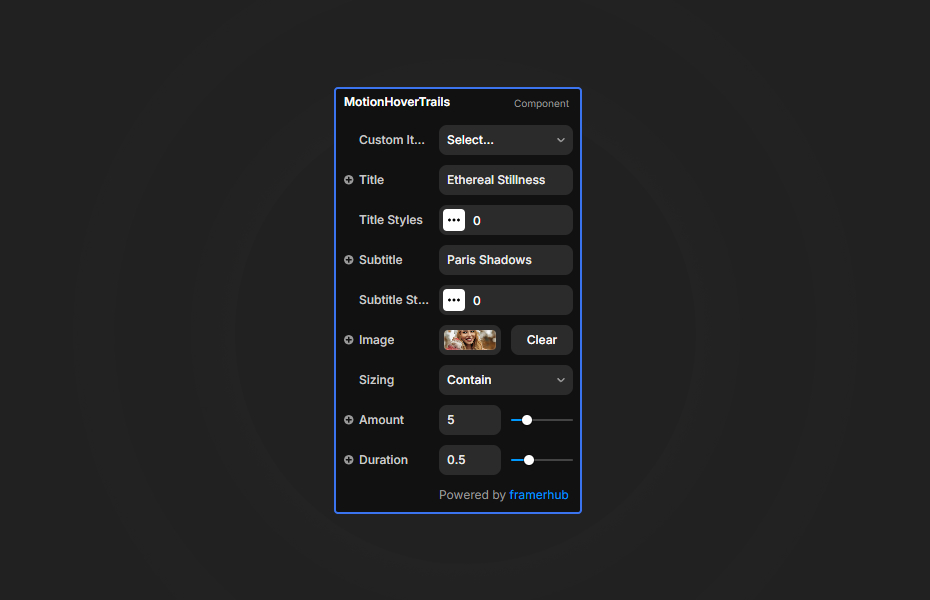
The component offers extensive customization through grouped property controls:
Title Styles
- Font (extended controls for size, weight, line height, letter spacing, alignment)
- Color & Hover Color
- Background, Padding, Border, Radius, Shadow
Subtitle Styles
- Same comprehensive options as title styles
Image Settings
- Image source via ResponsiveImage
- Sizing mode: Cover, Contain, or Custom dimensions
Effect Settings
- Amount: Number of trailing images (1-20)
- Duration: Trail animation timing (0-2s)
Quick Tips
Best Performance — The WebGL renderer uses canvas mode optimization. Reduce Amount on mobile for optimal performance.
Trail Length — Lower Amount (3-5) for subtle effect, higher (10-20) for dramatic cascading trail.
Duration Settings — Lower duration (0.3) for snappy trails, higher (1.0+) for dreamy, flowing effect.
Custom Content — Use the Custom Items slot to replace default text with your own Framer components.
License
Single Use License — Use in one client project with full commercial rights. No redistribution. 1 license = 1 client.
Refund Policy
Due to the nature of our digital products, we are unable to offer refunds, but we're here to assist you with any questions or concerns!
Why Designers Love This
Motion Hover Trails transforms ordinary hover interactions into mesmerizing experiences with its flowing trail effect. The Three.js-powered rendering ensures buttery-smooth animations while GSAP provides precise timing control.
Motion Hover Trails - $9
Mesmerizing image trails hover effect powered by WebGL.
You might also like
Why Choose Framer Hub Components
Loved by Framer teams
Used by Framer professionals who need premium, no-code experiences.
"The Best Framer CMS Filtering Plugin I've Found — Truly a Game-Changer. I've tested a lot of Framer CMS filtering and sorting components — both free and paid — and this is by far the best one I've come across."
"He really helped me out when I needed assistance adding it to my Framer project. Super fast customer support highly recommend!"
"We had tried a couple of other Framer CMS filter components but they were buggy, hard to use and support was slow or non-existent. FramerCMSFilter is easier to use and has a lot of added functionality."
Got questions? We've the answers
Got questions? We've the answers
Everything you need to know about FramerHub.