Neon Trails FREE
Colorful spiral helix pattern with forward-moving neon lines.
Overview
Colorful spiral helix pattern with forward-moving neon lines.
- Colorful spiral helix pattern with dynamic animations
- Forward-moving neon lines with customizable colors
- Mouse interaction for camera orbit control
Create Mesmerizing Neon Experiences
A stunning 3D animation component featuring colorful spiral helix patterns with forward-moving neon lines and interactive camera controls.
Features
Spiral Helix Pattern Mesmerizing spiral lines that create a dynamic helix pattern as they move forward through 3D space.
Neon Aesthetics Vibrant neon-style lines with customizable colors create eye-catching visual effects.
Mouse Interaction Enable camera orbit control with mouse movement for an interactive, immersive experience.
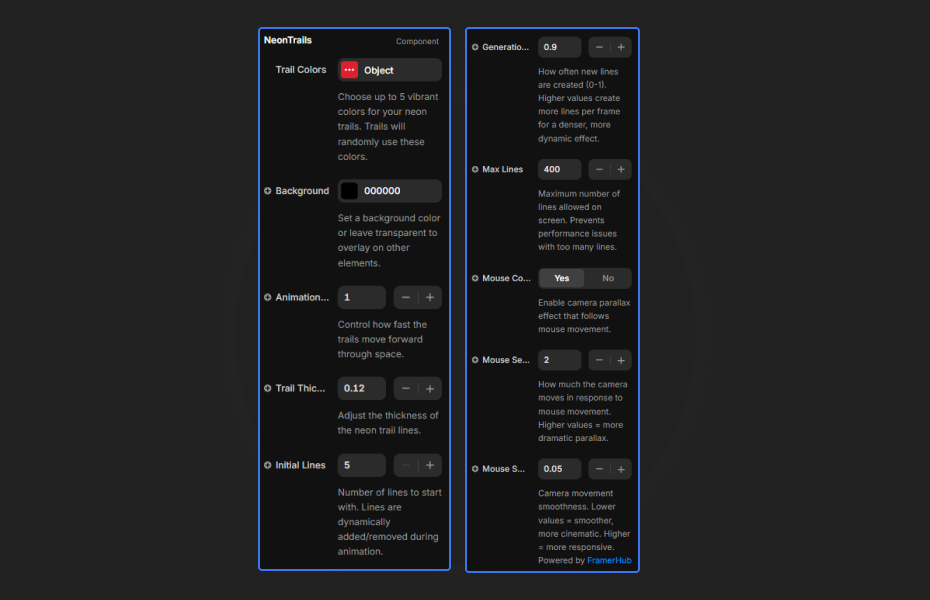
Customizable Colors Choose up to 5 vibrant colors for your neon trails. Lines will randomly use these colors.
Use Cases
Tech Websites — Perfect for modern tech companies, SaaS products, and digital agencies
Hero Sections — Create attention-grabbing hero sections with futuristic aesthetics
Product Launches — Add visual excitement to product launch pages and announcements
Portfolio Sites — Showcase creativity with dynamic, artistic backgrounds
How to Use
Installation
VIDEO PLACEHOLDER: Installation Tutorial
- Log in to your account at framerhub.io
- Navigate to framerhub.io/dashboard
- Find Neon Trails in your Recent Purchases
- Click the "Copy" button
- Open your Framer project
- Paste the component anywhere on your canvas (Cmd/Ctrl + V)
Use the property controls to customize your neon trails effect.
Trail Colors
- Color 1-5 — Customize up to 5 colors for the neon trails
Background
- Background Color — Set a background color for the entire canvas
Animation
- Speed — Control how fast the trails move forward (0.1-5)
- Line Width — Thickness of the neon trails (0.01-0.2)
- Line Count — Number of spiral lines (10-100)
- Frequency — How often new trails are generated (0.1-10)
- Max Lines — Maximum number of simultaneous lines (10-200)
Interaction
- Mouse Control — Toggle camera orbit based on mouse movement
- Mouse Sensitivity — How much the camera reacts to mouse movement (0.1-2)
- Mouse Smoothing — Camera movement smoothness (0.01-0.2)
Quick Tips
Best Aesthetics — Use dark backgrounds (black or deep navy) with bright neon colors for maximum visual impact.
Speed & Energy — Slower speeds (0.5-1.5) feel cinematic and elegant. Faster speeds (2-4) create energetic, dynamic scenes.
Line Count — Fewer lines (10-30) feel minimal and sophisticated. More lines (50-100) create dense, cyberpunk atmospheres.
Mouse Interaction — Enable mouse control for interactive experiences. Adjust sensitivity and smoothing for precise feel: low smoothing = responsive, high smoothing = cinematic.
Credits
Built upon Animated Mesh Lines by Jeremboo for Codrops.
Why Designers Love This
Transform your website with futuristic neon aesthetics. Built with Three.js for smooth 60fps performance, this component creates mesmerizing spiral patterns that captivate visitors.
Need Help? Visit framerhub.io/support for documentation and video tutorials.
Neon Trails - FREE
Colorful spiral helix pattern with forward-moving neon lines.
You might also like
Why Choose Framer Hub Components
Loved by Framer teams
Used by Framer professionals who need premium, no-code experiences.
"The Best Framer CMS Filtering Plugin I've Found — Truly a Game-Changer. I've tested a lot of Framer CMS filtering and sorting components — both free and paid — and this is by far the best one I've come across."
"He really helped me out when I needed assistance adding it to my Framer project. Super fast customer support highly recommend!"
"We had tried a couple of other Framer CMS filter components but they were buggy, hard to use and support was slow or non-existent. FramerCMSFilter is easier to use and has a lot of added functionality."
Got questions? We've the answers
Got questions? We've the answers
Everything you need to know about FramerHub.