Nebula Hero
Create stunning 3D particle hero sections with animated galaxy, nebula, and cosmic effects.
Overview
Create stunning 3D particle hero sections with animated galaxy, nebula, and cosmic effects.
- Five stunning 3D presets (Galaxy, Nebula, Star Field, Swarm, Vortex)
- Interactive orbit controls with mouse rotation and zoom
- Fully customizable particle density and colors
- Auto-play animation with adjustable speed
- Optional automatic color transitions
- Responsive and performance-optimized
- Works in any section or layout
- Zero coding required
Stunning 3D Particle Backgrounds for Framer
Add cinematic galaxy, nebula, and cosmic effects to your hero sections. Five ready-to-use presets with full customization—no code required.
Designed for agencies and freelancers who need premium hero sections fast.
Features
Five Visual Presets Galaxy, Nebula, Star Field, Swarm, or Vortex—each with unique particle patterns and motion.
Interactive Controls Mouse-controlled orbit rotation and zoom with smooth damping for a polished feel.
Full Customization Adjust particle density, animation speed, zoom level, colors, and particle size—all from Framer's properties panel.
Auto Color Transitions Enable automatic color shifts that cycle smoothly at your preferred speed, or set custom colors manually.
Performance Optimized Smooth 60fps animation that adapts to any viewport size. Works perfectly on desktop and mobile.
Use Cases
Hero Sections — Make unforgettable first impressions with animated cosmic backgrounds
Product Launches — Showcase tech products with futuristic effects that communicate innovation
Agency Portfolios — Stand out with interactive 3D backgrounds that demonstrate design excellence
SaaS Landing Pages — Build credibility with sophisticated animations that convey professionalism
Event Pages — Create excitement for conferences and launches with dynamic cosmic visuals
How to Use
Installation
After purchasing from FramerHub:
- Log in to your account at framerhub.io
- Navigate to framerhub.io/dashboard
- Find Nebula Hero in your Recent Purchases
- Click the "Copy" button
- Open your Framer project
- Paste the component anywhere on your canvas (Cmd/Ctrl + V)
Customization
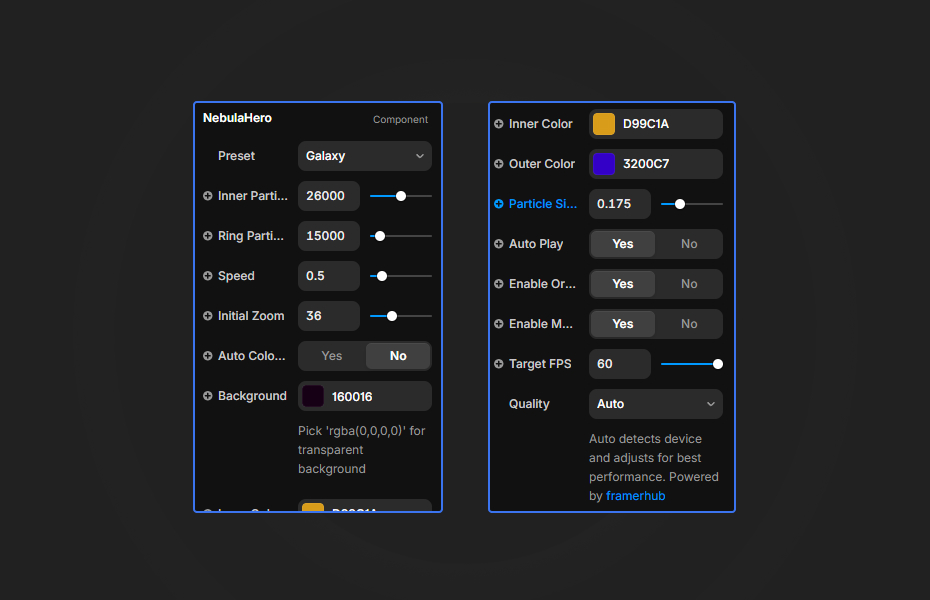
Everything you need is in Framer's properties panel:
Visual Style
- Choose from 5 presets: Galaxy, Nebula, Star Field, Swarm, Vortex
- Adjust particle density and size
- Set animation speed and initial zoom
Colors
- Customize background, inner, and outer gradient colors
- Or enable auto color transitions with speed control
Interaction
- Toggle mouse rotation (orbit controls)
- Enable/disable scroll zoom
- Set auto-play on or off
Quick Tips
Best Performance — Reduce particle counts on mobile (20,000 inner, 40,000 ring) for smooth animation
Color Harmony — Use complementary colors for depth. Dark backgrounds make particles pop
Layering — Place text above the component. White text with subtle shadows works best
License
Single Use License — Use in one client project with full commercial rights. No redistribution. 1 license = 1 client.
Why Designers Love This
Five ready-to-use presets mean you start with something beautiful, then make it yours with full color and animation control. No code, no complexity—just copy, paste, and customize through Framer's familiar properties panel.
Perfect for agencies delivering premium work fast and freelancers who want to stand out with interactive 3D effects.
Nebula Hero - $14
Create stunning 3D particle hero sections with animated galaxy, nebula, and cosmic effects.
You might also like
Why Choose Framer Hub Components
Loved by Framer teams
Used by Framer professionals who need premium, no-code experiences.
"The Best Framer CMS Filtering Plugin I've Found — Truly a Game-Changer. I've tested a lot of Framer CMS filtering and sorting components — both free and paid — and this is by far the best one I've come across."
"He really helped me out when I needed assistance adding it to my Framer project. Super fast customer support highly recommend!"
"We had tried a couple of other Framer CMS filter components but they were buggy, hard to use and support was slow or non-existent. FramerCMSFilter is easier to use and has a lot of added functionality."
Got questions? We've the answers
Got questions? We've the answers
Everything you need to know about FramerHub.