Neural Core
A mesmerizing 3D ASCII particle sphere with bloom effects.
Overview
A mesmerizing 3D ASCII particle sphere with bloom effects.
- 3D ASCII particle sphere
- Three character sets (Binary, Hex, Glyphs)
- Customizable bloom glow effect
- Interactive mouse tilt
- Auto quality detection
- Transparent background support
- Canvas-optimized performance
- Dual-color gradient particles
Neural Core
Create stunning 3D ASCII particle spheres for your Framer projects. Perfect for hero sections, loading screens, or any area that needs a futuristic, tech-focused visual impact.
Features
3D Particle Sphere A beautiful animated sphere made of thousands of ASCII characters with realistic depth and movement.
Three Character Sets Choose from Binary (0s and 1s), Hex (0-9, A-F), or Glyphs (symbols and special characters) to match your aesthetic.
Bloom Glow Effect Add an ethereal glow to your particles with adjustable bloom intensity for that perfect sci-fi look.
Transparent Background Seamlessly blend the component into your design with transparent background support (disables bloom).
Interactive Mouse Tilt The sphere responds to mouse movement, creating an engaging interactive experience for visitors.
Use Cases
Hero Backgrounds — Create an immersive, futuristic first impression.
Loading States — Keep users engaged with mesmerizing particle animation.
Tech Portfolios — Showcase a modern, code-focused aesthetic.
AI/ML Products — Perfect visual metaphor for neural networks and data processing.
How to Use
Installation
VIDEO PLACEHOLDER: Installation Tutorial
- Log in to your account at framerhub.io
- Navigate to framerhub.io/dashboard
- Find Neural Core in your Recent Purchases
- Click the "Copy" button
- Open your Framer project
- Paste the component anywhere on your canvas (Cmd/Ctrl + V)
Customization
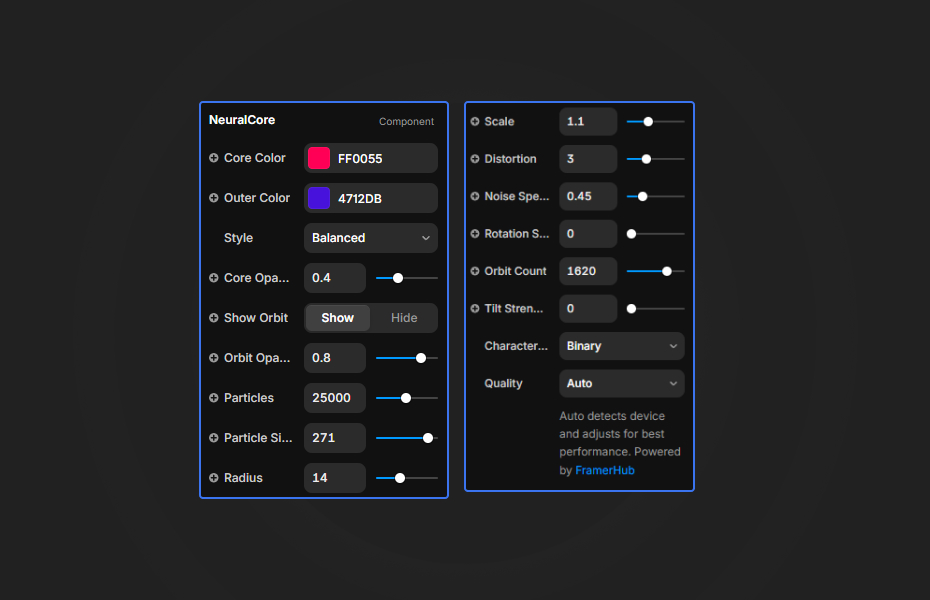
Customize the appearance and behavior using Framer's property controls.
Colors
- Core Color: Primary inner particle color
- Outer Color: Secondary gradient color
- Background: Scene background color (hidden when Transparent BG is on)
Particles
- Count: Number of particles (affects performance)
- Size: ASCII character size
- Radius: Sphere radius
- Scale: Uniform scaling of the entire sphere
Animation
- Distortion: Noise displacement strength
- Noise Speed: Animation speed
- Rotation Speed: Sphere spin rate
Effects
- Bloom: Glow intensity
- Tilt Strength: Mouse interaction sensitivity
- Character Set: Binary, Hex, or Glyphs
- Transparent BG: Toggle transparency (disables bloom)
Quick Tips
Best Performance — Use Auto quality mode which detects your device capabilities. On mobile, stick to 5,000-10,000 particles.
Color Combinations — Bright neon colors on dark backgrounds create stunning bloom effects. Try cyan/magenta or green/purple gradients.
Layering — Place content above or behind the component using transparent background. Use contrasting text colors for readability.
Character Style — Binary feels classic tech, Hex feels hacker/crypto, Glyphs feels sci-fi/alien.
License
Single Use License — Use in one client project with full commercial rights. No redistribution. 1 license = 1 client.
Refund Policy
Due to the nature of our digital products, we are unable to offer refunds, but we're here to assist you with any questions or concerns!
Why Designers Love This
A professional-grade 3D effect that would typically require custom Three.js development, now available as a simple drag-and-drop component with full customization options.
Neural Core - $14
A mesmerizing 3D ASCII particle sphere with bloom effects.
You might also like
Why Choose Framer Hub Components
Loved by Framer teams
Used by Framer professionals who need premium, no-code experiences.
"The Best Framer CMS Filtering Plugin I've Found — Truly a Game-Changer. I've tested a lot of Framer CMS filtering and sorting components — both free and paid — and this is by far the best one I've come across."
"He really helped me out when I needed assistance adding it to my Framer project. Super fast customer support highly recommend!"
"We had tried a couple of other Framer CMS filter components but they were buggy, hard to use and support was slow or non-existent. FramerCMSFilter is easier to use and has a lot of added functionality."
Got questions? We've the answers
Got questions? We've the answers
Everything you need to know about FramerHub.