Soft Body Physics
Interactive soft body simulation with smooth metaball physics.
Overview
Interactive soft body simulation with smooth metaball physics.
- Raymarching Metaballs
- Interactive Physics (Follow/Repel)
- 4 3D Shapes (Sphere, Cube, Torus, Capsule)
- Advanced Material & Color Controls
Soft Body Physics
A mesmerizing soft body physics simulation that creates organic, fluid-like interactions using advanced raymarching shaders. Unlike standard CSS or 2D canvas effects, this uses a pseudo-3D distance field to create true "blobby" merging effects.
Features
Metaball Rendering Uses signed distance functions (SDFs) to create perfectly smooth blends between objects, making them look like droplets of liquid merging and separating.
Interactive Controls Engage users with mouse interactions. Set objects to "Follow" the cursor for playful navigation or "Repel" to clear a path.
Material & Shape From matte clay to shiny plastic. Choose from Spheres, Cubes, Toruses, or Capsules and adjust their "Shininess" to get the perfect finish.
Wobble Effects Add a layer of organic noise to the surface with customizable frequency and strength, making the objects feel alive and breathing.
Use Cases
Hero Backgrounds — Create an immersive, organic backdrop.
Loading Indicators — A mesmerizing animation to keep users engaged.
How to Use
Installation
- Copy the component.
- Paste it into your Framer project.
Customization
Visual
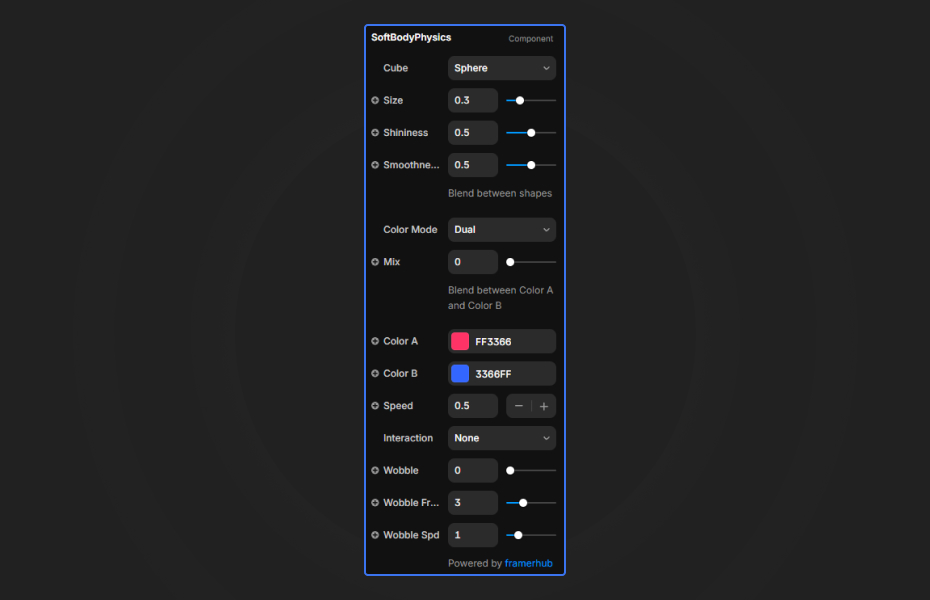
- Shape: Switch between Sphere, Cube, Torus, Capsule.
- Size & Radius: Fine-tune the dimensions of your chosen shape.
- Smoothness: Control how "gooey" the objects are when they touch.
- Shininess: Adjust surface reflectivity from 0 (Matte) to 1 (Glassy).
Colors
- Color Mode:
- Dual: Gradient mix between two colors.
- Solid: Flat single color.
- Multi: Assign a unique color to each of the 3 objects.
Creative (Wobble)
- Strength: Add surface distortion.
- Frequency: Scale of the noise pattern.
- Speed: How fast the surface ripple animates.
Animation & Interaction
- Speed: Global simulation speed.
- Interaction: Enable mouse Follow or Repel behaviors.
Quick Tips
Performance — The component automatically reduces quality on the Framer canvas to save performance while designing.
License
Single Use License — Use in one client project with full commercial rights. No redistribution. 1 license = 1 client.
Refund Policy
Due to the nature of our digital products, we are unable to offer refunds, but we're here to assist you with any questions or concerns!
Why Designers Love This
Soft Body Physics adds that coveted "high-end 3D" look to your site without needing Spline or heavy 3D files. It's performant, lightweight, and completely customizable directly in Framer, letting you create everything from abstract art to playful interactive backgrounds.
Soft Body Physics - $9
Interactive soft body simulation with smooth metaball physics.
You might also like
Why Choose Framer Hub Components
Loved by Framer teams
Used by Framer professionals who need premium, no-code experiences.
"The Best Framer CMS Filtering Plugin I've Found — Truly a Game-Changer. I've tested a lot of Framer CMS filtering and sorting components — both free and paid — and this is by far the best one I've come across."
"He really helped me out when I needed assistance adding it to my Framer project. Super fast customer support highly recommend!"
"We had tried a couple of other Framer CMS filter components but they were buggy, hard to use and support was slow or non-existent. FramerCMSFilter is easier to use and has a lot of added functionality."
Got questions? We've the answers
Got questions? We've the answers
Everything you need to know about FramerHub.