Curved Text SVG
Animate text along any SVG path with smooth GSAP-powered motion.
Overview
Animate text along any SVG path with smooth GSAP-powered motion.
- Multiple preset path shapes (Circle, Ellipse, Wave, Arc, Line)
- Custom SVG path support
- GSAP-powered smooth animation
- Extended font controls with full typography customization
- Text effects (shadow, blur, opacity)
- Background arc with customizable end caps
Make Your Text Follow Any Path
Transform ordinary text into captivating curved typography. The Curved Text SVG component lets you animate text along any SVG path—from simple waves to custom shapes—creating eye-catching headlines, logos, and decorative elements.
Features
Multiple Path Presets Choose from Circle, Ellipse, Wave, Arc, or Straight Line presets that automatically adapt to your component's dimensions.
Custom SVG Path Support Use your own SVG path data for complete creative control. Perfect for brand logos, unique shapes, and custom designs.
Smooth GSAP Animation Butter-smooth text scrolling powered by GSAP. Seamlessly loops without any visible jumps or stutters.
Full Typography Control Extended font controls including family, size, weight, letter spacing, and more—all accessible directly in Framer's properties panel.
Visual Effects Add depth with configurable text shadow, blur effects, and opacity adjustments.
Background Arc Add a customizable background stroke behind your text path with color, opacity, thickness, and end cap style options (Round, Flat, Square).
Use Cases
Hero Headlines — Create attention-grabbing curved text for landing page headers
Logo Animations — Animate brand text along custom paths for dynamic logos
Decorative Elements — Add visual interest with text following waves or arcs
Ticker/Marquee — Seamless looping text animation along circular or elliptical paths
How to Use
Installation
VIDEO PLACEHOLDER: Installation Tutorial
- Log in to your account at framerhub.io
- Navigate to framerhub.io/dashboard
- Find Curved Text SVG in your Recent Purchases
- Click the "Copy" button
- Open your Framer project
- Paste the component anywhere on your canvas (Cmd/Ctrl + V)
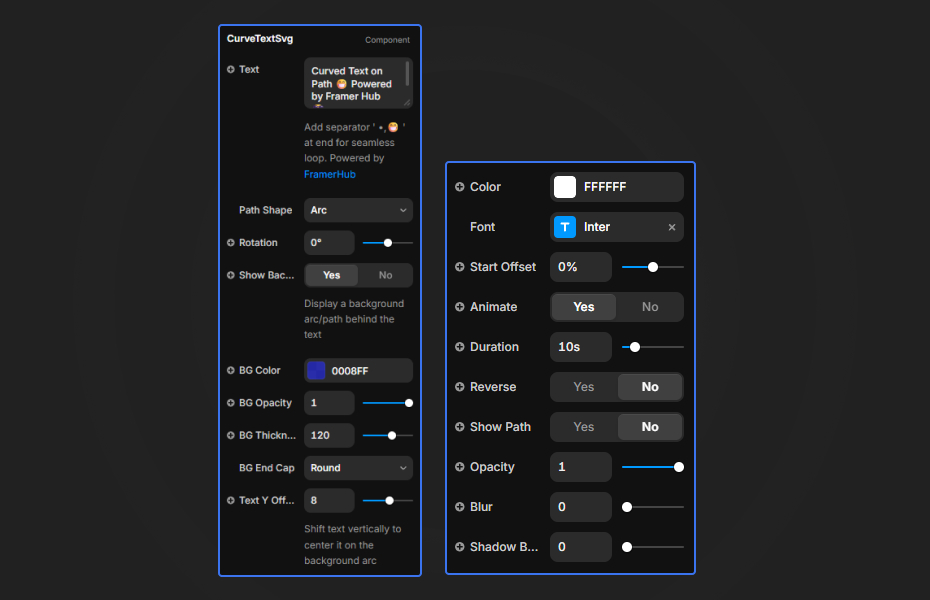
Text & Path
- Text: Your content with optional separator (use
•or emoji for seamless loops) - Path Shape: Choose from presets or select "Custom" for your own path
- Custom Path: Enter SVG path data (when Custom is selected)
- ViewBox: Set the coordinate system for custom paths
Typography
- Font: Full font family, size, weight, and letter spacing control
- Color: Text fill color
- Rotation: Rotate the entire text path
Animation
- Animate: Enable/disable animation
- Duration: Speed of text movement (1-60 seconds)
- Reverse: Change animation direction
Background Arc
- Show Background: Toggle the background arc visibility
- BG Color: Background arc color
- BG Opacity: Background arc transparency
- BG Thickness: Width of the background stroke
- BG End Cap: Shape of arc ends (Round, Flat, Square)
- Text Y Offset: Vertical adjustment to center text on the arc
Effects
- Opacity: Text transparency (0-1)
- Blur: Add blur effect to text
- Shadow Blur: Text shadow intensity
- Shadow Color: Color of the text shadow
Quick Tips
Seamless Loops — Add a separator like • or 😁 at the end of your text for smooth continuous animation.
Custom Paths — Generate SVG paths at svg-editor.griffen.codes or export from Figma/Illustrator.
Performance — Keep path complexity reasonable. Simpler paths render faster.
Responsive Design — The component automatically adapts preset paths to fill its container.
Debug Mode — Enable "Show Path" to visualize the path while designing.
License
Single Use License — Use in unlimited client projects with full commercial rights. No redistribution.
Refund Policy
Due to the nature of our digital products, we are unable to offer refunds, but we're here to assist you with any questions or concerns!
Why Designers Love This
Curved text effects add instant visual impact without complex workarounds. This component brings that creative freedom to Framer with no code required—just drag, drop, and customize.
Need Help? Visit framerhub.io/support for documentation and video tutorials.
Curved Text SVG - $5
Animate text along any SVG path with smooth GSAP-powered motion.
You might also like
Why Choose Framer Hub Components
Loved by Framer teams
Used by Framer professionals who need premium, no-code experiences.
"The Best Framer CMS Filtering Plugin I've Found — Truly a Game-Changer. I've tested a lot of Framer CMS filtering and sorting components — both free and paid — and this is by far the best one I've come across."
"He really helped me out when I needed assistance adding it to my Framer project. Super fast customer support highly recommend!"
"We had tried a couple of other Framer CMS filter components but they were buggy, hard to use and support was slow or non-existent. FramerCMSFilter is easier to use and has a lot of added functionality."
Got questions? We've the answers
Got questions? We've the answers
Everything you need to know about FramerHub.