InfiniteScrollingTicker
Create seamless looping text animations perfect for announcements, promos, and dynamic headlines.
Overview
Create seamless looping text animations perfect for announcements, promos, and dynamic headlines.
- Seamless infinite scroll animation
- Fully customizable text, fonts, and colors
- Optional separators (default star or custom SVG)
- Adjustable speed and spacing
- Comma-separated multi-item support
- Works in any section or layout
- Zero coding required
Seamless Looping Text Animations for Framer
Add eye-catching marquee scrolls to hero sections, announcement bars, or promotional banners. Perfect for sales, events, and dynamic messaging.
Built for designers who need professional animations without complexity.
Features
Seamless Looping Smooth infinite scroll with no jumps or breaks. Text flows continuously for a polished, professional look.
Multi-Item Support Add multiple messages separated by commas. Each item scrolls as part of one continuous stream.
Custom Separators Choose the default star icon or upload your own SVG separator. Control size and color to match your brand.
Full Typography Control Customize font family, size, weight, and color directly from Framer's properties panel.
Speed & Spacing Adjust animation speed (5-60 seconds) and gap between items (10-100px) for the perfect rhythm.
Production Ready Copy, paste, and customize in minutes. No code, no setup—just instant marquee animations.
Use Cases
Announcement Bars — Highlight sales, shipping updates, or limited-time offers at the top of any page
Promotional Banners — Create urgency with scrolling "BLACK FRIDAY • 50% OFF • LIMITED TIME" messages
Hero Sections — Add dynamic movement to headlines with scrolling keywords or brand values
Event Pages — Showcase dates, speakers, or key highlights in an engaging ticker format
Portfolio Headers — Display skills, services, or client names in a modern scrolling layout
How to Use
Installation
After purchasing from FramerHub:
- Log in to your account at framerhub.io
- Navigate to framerhub.io/dashboard
- Find Infinite Marquee in your Recent Purchases
- Click the "Copy" button
- Open your Framer project
- Paste the component anywhere on your canvas (Cmd/Ctrl + V)
Customization
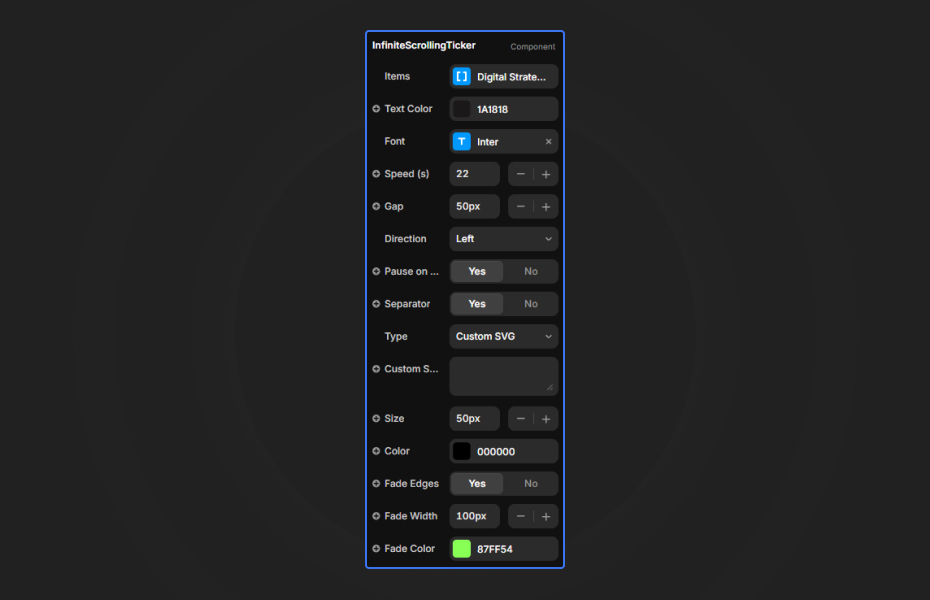
Everything you need is in Framer's properties panel:
Text Content
- Enter your text with items separated by commas
- Example: "BLACK FRIDAY, SALE, 50% OFF, LIMITED TIME"
- Each item becomes part of the continuous scroll
Typography
- Choose any font from Framer's library
- Adjust size, weight, and alignment
- Set text color to match your design
Animation Settings
- Speed: Control how fast text scrolls (5-60 seconds per loop)
- Gap: Set spacing between items (10-100px)
Separators
- Toggle separators on/off
- Use default star icon or upload custom SVG
- Adjust separator size and color
Quick Tips
Best Readability — Use 48px or larger for hero sections. Smaller sizes work for announcement bars.
Consistent Length — Keep items roughly similar in length for balanced visual rhythm.
Color Contrast — Ensure text color has strong contrast with background for easy reading.
Speed Balance — Slower speeds (15-25 seconds) work best for important messages.
License
Single Use License — Use in one client project with full commercial rights. No redistribution. 1 license = 1 client.
Refund Policy
Due to the nature of our digital products, we are unable to offer refunds, but we're here to assist you with any questions or concerns!
Why Designers Love This
No setup, no complexity—just copy, paste, and start customizing. Perfect for agencies delivering client work fast and designers who want professional marquee effects without writing code.
Instant visual impact with complete control over every detail through Framer's familiar interface.
InfiniteScrollingTicker - $5
Create seamless looping text animations perfect for announcements, promos, and dynamic headlines.
You might also like
Why Choose Framer Hub Components
Loved by Framer teams
Used by Framer professionals who need premium, no-code experiences.
"The Best Framer CMS Filtering Plugin I've Found — Truly a Game-Changer. I've tested a lot of Framer CMS filtering and sorting components — both free and paid — and this is by far the best one I've come across."
"He really helped me out when I needed assistance adding it to my Framer project. Super fast customer support highly recommend!"
"We had tried a couple of other Framer CMS filter components but they were buggy, hard to use and support was slow or non-existent. FramerCMSFilter is easier to use and has a lot of added functionality."
Got questions? We've the answers
Got questions? We've the answers
Everything you need to know about FramerHub.