Letter Swap
Smooth letter-swapping hover effect with staggered animations.
Overview
Smooth letter-swapping hover effect with staggered animations.
- Staggered letter animation
- 2 Interaction Modes (One-shot, Hover)
- Customizable direction and timing
- Full font support
Letter Swap
Add playful interactivity to links, headers, or buttons with Letter Swap. This component smoothly swaps characters on hover, creating a satisfying "slot machine" style motion that draws attention.
Features
Staggered Animation Letters animate one by one (staggered) for a fluid, wave-like motion rather than a stiff, uniform movement.
2 Interaction Modes
- Forward: The swap happens once on hover and resets instantly (good for links).
- PingPong: The swap reverses when the mouse leaves (good for buttons).
Full Customization Control the stagger direction (first-to-last, center-out), animation speed, spring physics, and of course, any font family and style.
Use Cases
Navigation Links — Add subtle micro-interactions to your site navigation that encourage exploration.
Call-to-Action Buttons — Draw attention to important buttons with playful text effects that feel premium.
Hero Headlines — Create memorable first impressions with animated headings that engage visitors.
Portfolio Titles — Showcase creativity with dynamic text effects that reflect your design aesthetic.
How to Use
Installation
VIDEO PLACEHOLDER: Installation Tutorial
- Log in to your account at framerhub.io
- Navigate to framerhub.io/dashboard
- Find Letter Swap in your Recent Purchases
- Click the "Copy" button
- Open your Framer project
- Paste the component anywhere on your canvas (Cmd/Ctrl + V)
Customization
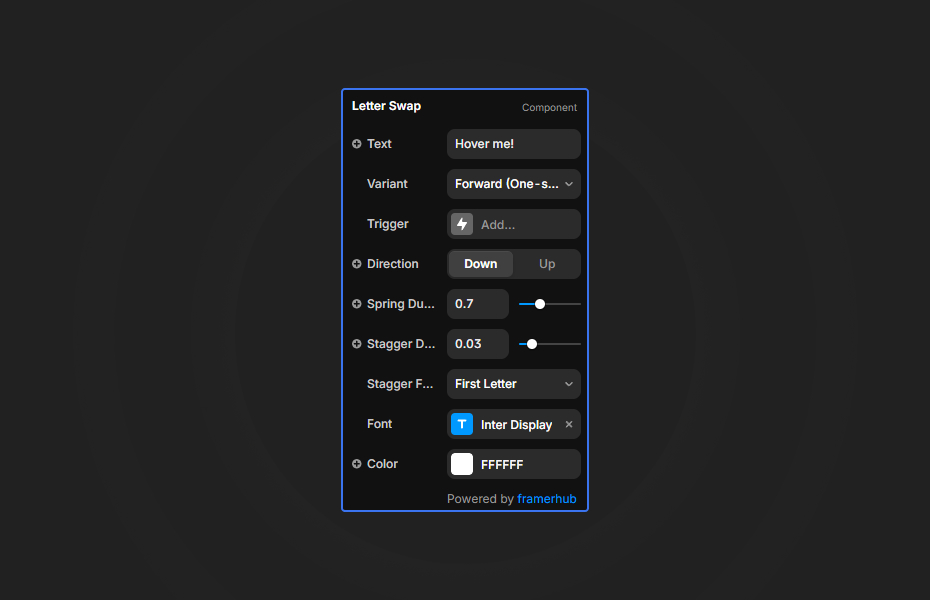
Letter Swap provides intuitive controls for complete customization:
Text & Animation
- Text: Enter your content directly
- Variant: Choose between Forward (one-shot) or PingPong (toggle on hover)
- Direction: Control whether letters animate up or down
Timing Controls
- Spring Duration: Adjust the animation bounciness (0.1 - 2.0s)
- Stagger Duration: Fine-tune the delay between each letter
- Stagger From: Start animation from first letter, last letter, or center
Typography
- Full font control via Framer's extended font picker
- Color picker for text styling
Quick Tips
Best for Buttons — Use PingPong mode for interactive buttons where the effect should reverse on mouse leave.
Create Wave Effects — Set Stagger From to "Center" for an outward wave animation that expands from the middle.
Subtle is Better — Start with default stagger (0.03s) for smooth motion. Higher values create more dramatic, typewriter-like effects.
Spring Physics — Lower spring values (0.4-0.6) feel snappy and modern, while higher values (0.8-1.0) add playful bounce.
License
Single Use License — Use in one client project with full commercial rights. No redistribution. 1 license = 1 client.
Refund Policy
Due to the nature of our digital products, we are unable to offer refunds, but we're here to assist you with any questions or concerns!
Why Designers Love This
Letter Swap transforms static text into an interactive experience. The staggered animation creates a premium, polished feel that impresses clients and engages visitors. With two animation modes and full customization, you can use it anywhere—from subtle navigation links to bold hero headlines. No code required, just drop it in and customize through the Framer properties panel.
Letter Swap - $9
Smooth letter-swapping hover effect with staggered animations.
You might also like
Why Choose Framer Hub Components
Loved by Framer teams
Used by Framer professionals who need premium, no-code experiences.
"The Best Framer CMS Filtering Plugin I've Found — Truly a Game-Changer. I've tested a lot of Framer CMS filtering and sorting components — both free and paid — and this is by far the best one I've come across."
"He really helped me out when I needed assistance adding it to my Framer project. Super fast customer support highly recommend!"
"We had tried a couple of other Framer CMS filter components but they were buggy, hard to use and support was slow or non-existent. FramerCMSFilter is easier to use and has a lot of added functionality."
Got questions? We've the answers
Got questions? We've the answers
Everything you need to know about FramerHub.