VFX Scroll Shift
Apply a stunning multi-color glitch effect to text, driven by scroll velocity.
Overview
Apply a stunning multi-color glitch effect to text, driven by scroll velocity.
- Velocity-based scroll effect
- High-performance native Three.js WebGL rendering
- Customizable smoothing and intensity
Title/Headline
Transform your typography into an interactive WebGL masterpiece. The VFX Scroll Shift component applies a dynamic multi-color split glitch effect that reacts to your scroll speed.
Features
Velocity Reactive The faster you scroll, the more intense the glitch separation becomes, creating a dynamic sense of speed and motion.
Customizable Colors Configure three distinct colors (Main Text, Trail 1, Trail 2) for maximum aesthetic control instead of being locked into a standard RGB split.
Smooth Decay Built-in interpolation ensures the glitch effect smoothly fades out when scrolling stops, providing a polished and premium feel.
Use Cases
Hero Typography — Make massive typography headings distort dynamically as users scroll past them.
Kinetic Typography — Perfect for highly interactive typography sections that demand attention.
How to Use
Installation
VIDEO PLACEHOLDER: Installation Tutorial
- Log in to your account at framerhub.io
- Navigate to framerhub.io/dashboard
- Find VFX Scroll Shift in your Recent Purchases
- Click the "Copy" button
- Open your Framer project
- Paste the component anywhere on your canvas (Cmd/Ctrl + V)
Customization
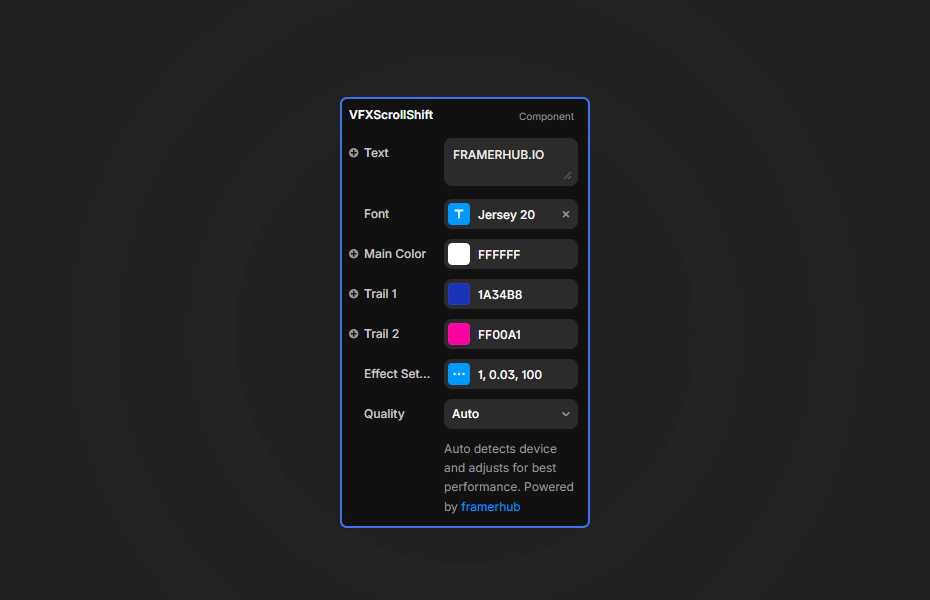
Drag the component onto your canvas, type your text, and tweak the properties.
Typography & Color
- Text: The text string to display.
- Font: Full extended font controls (Family, Weight, Size, Spacing).
- Colors: Set your Main Color, and your two glitch split colors (Trail 1, Trail 2).
Effect Controls
- Strength: Multiplier for how far the glitch channels separate during scroll.
- Smoothing: Adjusts the decay rate. Lower values create a longer trail effect.
- Overflow: Adds extra boundary space to prevent the glitch effect from clipping at the edges.
Quick Tips
Performance — This component utilizes a native WebGL texture for the text rendering, providing excellent performance across devices. Use the Quality setting to toggle between Performance and Quality modes if needed.
Combine with Sticky — Place this component inside a Sticky positioned section so users can scroll while the element stays in view, maximizing the visible effect.
License
Single Use License — Use in one client project with full commercial rights. No redistribution. 1 license = 1 client.
Refund Policy
Due to the nature of our digital products, we are unable to offer refunds, but we're here to assist you with any questions or concerns!
Why Designers Love This
It takes standard typography and elevates it into a highly immersive WebGL experience without writing a single line of shader code.
VFX Scroll Shift - $9
Apply a stunning multi-color glitch effect to text, driven by scroll velocity.
You might also like
Why Choose Framer Hub Components
Loved by Framer teams
Used by Framer professionals who need premium, no-code experiences.
"The Best Framer CMS Filtering Plugin I've Found — Truly a Game-Changer. I've tested a lot of Framer CMS filtering and sorting components — both free and paid — and this is by far the best one I've come across."
"He really helped me out when I needed assistance adding it to my Framer project. Super fast customer support highly recommend!"
"We had tried a couple of other Framer CMS filter components but they were buggy, hard to use and support was slow or non-existent. FramerCMSFilter is easier to use and has a lot of added functionality."
Got questions? We've the answers
Got questions? We've the answers
Everything you need to know about FramerHub.