VideoHatch
Apply a real-time, hand-drawn hatching shader effect to any video.
Overview
Apply a real-time, hand-drawn hatching shader effect to any video.
- Native WebGL Three.js Effect
- Real-time Video Textures
- Original Color Sampling
- Interactive Hover States
- Fully Customizable Jitter & Hatching
Hand-Drawn Video Playback
Add a dynamic, scribbled hatching effect to your videos with VideoHatch. Powered by native Three.js WebGL, this component uses VideoTexture to convert any standard MP4 into a beautifully shaded, hand-drawn animation right on the canvas with incredibly smooth performance.
Features
Original Color Sampling The hatching shader samples the exact colors from the underlying video pixels, recreating your video entirely out of colored scribble strokes. Alternatively, turn off Original Color to tint the entire sketch with a single custom color.
Interactive Triggers Set the effect to run continuously or smoothly animate in on hover using Framer Motion springs. The video continues to play underneath, but the scribble mask dynamically transitions in and out.
Fully Customizable Fine-tune the angle, spacing, width, jitter, speed, and softness to achieve the exact stylistic sketch look you need.
Use Cases
Creative Portfolios — Make your showreel or project thumbnails stand out by presenting them as living sketches.
Hero Backgrounds — Use a muted, monochromatic hatching effect on a background video to add subtle, organic texture without distracting from your foreground content.
How to Use
Installation
VIDEO PLACEHOLDER: Installation Tutorial
- Log in to your account at framerhub.io
- Navigate to framerhub.io/dashboard
- Find VideoHatch in your Recent Purchases
- Click the "Copy" button
- Open your Framer project
- Paste the component anywhere on your canvas (Cmd/Ctrl + V)
Customization
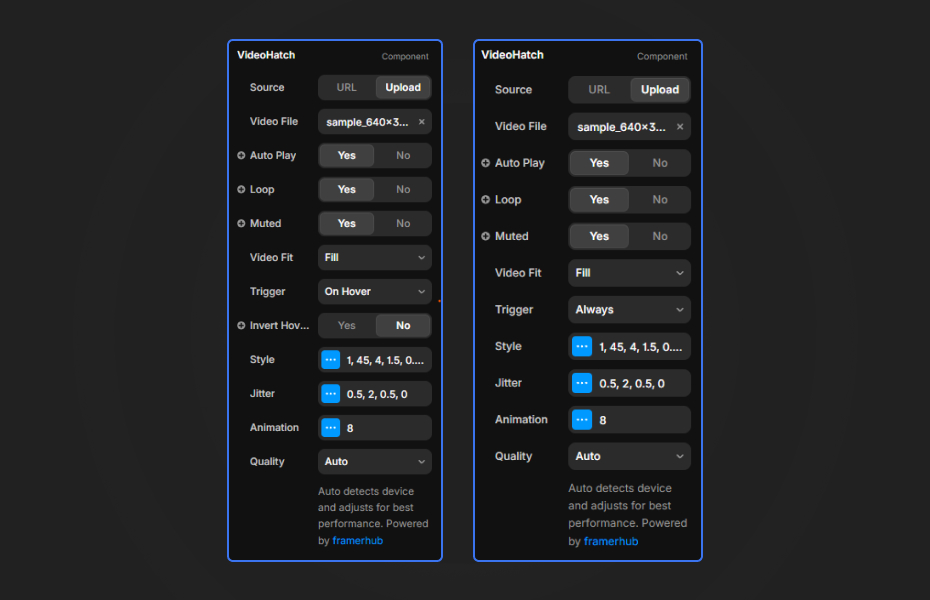
VideoHatch exposes a wide array of parameters grouped logically to keep your properties panel clean.
Video Settings
- Source: Toggle between pasting a URL or Uploading a local video file.
- Playback Controls: Toggle AutoPlay, Loop, and Mute.
- Video Fit: Control how the video scales within the component bounds (Fill, Fit, Stretch).
- Trigger: Choose whether the effect runs always, or only animates in when hovered.
- Quality: Auto-detects device capabilities to ensure optimal framerates. Video textures are heavy, so leaving this on Auto is recommended.
Style & Geometry
- Original Color: Enable this to sample colors directly from the video. Disable it to tint the strokes with a single solid
Color. - Angle: Define the tilt of the hatch lines.
- Spacing: How far apart the scribble strokes are.
- Line Width: The thickness of each stroke.
Jitter & Animation
- Control how messy the scribble looks by tweaking Angle Jitter, Offset Jitter, and Spacing Jitter. Set the animation speed to control how fast the scribble updates over time.
Quick Tips
Best Performance — Video textures are the most demanding type of texture in WebGL. To ensure 60fps on mobile devices, compress your video files and keep the resolution reasonable (e.g., 720p or 1080p max).
Static Sketches — Set the Speed to 0 and tweak the Seed property to lock in a specific, perfect scribble iteration. The video will still play underneath, but the strokes will remain fixed in place.
License
Single Use License — Use in one client project with full commercial rights. No redistribution. 1 license = 1 client.
Refund Policy
Due to the nature of our digital products, we are unable to offer refunds, but we're here to assist you with any questions or concerns!
Why Designers Love This
VideoHatch brings the coveted "awwwwards-style" WebGL shading effect directly into Framer video playback without writing a single line of shader code.
VideoHatch - $9
Apply a real-time, hand-drawn hatching shader effect to any video.
You might also like
Why Choose Framer Hub Components
Loved by Framer teams
Used by Framer professionals who need premium, no-code experiences.
"The Best Framer CMS Filtering Plugin I've Found — Truly a Game-Changer. I've tested a lot of Framer CMS filtering and sorting components — both free and paid — and this is by far the best one I've come across."
"He really helped me out when I needed assistance adding it to my Framer project. Super fast customer support highly recommend!"
"We had tried a couple of other Framer CMS filter components but they were buggy, hard to use and support was slow or non-existent. FramerCMSFilter is easier to use and has a lot of added functionality."
Got questions? We've the answers
Got questions? We've the answers
Everything you need to know about FramerHub.