ASCII Image
Transform any image into stunning ASCII art with customizable characters and colors.
Overview
Transform any image into stunning ASCII art with customizable characters and colors.
- Image to ASCII conversion
- Customizable grid size (columns & rows)
- Multiple color palettes (Mono, Grey, Full Color)
- Custom character set support
- Extended font controls
- Responsive resize handling with debouncing
Transform Images into ASCII Art
Create retro-style ASCII art effects from any image. Perfect for hero sections, backgrounds, or unique visual effects that stand out.
Features
Image Conversion Upload any image and watch it transform into a grid of ASCII characters in real-time.
Grid Control Fine-tune the resolution with adjustable columns (10-400) and rows (10-400) for the perfect balance of detail and performance.
Color Palettes Choose from three color modes:
- Mono — Classic monochrome look
- Grey 4 — 4-level grayscale for subtle depth
- Color — Full RGB color preservation
Custom Charset Define your own character set to control the visual density and style of the output.
Extended Font Controls Full control over font family, size, weight, line height, and letter spacing.
Responsive Design Automatically adapts to container size changes with optimized debounced resize handling (100ms) using ResizeObserver for smooth performance.
Use Cases
Hero Sections — Create eye-catching headers with ASCII-style imagery
Portfolio Sites — Stand out with unique visual effects
Retro Themes — Perfect for nostalgic or tech-focused designs
Interactive Backgrounds — Add visual interest without heavy assets
How to Use
Installation
- Log in to your account at framerhub.io
- Navigate to framerhub.io/dashboard
- Find ASCII Image in your Recent Purchases
- Click the "Copy" button
- Open your Framer project
- Paste the component anywhere on your canvas (Cmd/Ctrl + V)
Customization
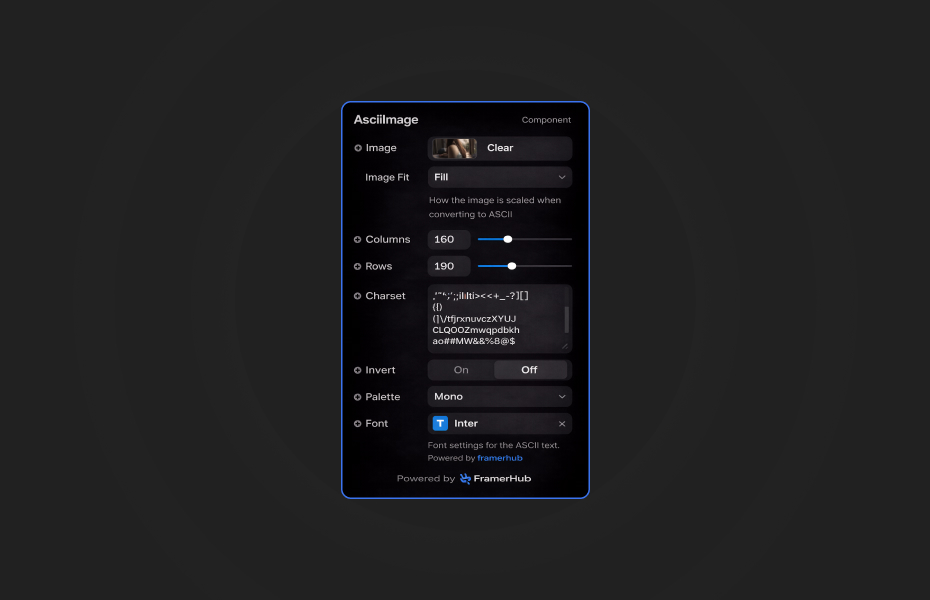
Grid Settings
- Columns: Controls horizontal resolution (default: 120)
- Rows: Controls vertical resolution (default: 60)
Visual Options
- Charset: Custom characters for ASCII mapping
- Invert: Toggle light/dark character mapping
- Palette: Choose color output mode
Typography
- Font: Extended controls for font family, size, weight, and spacing
Quick Tips
Performance — Lower grid values (60-80 columns) for smooth performance on mobile. Higher values (150+) for detailed desktop displays.
Monospace Fonts — Use monospace fonts like Courier New or Fira Code for authentic ASCII aesthetics.
Contrast — Enable Invert for dark backgrounds, disable for light backgrounds.
License
Single Use License — Use in one client project with full commercial rights. No redistribution. 1 license = 1 client.
Refund Policy
Due to the nature of our digital products, we are unable to offer refunds, but we're here to assist you with any questions or concerns!
Why Designers Love This
Add a unique, retro-tech aesthetic to any project with zero performance impact. ASCII art creates memorable visual experiences that set your designs apart.
Need Help? Visit framerhub.io/support for documentation and video tutorials.
ASCII Image - $9
Transform any image into stunning ASCII art with customizable characters and colors.
You might also like
Why Choose Framer Hub Components
Loved by Framer teams
Used by Framer professionals who need premium, no-code experiences.
"The Best Framer CMS Filtering Plugin I've Found — Truly a Game-Changer. I've tested a lot of Framer CMS filtering and sorting components — both free and paid — and this is by far the best one I've come across."
"He really helped me out when I needed assistance adding it to my Framer project. Super fast customer support highly recommend!"
"We had tried a couple of other Framer CMS filter components but they were buggy, hard to use and support was slow or non-existent. FramerCMSFilter is easier to use and has a lot of added functionality."
Got questions? We've the answers
Got questions? We've the answers
Everything you need to know about FramerHub.