Shader Frame FREE
A mesmerizing WebGL shader frame with interactive distortion and color controls.
Overview
A mesmerizing WebGL shader frame with interactive distortion and color controls.
- Custom ray-marching shader
- Interactive mouse distortion
- Adjustable speed, brightness, and contrast
- Tint color control
- Auto Quality Detection for optimal performance
Turn Any Section into Abstract Art
Shader Frame uses advanced ray-marching techniques to create a continuously evolving, 3D-like frame that responds to mouse movement. Perfect for hero backgrounds, creative portfolios, and eye-catching visual experiences.
Features
Hypnotic Visuals The component renders a complex, self-shadowing 3D structure that constantly twists and turns, creating a mesmerizing background or focal point.
Interactive Engage your visitors with optional mouse interaction. The shader distorts and ripples as the cursor moves across the frame.
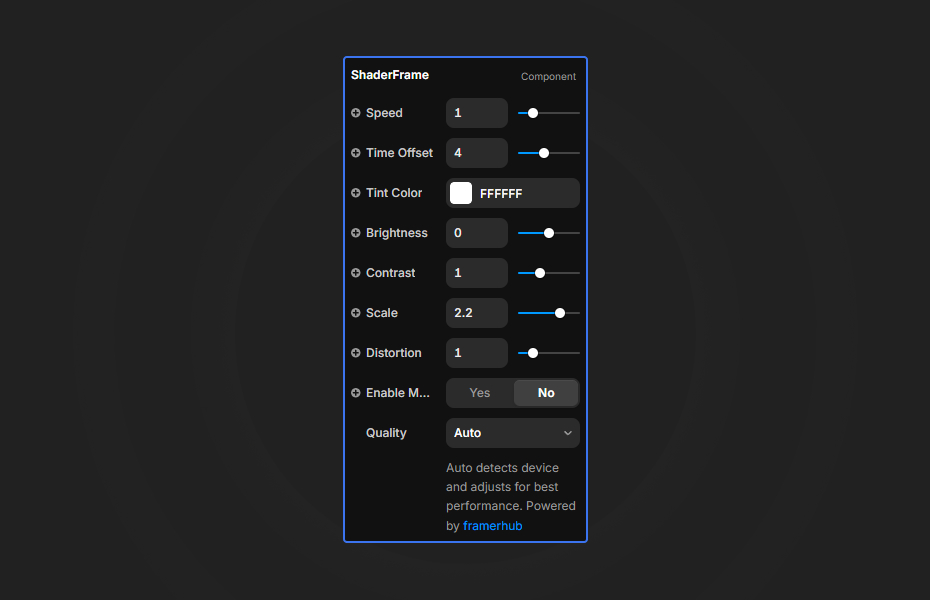
Fully Customizable Fine-tune the visual output with controls for speed, time offset, tint color, brightness, contrast, scale, and distortion intensity.
Performance Optimized Adapts rendering quality based on RenderTarget for smooth performance in both canvas and preview modes.
Use Cases
Hero Backgrounds — Create an immersive, animated backdrop that captivates visitors instantly.
Creative Portfolios — Showcase your appreciation for cutting-edge web graphics with this high-end effect.
Landing Pages — Make a bold first impression with hypnotic, abstract visuals.
Section Dividers — Use as an animated separator between content sections.
How to Use
Installation
VIDEO PLACEHOLDER: Installation Tutorial
- Log in to your account at framerhub.io
- Navigate to framerhub.io/dashboard
- Find Shader Frame in your Recent Purchases
- Click the "Copy" button
- Open your Framer project
- Paste the component anywhere on your canvas (Cmd/Ctrl + V)
Customization
Animation
- Speed: Control animation speed (0-5)
- Time Offset: Shift the starting point of the animation
Appearance
- Tint Color: Apply a color tint to the shader
- Brightness: Adjust overall brightness (-1 to 1)
- Contrast: Control contrast levels (0-3)
- Scale: Zoom in/out of the pattern (0.2-3)
- Distortion: Control the distortion intensity (0-5)
Interaction
- Enable Mouse: Toggle mouse interaction
- Mouse Strength: Control how strongly mouse movement affects the shader
Quick Tips
Performance — The shader uses ray-marching which can be GPU-intensive. Use moderate settings on mobile devices.
Subtle Effects — Lower distortion (0.5-1) and slower speed (0.5) create elegant, subtle animations.
Bold Statements — Higher distortion (3+) with faster speed creates energetic, attention-grabbing visuals.
Background Usage — Works great behind text with reduced brightness and increased contrast for readability.
License
Single Use License — Use in one client project with full commercial rights. No redistribution. 1 license = 1 client.
Refund Policy
Due to the nature of our digital products, we are unable to offer refunds, but we're here to assist you with any questions or concerns!
Why Designers Love This
Shader Frame brings GPU-powered, cinema-quality visuals to Framer with zero coding. The mesmerizing ray-marched patterns create instant visual impact, perfect for creative agencies and portfolios that want to stand out.
Shader Frame - FREE
A mesmerizing WebGL shader frame with interactive distortion and color controls.
You might also like
Why Choose Framer Hub Components
Loved by Framer teams
Used by Framer professionals who need premium, no-code experiences.
"The Best Framer CMS Filtering Plugin I've Found — Truly a Game-Changer. I've tested a lot of Framer CMS filtering and sorting components — both free and paid — and this is by far the best one I've come across."
"He really helped me out when I needed assistance adding it to my Framer project. Super fast customer support highly recommend!"
"We had tried a couple of other Framer CMS filter components but they were buggy, hard to use and support was slow or non-existent. FramerCMSFilter is easier to use and has a lot of added functionality."
Got questions? We've the answers
Got questions? We've the answers
Everything you need to know about FramerHub.