ShaderHatch
Add beautiful hatching and scribble WebGL effects to your elements.
Overview
Add beautiful hatching and scribble WebGL effects to your elements.
- Native WebGL Three.js Effect
- Responsive Image Fitting
- Interactive Hover States
- Fully Customizable Jitter & Hatching
Bring Your Elements to Life
Add a dynamic, scribbled hatching effect to your images with ShaderHatch. Powered by native Three.js WebGL, this component converts standard images into beautifully shaded artwork right on the canvas with incredibly smooth performance.
Features
Interactive Triggers Set the effect to run continuously or smoothly animate in on hover using Framer Motion springs.
Perfect Responsive Fitting Standard image fit modes (Fill, Fit, Stretch, Tile) ensure your images and the shader effect adapt flawlessly to any container size.
Fully Customizable Fine-tune the angle, spacing, width, jitter, speed, and softness to achieve the exact stylistic look you need.
Use Cases
Hero Graphics — Transform a standard hero image into a striking, animated scribble illustration.
Interactive Portfolios — Make your creative work stand out with highly customized hover or reveal states.
How to Use
Installation
VIDEO PLACEHOLDER: Installation Tutorial
- Log in to your account at framerhub.io
- Navigate to framerhub.io/dashboard
- Find ShaderHatch in your Recent Purchases
- Click the "Copy" button
- Open your Framer project
- Paste the component anywhere on your canvas (Cmd/Ctrl + V)
Customization
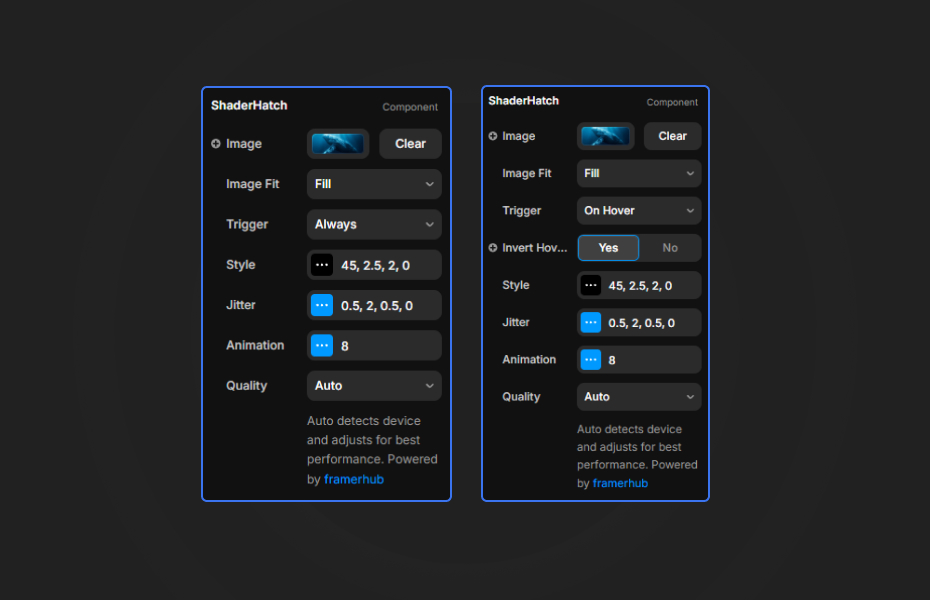
ShaderHatch exposes a wide array of parameters grouped logically to keep your properties panel clean.
Core Settings
- Image: Upload your source image.
- Image Fit: Control how the image scales within its container.
- Trigger: Choose whether the effect runs always, or only animates in when hovered.
- Quality: Auto-detects device capabilities to ensure optimal framerates.
Style & Geometry
- Angle: Define the tilt of the hatch lines.
- Spacing: Adjust the gap between consecutive strokes.
- Line Width: Set the thickness of the scribbles.
- Softness & Round Cap: Control anti-aliasing and stroke terminations.
Jitter & Animation
- Angle, Offset, & Spacing Jitter: Introduce randomness to create a hand-drawn feel.
- Speed: Determine the frame rate of the scribble animation. Set to 0 for a static sketch.
Quick Tips
Performance — The component automatically detects device capabilities to adjust pixel ratio and antialiasing. You can manually force it into "Performance" mode via the Quality dropdown for heavy pages.
Static Sketches — Set the Speed to 0 and tweak the Seed property to lock in a specific, perfect scribble iteration.
Dynamic Coloring — By turning off Use Original, you can enforce a monochrome or specific line color, making the component highly adaptable to different color themes.
License
Single Use License — Use in one client project with full commercial rights. No redistribution. 1 license = 1 client.
Refund Policy
Due to the nature of our digital products, we are unable to offer refunds, but we're here to assist you with any questions or concerns!
Why Designers Love This
ShaderHatch brings the power of custom shaders into Framer with zero code. It provides an immediate, striking visual upgrade to regular media that cannot be replicated with standard CSS filters.
ShaderHatch - $9
Add beautiful hatching and scribble WebGL effects to your elements.
You might also like
Why Choose Framer Hub Components
Loved by Framer teams
Used by Framer professionals who need premium, no-code experiences.
"The Best Framer CMS Filtering Plugin I've Found — Truly a Game-Changer. I've tested a lot of Framer CMS filtering and sorting components — both free and paid — and this is by far the best one I've come across."
"He really helped me out when I needed assistance adding it to my Framer project. Super fast customer support highly recommend!"
"We had tried a couple of other Framer CMS filter components but they were buggy, hard to use and support was slow or non-existent. FramerCMSFilter is easier to use and has a lot of added functionality."
Got questions? We've the answers
Got questions? We've the answers
Everything you need to know about FramerHub.