Sprite Video ASCII
Transform video into live ASCII art with color grading, fit controls, and retro scanline styling.
Overview
Transform video into live ASCII art with color grading, fit controls, and retro scanline styling.
- Real-time video to ASCII conversion
- Upload and direct video URL source modes
- Brightness, contrast, and saturation controls
- Contain, cover, and stretch fit options
- True color mode with adjustable color boost
- Retro scanline overlay with opacity and spacing controls
- Playback and quality controls for performance tuning
Transform Video into ASCII Motion
Sprite Video ASCII turns ordinary video into a live typographic effect inside Framer. Use it for retro interfaces, cinematic hero sections, experimental portfolios, or looping motion backgrounds that need a more distinctive look than standard video.
Features
Real-Time Video Conversion Render moving video as animated ASCII art with responsive behavior and live control updates in Framer.
Flexible Source Options
Use either uploaded Framer video files or direct .mp4, .webm, .ogg, or .mov URLs when the host allows cross-origin access.
Advanced Visual Tuning Shape the final look with density, character ramps, brightness, contrast, saturation, framing, colors, and background styling.
True Color Mode Preserve source color in the ASCII output and push it further with a Color Boost control for stronger results.
Retro Scanline Styling Add a CRT-inspired overlay with adjustable opacity and spacing for a sharper analog-display feel.
Playback and Quality Controls Tune speed, looping, autoplay, and rendering quality to get the right balance between fidelity and performance.
Use Cases
Portfolio Heroes - Build memorable landing sections with animated ASCII visuals that feel custom and technical.
Retro-Futuristic Interfaces - Perfect for terminal-inspired, cyberpunk, and archival visual directions.
Looping Background Systems - Turn short clips into repeatable animated textures behind copy or UI.
Campaign and Promo Pages - Stylize motion assets for music, fashion, editorial, or event microsites.
How to Use
Installation
VIDEO PLACEHOLDER: Installation Tutorial
- Log in to your account at framerhub.io
- Navigate to framerhub.io/dashboard
- Find Sprite Video ASCII in your Recent Purchases
- Click the "Copy" button
- Open your Framer project
- Paste the component anywhere on your canvas (Cmd/Ctrl + V)
Customization
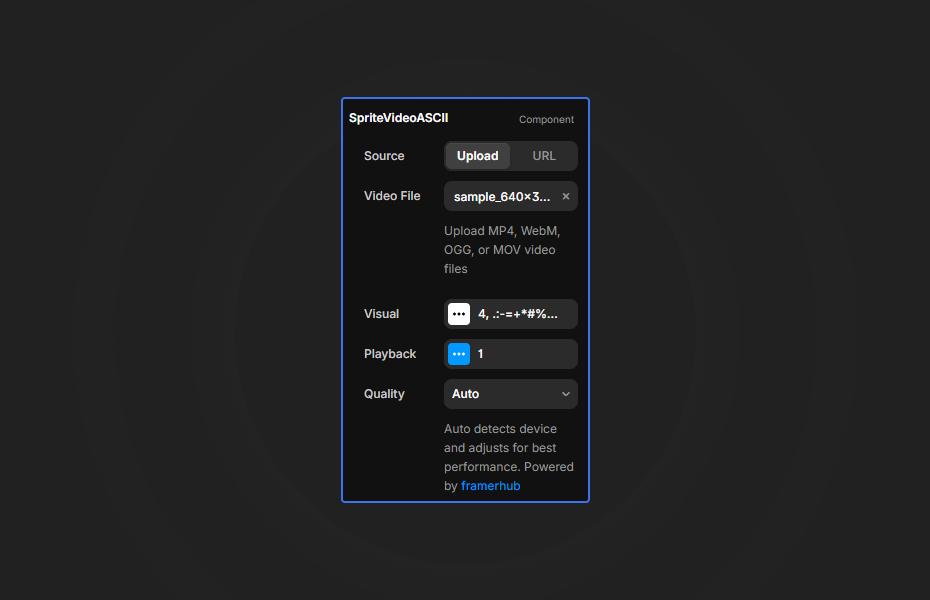
Configure the source and visual treatment based on the kind of motion you want.
Source Setup
- Use
Source > Uploadfor the most reliable workflow - Use
Source > URLonly with direct video file links - External video URLs must allow cross-origin access
- YouTube and Vimeo page or embed links are not supported for ASCII frame sampling
Visual Controls
- Density changes how fine or chunky the ASCII grid feels
- Characters lets you define your own tonal ramp
- Fit gives you
Contain,Cover, orStretch - Brightness, Contrast, and Saturation adjust the source before ASCII conversion
- True Color keeps sampled video color, while Color Boost increases intensity
- Scanlines can be styled further with Line Opacity and Line Spacing
Playback Controls
- Speed adjusts playback rate
- Loop repeats the video
- Autoplay starts motion automatically when the browser allows it
Quick Tips
Best Performance - Start with Density around 8-12 for a strong balance between clarity and performance.
Best Source Type - Uploaded files are the most dependable option. For URL mode, use direct CDN-hosted video files with proper CORS headers.
Stronger Contrast - Videos with clearer light and dark separation create more readable ASCII structure.
Canvas Editing - Framer canvas can resize while editing. If the framing looks off during editing, switching Fit or Quality can force a clean recalculation.
License
Single Use License - Use in one client project with full commercial rights. No redistribution. 1 license = 1 client.
Refund Policy
Due to the nature of our digital products, we are unable to offer refunds, but we're here to assist you with any questions or concerns!
Why Designers Love This
Sprite Video ASCII combines live motion with a recognizable graphic language that feels both nostalgic and modern. It gives designers a fast way to turn simple video assets into stylized, high-character visuals without building a custom rendering pipeline from scratch.
Sprite Video ASCII - $12
Transform video into live ASCII art with color grading, fit controls, and retro scanline styling.
You might also like
Why Choose Framer Hub Components
Loved by Framer teams
Used by Framer professionals who need premium, no-code experiences.
"The Best Framer CMS Filtering Plugin I've Found — Truly a Game-Changer. I've tested a lot of Framer CMS filtering and sorting components — both free and paid — and this is by far the best one I've come across."
"He really helped me out when I needed assistance adding it to my Framer project. Super fast customer support highly recommend!"
"We had tried a couple of other Framer CMS filter components but they were buggy, hard to use and support was slow or non-existent. FramerCMSFilter is easier to use and has a lot of added functionality."
Got questions? We've the answers
Got questions? We've the answers
Everything you need to know about FramerHub.