VFX Image Duotone
Apply a stylish duotone color grade to your images with WebGL-powered effects.
Overview
Apply a stylish duotone color grade to your images with WebGL-powered effects.
- Custom duotone colors with shadow and highlight mapping
- Smooth animated color transitions
- Three.js WebGL powered for optimal performance
- Multiple image fit modes (Cover, Contain, Fill)
- Hover trigger with invert option
VFX Image Duotone
Transform your images with a classic duotone effect, powered by Three.js WebGL for smooth performance and stunning visuals.
Features
Custom Duotone Colors Map the shadows and highlights of your image to any two colors for complete creative control.
Smooth Animation Add subtle movement to the effect with the Speed control for dynamic, living visuals.
Multiple Image Fit Modes Choose from Cover, Contain, or Fill to control how your image displays within the component.
Interactive Triggers Enable hover-based activation with optional invert logic for creative interaction patterns.
Use Cases
Brand Consistency — Tint images to match your brand's color palette across your entire site.
Artistic Direction — Create a cohesive look across a grid of disparate images.
Hero Sections — Add dramatic duotone effects to hero images for visual impact.
Portfolio Galleries — Apply consistent color grading to showcase work professionally.
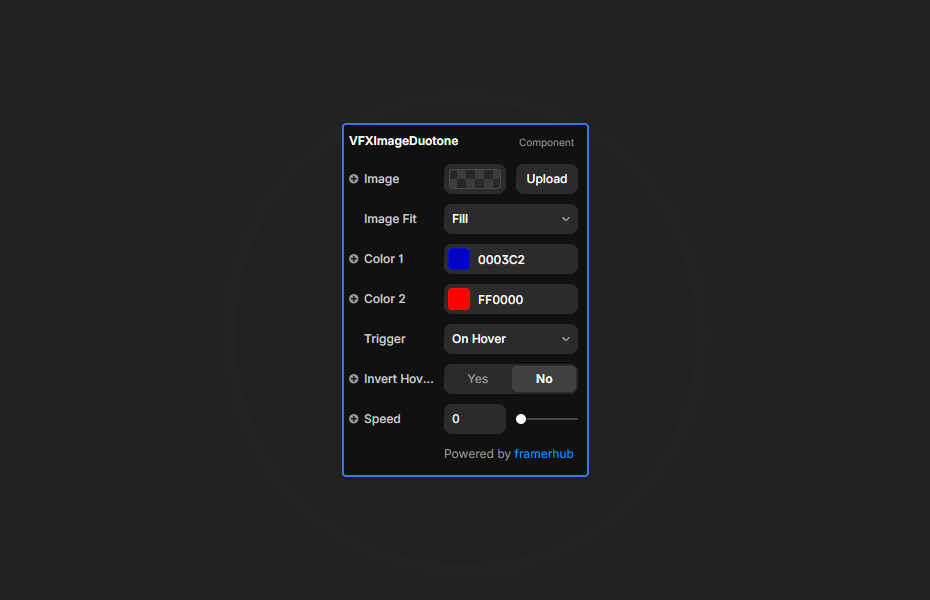
How to Use
Installation
VIDEO PLACEHOLDER: Installation Tutorial
- Log in to your account at framerhub.io
- Navigate to framerhub.io/dashboard
- Find VFX Image Duotone in your Recent Purchases
- Click the "Copy" button
- Open your Framer project
- Paste the component anywhere on your canvas (Cmd/Ctrl + V)
Customization
Image Settings
- Image: Choose your image source
- Image Fit: Select Cover, Contain, or Fill display mode
Color Settings
- Color 1: Set the shadow/dark tones color
- Color 2: Set the highlight/light tones color
Animation & Trigger
- Trigger: Choose Always or On Hover activation
- Invert Hover: Flip the hover logic when trigger is set to Hover
- Speed: Control animation speed (0 for static, up to 5 for fast)
Quick Tips
Best Colors — High contrast between Color 1 and Color 2 creates the most dramatic duotone effect. Try complementary colors for bold results.
Static vs Animated — Set Speed to 0 for a clean, static duotone. Increase speed for subtle color shifts that add life.
Hover Effects — Use Hover trigger with Invert to reveal the original image on hover while showing duotone by default.
Image Quality — Use high-resolution images for best results with the WebGL shader.
License
Single Use License — Use in one client project with full commercial rights. No redistribution. 1 license = 1 client.
Refund Policy
Due to the nature of our digital products, we are unable to offer refunds, but we're here to assist you with any questions or concerns!
Why Designers Love This
VFX Image Duotone gives you the power to apply professional-grade color grading with zero design software required. The WebGL-powered effect runs smoothly on all devices, and the intuitive controls make it easy to achieve stunning results in seconds.
VFX Image Duotone - $9
Apply a stylish duotone color grade to your images with WebGL-powered effects.
You might also like
Why Choose Framer Hub Components
Loved by Framer teams
Used by Framer professionals who need premium, no-code experiences.
"The Best Framer CMS Filtering Plugin I've Found — Truly a Game-Changer. I've tested a lot of Framer CMS filtering and sorting components — both free and paid — and this is by far the best one I've come across."
"He really helped me out when I needed assistance adding it to my Framer project. Super fast customer support highly recommend!"
"We had tried a couple of other Framer CMS filter components but they were buggy, hard to use and support was slow or non-existent. FramerCMSFilter is easier to use and has a lot of added functionality."
Got questions? We've the answers
Got questions? We've the answers
Everything you need to know about FramerHub.