BubbleBurst FREE
Interactive 3D physics simulation with colorful bouncing bubbles.
Overview
Interactive 3D physics simulation with colorful bouncing bubbles.
- Realistic physics simulation with gravity and collisions
- Customizable colors, materials, and lighting
- Interactive mouse/touch controls with multiple modes
Transform Your Designs with Dynamic 3D Physics
BubbleBurst brings life to your Framer projects with an interactive 3D physics simulation featuring colorful, bouncing bubbles that respond naturally to mouse and touch interactions.
Features
Realistic Physics Engine Advanced physics simulation with gravity, friction, elasticity, and ball-to-ball collision detection for natural, organic movement.
Premium Visual Quality Built with Three.js using physically-based materials with metalness, roughness, and clearcoat properties for stunning reflections and depth.
Interactive Controls Three interaction modes: Repel, Attract, or Push bubbles with your mouse or touch. Fully customizable force and radius settings.
Performance Optimized Engineered for smooth 60fps performance with Float32Array physics data, object pooling, and smart rendering optimizations.
Mobile First Full touch support with visibility detection - automatically pauses when off-screen to save battery and resources.
Use Cases
Hero Sections — Create eye-catching landing page backgrounds that engage visitors immediately
Product Showcases — Add dynamic, interactive elements to product pages and presentations
Creative Portfolios — Showcase your artistic vision with premium, physics-based animations
Event Pages — Build excitement with playful, interactive bubble effects
How to Use
Installation
VIDEO PLACEHOLDER: Installation Tutorial
- Log in to your account at framerhub.io
- Navigate to framerhub.io/dashboard
- Find BubbleBurst in your Recent Purchases
- Click the "Copy" button
- Open your Framer project
- Paste the component anywhere on your canvas (Cmd/Ctrl + V)
Customization
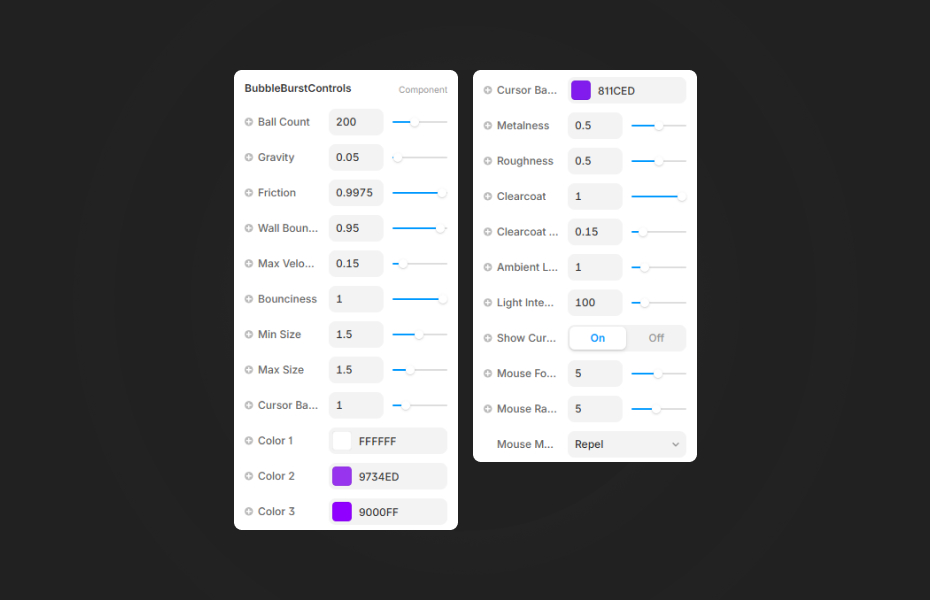
BubbleBurst offers extensive customization options organized into intuitive sections:
Physics Settings
- Ball Count: Control the number of bubbles (10-500)
- Gravity: Adjust downward force strength
- Friction: Control how quickly bubbles slow down
- Wall Bounce: Set energy retained when hitting boundaries
- Max Velocity: Limit maximum speed
- Bounciness: Control elasticity in ball-to-ball collisions
Size Controls
- Min Size: Smallest bubble size
- Max Size: Largest bubble size
- Cursor Ball Size: Size of the interactive cursor bubble
Colors & Materials
- Color 1, 2, 3: Create beautiful color gradients across bubbles
- Cursor Ball Color: Customize the interactive cursor bubble
- Metalness: Control metallic appearance (0-1)
- Roughness: Adjust surface roughness (0-1)
- Clearcoat: Add glossy coating effect
- Clearcoat Roughness: Fine-tune clearcoat appearance
Lighting
- Ambient Light: Overall scene brightness
- Light Intensity: Dynamic point light that follows cursor
Interaction
- Show Cursor Ball: Toggle visibility of interactive cursor bubble
- Mouse Force: Strength of mouse interaction
- Mouse Radius: Range of mouse influence
- Mouse Mode: Choose between Repel, Attract, or Push modes
Quick Tips
Performance — For better performance on lower-end devices, reduce ball count and disable some advanced material properties
Backgrounds — Set the component to 100% width and height for full-screen background effects
Color Schemes — Use 2-3 colors that complement your brand for cohesive design
Interaction Modes — Repel mode works great for hero sections, while Attract creates a magnetic, playful effect
License
Single Use License — Use in one client project with full commercial rights. No redistribution. 1 license = 1 client.
Why Designers Love This
BubbleBurst isn't just another animation component - it's a fully production-ready 3D physics engine optimized for the web. With realistic collision detection, premium materials, and buttery-smooth performance, your designs will stand out from the crowd. Whether you're building a stunning portfolio, an engaging product page, or an unforgettable landing experience, BubbleBurst delivers that "wow" factor your clients expect.
Need Help? Visit framerhub.io/support for documentation and video tutorials.
BubbleBurst - FREE
Interactive 3D physics simulation with colorful bouncing bubbles.
You might also like
Why Choose Framer Hub Components
Loved by Framer teams
Used by Framer professionals who need premium, no-code experiences.
"The Best Framer CMS Filtering Plugin I've Found — Truly a Game-Changer. I've tested a lot of Framer CMS filtering and sorting components — both free and paid — and this is by far the best one I've come across."
"He really helped me out when I needed assistance adding it to my Framer project. Super fast customer support highly recommend!"
"We had tried a couple of other Framer CMS filter components but they were buggy, hard to use and support was slow or non-existent. FramerCMSFilter is easier to use and has a lot of added functionality."
Got questions? We've the answers
Got questions? We've the answers
Everything you need to know about FramerHub.