CMS Gallery Slider
Transform CMS galleries into smooth, animated sliders with customizable thumbnails and navigation.
Overview
Transform CMS galleries into smooth, animated sliders with customizable thumbnails and navigation.
- Works with CMS Gallery fields or standard image arrays
- Smooth animations with five transition styles (Slide, Fade, Scale, combinations)
- Four thumbnail positions (Top, Bottom, Left, Right) with auto-responsive behavior
- Customizable navigation arrows with hover effects
- Full control over thumbnail styling, spacing, and animations
- Auto-scroll to active thumbnail for seamless browsing
- Performance-optimized with smooth 60fps transitions
- No coding required
Versatile Gallery Slider for Framer
A flexible gallery slider component that seamlessly integrates with Framer CMS or works standalone with custom images. Perfect for product galleries, portfolios, and image showcases with smooth animations and fully customizable controls.
Features
Dual Gallery Modes Switch between CMS Gallery mode (connect directly to your CMS gallery field) or Normal Gallery mode (add images manually) with a simple toggle.
Smart Thumbnail Navigation Position thumbnails on any side (bottom, top, left, right) with automatic responsive behavior—side thumbnails switch to bottom on mobile. Auto-scrolling keeps the active thumbnail visible.
Smooth Transitions Choose from 5 transition types: Slide, Fade, Scale, Slide+Scale, or Slide+Fade. Control animation speed and direction (horizontal/vertical) for the perfect effect.
Custom Arrows Fully customizable navigation arrows with hover effects, custom icons support, and precise positioning controls.
Use Cases
Product Pages — Showcase multiple product images with thumbnail previews for e-commerce sites.
Portfolios — Display project galleries with smooth transitions and professional presentation.
Real Estate Listings — Present property photos with intuitive navigation.
Blog Galleries — Enhance articles with connected CMS image galleries.
How to Use
Installation
- Log in to your account at framerhub.io
- Navigate to framerhub.io/dashboard
- Find CMS Gallery Slider in your Recent Purchases
- Click the "Copy" button
- Open your Framer project
- Paste the component anywhere on your canvas (Cmd/Ctrl + V)
Customization
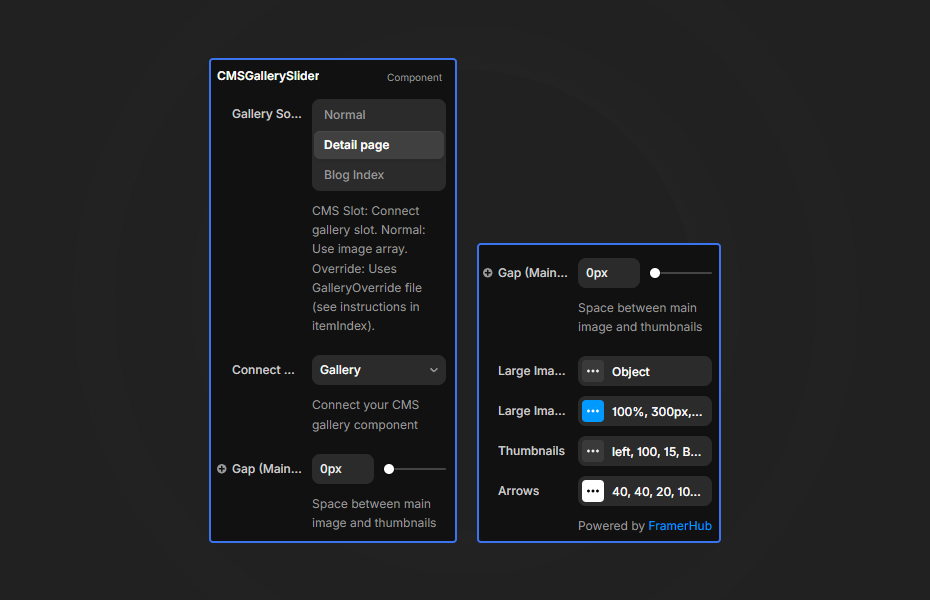
Gallery Source
- Toggle between "CMS" and "Normal" modes
- For CMS: Connect your CMS Gallery component to the slot
- For Normal: Add images directly to the Gallery Images array
Large Image Settings
- Width/Height: Set dimensions (%, px, vh supported)
- Object Fit: Cover, Contain, Fill, None, Scale Down
- Border Radius: Round the image corners
- Animation: Speed, direction, and transition type
Thumbnail Settings
- Position: Bottom, Top, Left, Right
- Size & Gap: Control thumbnail dimensions
- Opacity: Active vs inactive states
- Animation: Scale, Lift, Glow, or Scale+Lift hover effects
- Border & Background: Full styling control
Arrow Controls
- Size, position, and border radius
- Colors for normal and hover states
- Upload custom arrow icons
Quick Tips
Responsive Thumbnails — Left/right positioned thumbnails automatically move to bottom on screens smaller than the breakpoint (default 768px).
CMS Connection — When using CMS mode, connect a CMS Gallery component to the slot. The main image becomes the first slide.
Performance — Use appropriately sized images. The component handles display sizing, but source images affect load time.
Transition Combos — Slide+Fade and Slide+Scale offer the most dynamic transitions for showcasing products.
License
Single Use License — Use in one client project with full commercial rights. No redistribution. 1 license = 1 client.
Refund Policy
Due to the nature of our digital products, we are unable to offer refunds, but we're here to assist you with any questions or concerns!
Why Designers Love This
Zero code required to create stunning, CMS-connected product galleries. Every aspect is customizable through Framer's properties panel—from thumbnail animations to arrow styling—making it perfect for e-commerce and portfolio sites where image presentation matters.
CMS Gallery Slider - $14
Transform CMS galleries into smooth, animated sliders with customizable thumbnails and navigation.
You might also like
Why Choose Framer Hub Components
Loved by Framer teams
Used by Framer professionals who need premium, no-code experiences.
"The Best Framer CMS Filtering Plugin I've Found — Truly a Game-Changer. I've tested a lot of Framer CMS filtering and sorting components — both free and paid — and this is by far the best one I've come across."
"He really helped me out when I needed assistance adding it to my Framer project. Super fast customer support highly recommend!"
"We had tried a couple of other Framer CMS filter components but they were buggy, hard to use and support was slow or non-existent. FramerCMSFilter is easier to use and has a lot of added functionality."
Got questions? We've the answers
Got questions? We've the answers
Everything you need to know about FramerHub.