CMS Masonry Lightbox
Transform your CMS collections into beautiful masonry galleries with built-in lightbox and filtering—no code required.
Overview
Transform your CMS collections into beautiful masonry galleries with built-in lightbox and filtering—no code required.
- Auto-adapting masonry layout for any CMS collection
- Built-in lightbox for images and videos
- Category filtering with single or multi-select
- Customizable hover effects and transitions
- Fully responsive grid (1-12 columns)
- Custom category pill styling
- Works with any CMS field structure
- Zero coding required
Beautiful Masonry Galleries from Your CMS
Turn any CMS collection into a professional masonry gallery with lightbox preview and category filtering. Perfect for portfolios, product showcases, and media libraries.
Built for designers who need production-ready galleries without touching code.
Features
Auto-Adapting Masonry Layout Connect any CMS collection and watch it transform into a Pinterest-style masonry grid. Supports 1-12 columns with custom gap spacing.
Built-In Lightbox Click any image or video to open an elegant full-screen lightbox. Automatically detects media types and handles both images and videos seamlessly.
Smart Category Filtering Add filter pills that automatically sync with your CMS categories. Choose single-select or multi-select modes. Fully customizable pill colors, fonts, and spacing.
Customizable Hover Effects Four hover animations (scale, fade, slide, bounce) with adjustable overlay colors, icons, and shadow intensity for polished interactions.
Flexible Grid Control Adjust columns, gaps, and shadows from the properties panel. Everything responds instantly without code.
Use Cases
Portfolio Galleries — Showcase design work with category filters that let visitors browse by project type
Product Showcases — Display product images with lightbox zoom for detailed views and filtering by category
Photography Sites — Create stunning image galleries with masonry layouts that adapt to different image sizes
Case Study Libraries — Organize client work with filterable categories and quick preview capabilities
Media Archives — Build searchable collections of images and videos with elegant lightbox playback
How to Use
Installation
After purchasing from FramerHub:
- Log in to your account at framerhub.io
- Navigate to framerhub.io/dashboard
- Find CMS Masonry Lightbox in your Recent Purchases
- Click the "Copy" button
- Open your Framer project
- Paste the component anywhere on your canvas (Cmd/Ctrl + V)
Setup
Connect Your CMS
- Drag the component onto your canvas
- In the properties panel, click "Connect CMS"
- Select your CMS collection
- The masonry layout appears automatically
Configure Layout
- Set your preferred number of columns (1-12)
- Adjust gap spacing between items
- Choose shadow intensity for depth
Enable Lightbox (optional)
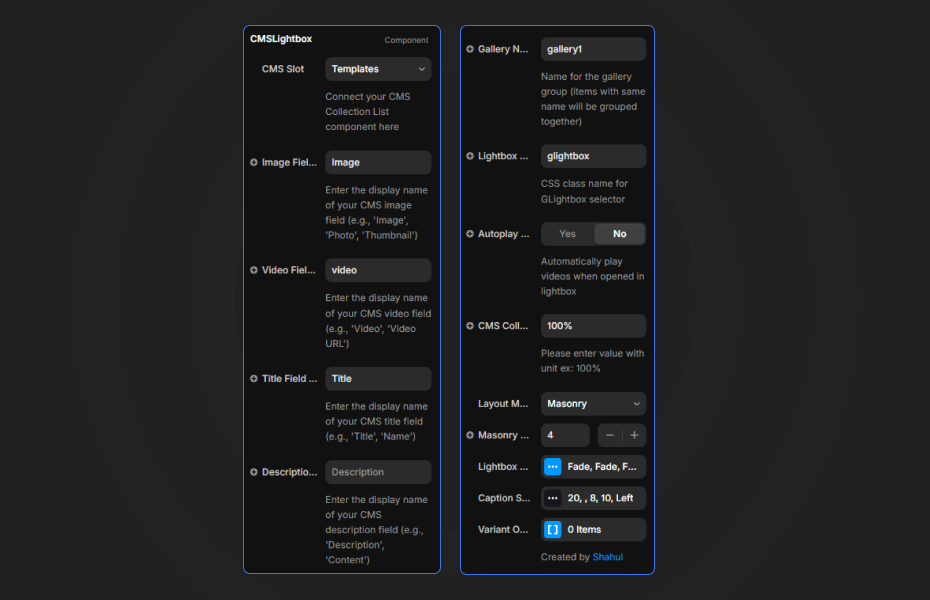
- Toggle "Enable Lightbox" in the properties panel
- Specify your CMS image field name (default: "image")
- Specify your CMS video field name (default: "video")
- Customize hover effects and overlay styles
Add Category Filtering (optional)
- Paste the CMSMasonboxFilter component above your gallery
- Set the "Category Field" to match your CMS field name
- Choose single or multi-select mode
- Customize pill colors, fonts, and spacing
Both components automatically sync using a "Store Key"—no manual connection needed.
Quick Tips
Column Strategy — Use 3-4 columns on desktop, 2 on tablet, 1 on mobile for best readability
Field Names — Make sure your image/video field names match exactly what you set in the properties panel
Filter Setup — If your CMS uses a different field name for categories, update both components to match
Performance — For large collections (90+ items), consider using CMS pagination limits
License
Single Use License — Use in one client project with full commercial rights. No redistribution. 1 license = 1 client.
Why Designers Love This
Connect your CMS and get a polished masonry gallery in seconds. No wrestling with layouts or writing filter logic—just paste, connect, and customize through Framer's properties panel.
Perfect for agencies building portfolio sites and freelancers delivering client galleries without custom development.
CMS Masonry Lightbox - $29
Transform your CMS collections into beautiful masonry galleries with built-in lightbox and filtering—no code required.
You might also like
Why Choose Framer Hub Components
Loved by Framer teams
Used by Framer professionals who need premium, no-code experiences.
"The Best Framer CMS Filtering Plugin I've Found — Truly a Game-Changer. I've tested a lot of Framer CMS filtering and sorting components — both free and paid — and this is by far the best one I've come across."
"He really helped me out when I needed assistance adding it to my Framer project. Super fast customer support highly recommend!"
"We had tried a couple of other Framer CMS filter components but they were buggy, hard to use and support was slow or non-existent. FramerCMSFilter is easier to use and has a lot of added functionality."
Got questions? We've the answers
Got questions? We've the answers
Everything you need to know about FramerHub.