Trusted by 1.5k+ Framer Pros
The form system Framer didn't ship.
40+ form components. Drag and drop. Configure from properties. No code. Start free, upgrade when you need to.
Every designer hits this wall
Before Form Kit
Client asks for a multi-step project intake form. Framer gives you a text input and a submit button.
You try custom code overrides. They break on deploy. You embed a Typeform. The brand match is off. Loading speed tanks.
Three meetings later, you're still duct-taping validation with code components that don't talk to each other.
After Form Kit
Open the plugin. Drag a Form Container. Add Text, Email, Phone, Select fields. Set validation from the property panel.
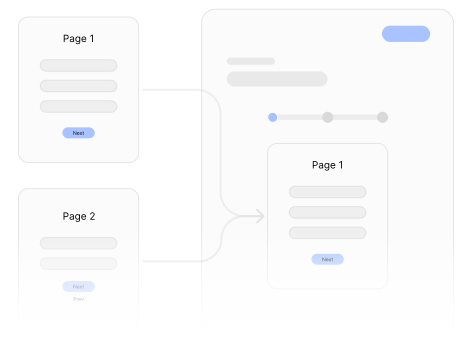
Add a step break — now it's multi-step with a progress bar. Add conditional logic — fields show based on previous answers.
Preview. It works. Publish. The form matches your design system perfectly because it IS your design system.
40+ Components
Component Gallery
Text
FreeStandard text input
Email with format validation
Number
FreeNumeric input with min/max
Textarea
FreeMulti-line text
Phone
FreePhone with format validation
URL
FreeURL with format validation
Select
FreeDropdown select
Checkbox
FreeSingle checkbox
Submit
FreeSubmit button with states
Checkbox Group
PremiumMultiple checkboxes
Radio
PremiumStyled radio buttons
Toggle
PremiumOn/off switch
Date Picker
PremiumCalendar date selection
Time Picker
PremiumTime selection
Date Time
PremiumDate and time selection
File Upload
PremiumFile attachment
File Multi Upload
PremiumMultiple file attachment
Image Upload
PremiumImage upload
Slider
PremiumRange slider input
Rating
PremiumStar rating
Net Promoter Score
PremiumNPS for numeric rating questions
Password
PremiumPassword with strength indicator
Button Group
PremiumGrouped button choices with active states
hCaptcha
PremiumBot protection with hCaptcha verification
Hidden
PremiumHidden field for passing metadata silently
Phone Pro
PremiumAdvanced international phone input
reCAPTCHA
PremiumGoogle reCAPTCHA protection for submissions
Repeator
PremiumRepeatable field groups for nested inputs
Summary
PremiumReview step that summarizes entered values
Turnstile
PremiumCloudflare Turnstile spam protection
Multi Step
PremiumSplit forms into multiple guided steps
Next
PremiumStep navigation button for advancing forms
Previous
PremiumStep navigation button for going back
Progress
PremiumCurrent step indicator for multi-step forms
Progress Bar
PremiumVisual progress bar for form completion
Reset Button
PremiumReset all fields back to their default values
Signature
ProDraw signature
Rich Text
ProRich text input
Color Picker
ProColor selection
Image Button
ProImage as button
Country
ProCountry selection
Multi-Step Forms
Break long forms into digestible steps. Progress bars. Step indicators. Navigation buttons. Next button validates current step before advancing. Auto-saves to localStorage so users never lose progress.
Real Validation
Required fields, email/phone/URL format checks, character limits, regex patterns, min/max ranges. Errors show inline on blur. Custom error messages that match your brand voice.
Conditional Logic
Show, hide, enable, or disable any field based on other field values. Eight operators: equals, not equals, contains, not contains, greater than, less than, is empty, is not empty. AND/OR matching.
Setup in 60 seconds
Install
One-click from Framer Marketplace. 60 seconds.
Drag
Works like native components. Drag fields onto your canvas.
Configure
Validation, conditions, styling — all from the property panel.
Framer Form Kit
Ready to impress your clients? Stop apologizing for missing features and build powerful, logic-driven forms today.
Install Plugin