Framer vs Webflow: Honest Comparison for 2026
 Shahul
Two no-code platforms. Both let you build production websites without writing code. But Framer and Webflow solve different problems, and choosing the wrong one costs you weeks of rework.
We build
Here's what actually matters when choosing between Framer and Webflow in 2026.
Quick verdict
Neither platform is "better." They're better at different things.
| Category | Framer | Webflow | Winner |
|---|---|---|---|
| Design freedom | Figma-like canvas, pixel-perfect | Box model, structured layout | Framer |
| Animations | First-class, scroll-triggered, GPU-accelerated | Custom interactions, Lottie support | Framer |
| CMS maturity | 1,000 items (Pro), basic filtering | 10,000 items, robust filtering | Webflow |
| SEO tools | Solid basics, auto sitemap | Granular control, 301 redirects | Webflow |
| E-commerce | Third-party required | Native checkout + inventory | Webflow |
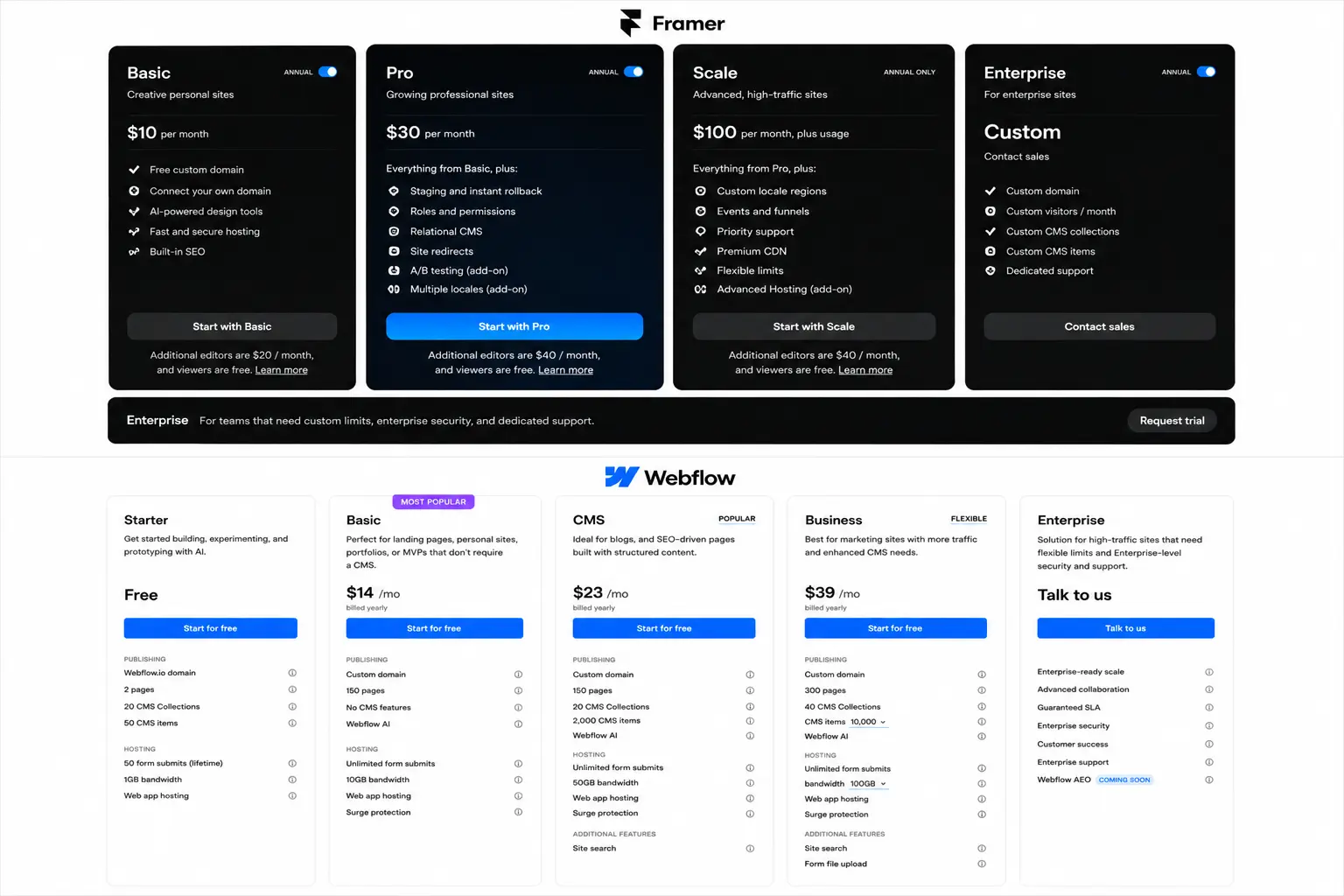
| Pricing (entry) | Free plan, $10/mo Basic | Free plan, $14/mo Basic | Framer |
| Plugin ecosystem | 100+ plugins, growing fast | 200+ apps, mature marketplace | Tie |
The short version: Framer wins on design speed and animations. Webflow wins on CMS depth and native e-commerce. For most Framer limitations,
Close the gaps with FramerHub plugins
CMS filtering, forms, Shopify, components, and more. Used by 2,000+ Framer users.
What Framer does better
Design freedom that feels like Figma
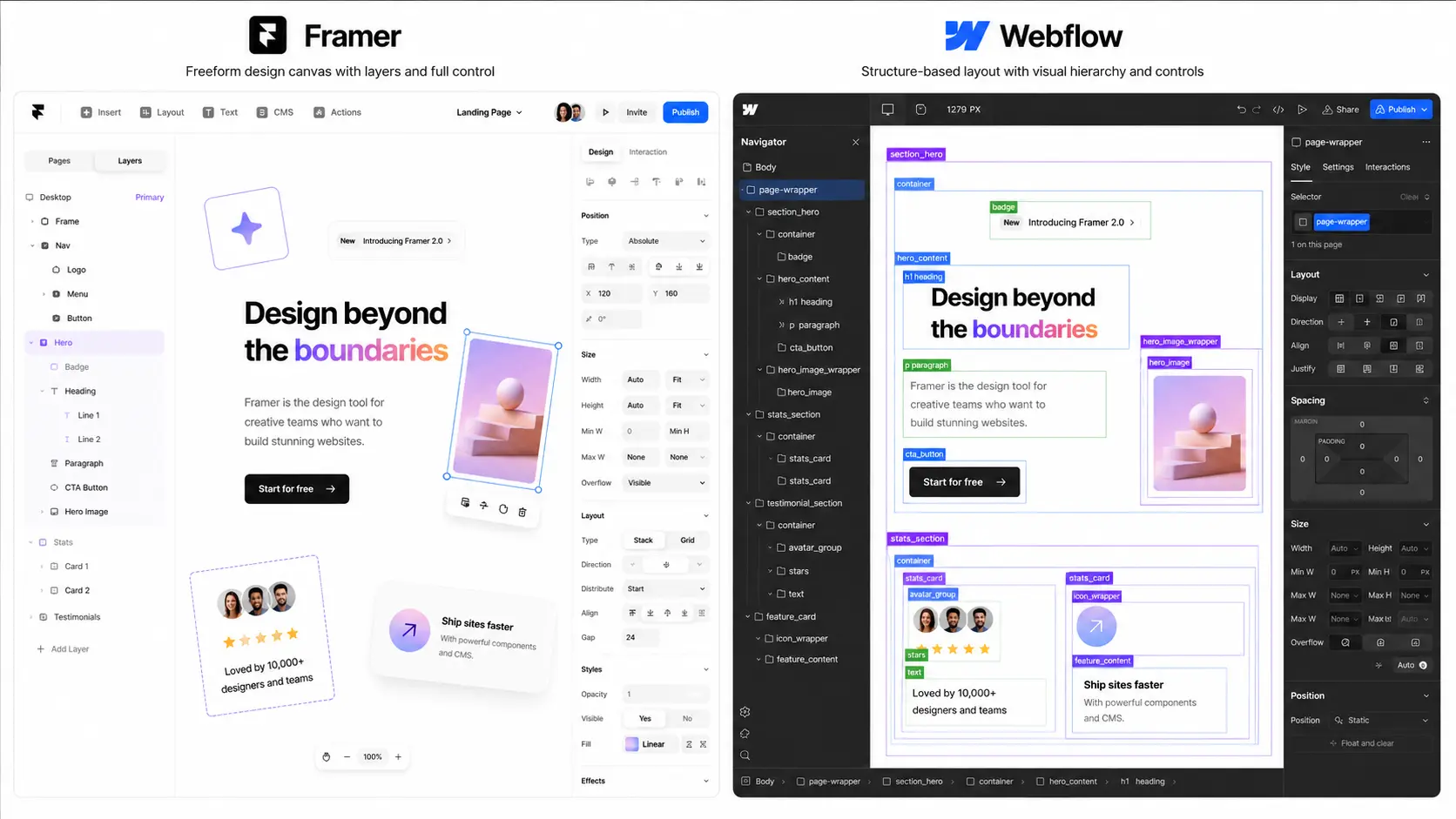
Framer's canvas works like Figma. Drag elements anywhere. No box-model constraints unless you want them. This means designers can build exactly what they envision without fighting the layout system.
Webflow's box model is powerful but rigid. Every element lives in a parent-child structure. Great for developers. Frustrating for designers who want to break the grid.
Real impact: A landing page that takes 4 hours in Webflow can ship in 2 hours in Framer. Less structural friction, more creative output.
Animations and interactions
Framer treats animations as first-class citizens. Scroll-triggered effects, page transitions, hover states, spring physics, all built into the visual editor. No code needed for complex motion.
Webflow has interactions too, but they feel bolted on. You build them in a separate panel with a timeline-based system. Powerful, but slower to iterate on.
When this matters: SaaS landing pages, portfolio sites, product showcases, anywhere motion sells the product.
Speed to production
Framer's component system, responsive variants, and publish flow mean you can go from blank canvas to live site in hours. The learning curve is gentler for anyone coming from design tools.
Webflow requires understanding its class system, element hierarchy, and CMS structure before you're productive. Steeper curve, but more structured long-term.
Growing faster than Webflow
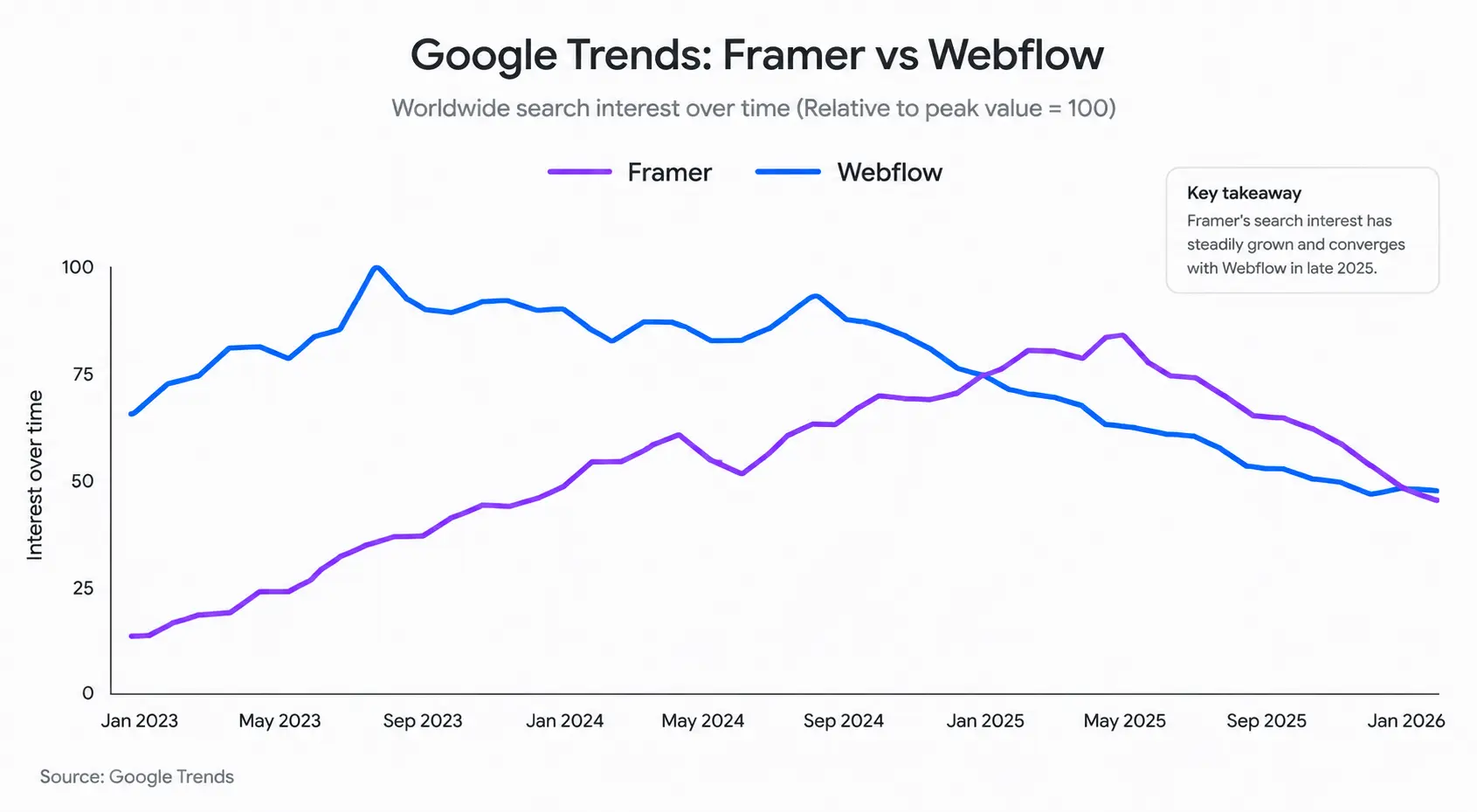
Framer's search interest has been closing the gap with Webflow fast, Google Trends shows them neck-and-neck by late 2025. Framer powers ~70,000 websites versus Webflow's ~720,000, but that ratio is shifting quickly.
What Webflow does better
CMS maturity
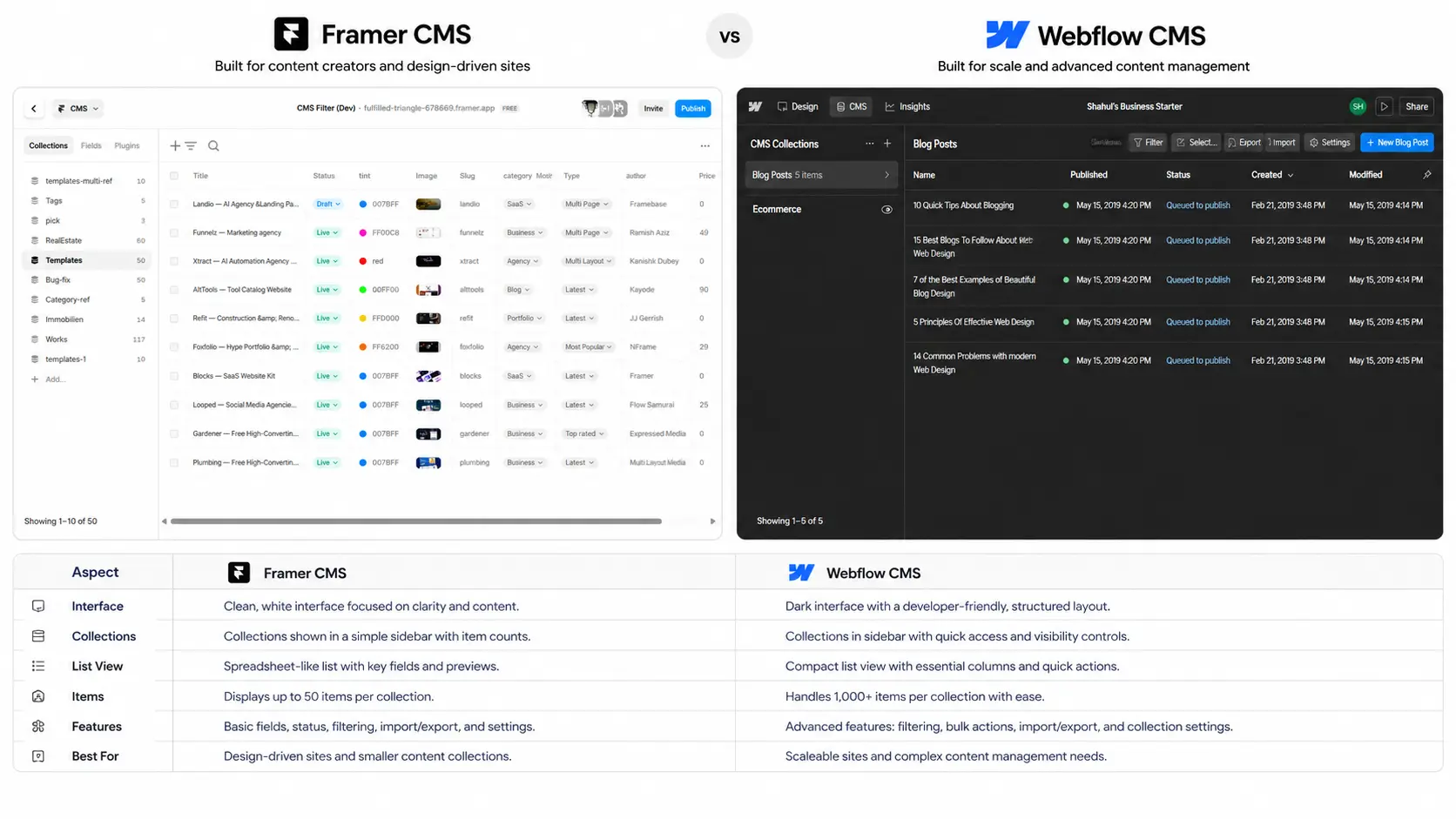
This is Webflow's clearest advantage. Webflow CMS supports up to 10,000 items per collection. Framer's Pro plan caps at 1,000. For content-heavy sites, blogs with hundreds of posts, large product catalogs, resource libraries, Webflow handles the scale.
Webflow's native filtering is also more capable out of the box. Multiple conditions, sorting, pagination, it works without plugins.
Framer's CMS is improving fast, but it's still behind for large-scale content sites.
SEO control
Both platforms handle SEO basics well, meta titles, descriptions, Open Graph, sitemaps. Webflow edges ahead with:
- Native 301 redirect management
- Per-page sitemap priority settings
- Granular robots.txt control
- Built-in lazy loading controls
Framer's SEO is solid for most sites. But if search rankings drive your business, Webflow gives you more knobs to turn. Check our
Native e-commerce
Webflow E-commerce is a complete solution: product management, cart, checkout, inventory tracking, abandoned cart emails. It's not Shopify-level, but it works out of the box.
Framer has no native e-commerce. You need third-party solutions like Shopify-based storefront setups or Framer Commerce. This gap is real, though the third-party options are catching up.
If you're selling with Framer today, the safest route is pairing Framer with a dedicated commerce backend and keeping the storefront experience lightweight.
Enterprise features
Webflow offers SOC2 compliance, team roles and permissions, design system management, and client billing. If you're an agency managing 20+ client sites with compliance requirements, Webflow has the infrastructure.
Framer is adding team features, but it's still built more for individual creators and small teams.
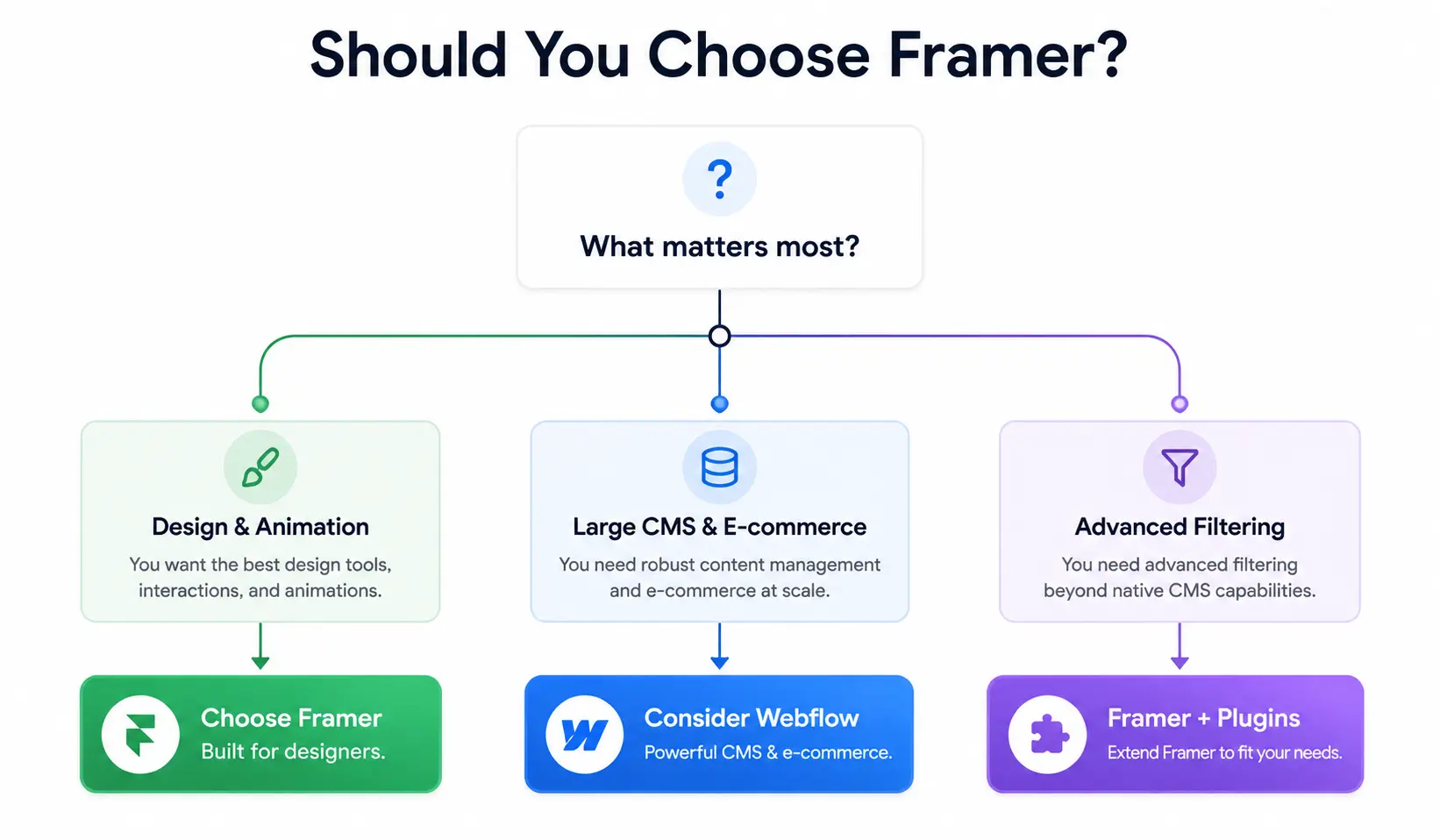
When to choose Framer
Choose Framer when:
- Design matters most, startup landing pages, portfolio sites, creative showcases
- You need animations, product demos, scroll-driven storytelling, interactive experiences
- Speed is critical, MVPs, campaign pages, rapid prototyping
- Budget is tight, Framer's free plan and $10/mo Basic beat Webflow's $14/mo entry
- Your CMS needs are moderate, under 1,000 items, standard content types
- You need advanced filtering, Framer's native Dynamic Filters handle basics, and plugins like
add the full discovery layer: multi-field search, facets, counts, and synchronized filter groups
Best Framer use cases: SaaS landing pages, agency portfolios, personal sites, directory websites (with filtering plugins), small e-commerce storefronts (with Shopify integration).
Building a Framer site? Get the All Access Pass
Every plugin, every component, every future release. One price.
When to choose Webflow
Choose Webflow when:
- Content scale matters, 1,000+ CMS items, large blogs, resource libraries
- Native e-commerce, built-in cart, checkout, and inventory without third-party tools
- SEO is your primary channel, you need granular redirect management and sitemap control
- Enterprise requirements, SOC2 compliance, team permissions, client billing
- Complex CMS relationships, multi-reference fields, heavily interconnected content types
Best Webflow use cases: Content marketing sites, mid-size e-commerce stores, enterprise marketing sites, multi-author blogs, large resource libraries.
The real comparison: CMS filtering
Here's something no other Framer vs Webflow comparison covers.
Both platforms let you display CMS content. But when clients need filtering, search bars, category filters, price range sliders, multi-field combinations, the story gets interesting.
Webflow handles basic filtering natively. You can filter by category, add conditional visibility, and sort collections. It works for simple use cases.
Framer's native Dynamic Filters handle the basics well. You can bind a field to a page variable and let the collection react. It works for simple category dropdowns and single-field filtering. Framer validated that CMS filtering matters, that's a good thing.
But real CMS sites usually need more than a basic filter toggle. When clients need multi-field search, coordinated sort + facets + counts, active filter chips, price range sliders, or synchronized filters across desktop and mobile layouts, native Dynamic Filters don't cover it yet.
Framer with plugins bridges this gap. A dedicated filtering system like
| Filtering Feature | Webflow Native | Framer Native | Framer + CMS Filter |
|---|---|---|---|
| Category filter | Yes | Yes (Dynamic Filters) | Yes (8+ filter types) |
| Multi-field search | No (custom code) | No | Yes (title + tags + author) |
| Price range slider | No (custom code) | No | Yes |
| Coordinated filters | Conditional visibility | Basic variable binding | Full system (search + sort + facets + counts) |
| Synced filter groups | No | No | Yes (top bar + sidebar + mobile) |
| AND/OR logic | No | No | Yes |
This is where we have a unique perspective. We built
Need advanced CMS filtering in Framer?
Multi-field search, 8+ filter types, facets, counts, AND/OR logic. Five-minute setup.
Pricing breakdown
| Plan | Framer | Webflow |
|---|---|---|
| Free | 1 project, framer.site domain | 1 project, webflow.io domain |
| Entry | Basic: $10/mo | Basic: $14/mo |
| Mid | Pro: $30/mo (1,000 CMS items) | CMS: $23/mo |
| Top | Scale: $100/mo | Business: $39/mo (10K CMS items) |
| E-commerce | Not available natively | Standard: $29/mo, Plus: $74/mo |
Framer is cheaper at entry level: $10/mo vs $14/mo for a custom domain, SSL, and hosting. At the mid tier, Framer's Pro ($30/mo) is more than Webflow's CMS plan ($23/mo), but includes more publishing features. Webflow's Business plan ($39/mo) includes 10x the CMS item limit.
Save more with the Framer + FramerHub stack
Framer's lower pricing + our plugins = Webflow-level features at a fraction of the cost.
More Framer resources
Want to go deeper on Framer performance, SEO, and production workflows? Start here:
, practical speed wins for production sites , how to keep larger client builds maintainable , on-page and technical SEO checks before launch , interaction and visual ideas worth borrowing
FAQ
Is Framer better than Webflow in 2026?
It depends on your project. Framer is better for design-heavy sites, animations, and fast production. Webflow is better for large CMS sites, native e-commerce, and enterprise needs. For most freelancer and agency projects under 1,000 CMS items, Framer delivers faster results at a lower cost.
Can Framer handle complex CMS filtering?
Framer's native Dynamic Filters handle basic filtering, bind a field to a variable and the collection reacts. For more advanced needs, plugins like
Is Framer cheaper than Webflow?
At entry level, yes. Framer's Basic plan ($10/mo) vs Webflow's Basic ($14/mo). At Pro level, Framer is $30/mo vs Webflow's Business at $39/mo, though Webflow includes 10x the CMS item limit at that tier.
Can I migrate from Webflow to Framer (or Framer to Webflow)?
There's no one-click migration tool in either direction. Moving from Webflow to Framer or Framer to Webflow means rebuilding the design and exporting CMS content via CSV. For simple sites, this takes a few hours. For complex CMS sites with hundreds of items and custom interactions, budget a few days.
Does Framer support e-commerce?
Not natively. You need third-party solutions like Shopify-based storefront setups, Framer Commerce, or Frameship. These connect your Framer frontend to a commerce backend for products, cart, and checkout. Webflow has the advantage here with native e-commerce built in.
Bottom line
Framer and Webflow are both excellent platforms. The right choice comes down to what your project actually needs.
Choose Framer for design speed, animations, and cost-effective sites. Its plugin ecosystem, including
Choose Webflow for content-heavy sites, native e-commerce, and enterprise requirements.
We build Framer plugins because we believe in the platform's trajectory. But we also know where it falls short. That's the honest comparison.
Last updated: May 2026
Shahul
Founder of FramerHub