Variable Font Hover
Interactive letter-by-letter hover animation with variable fonts
Overview
Interactive letter-by-letter hover animation with variable fonts
- Letter-by-letter hover animation
- Variable font weight transitions
- Customizable stagger effects
- Optional slant axis support
- Hover or click toggle modes
Interactive Typography That Responds
Transform your text into an interactive experience with Variable Font Hover – each letter responds to mouse hover with smooth weight transitions, creating elegant ripple effects across your typography.
Features
Letter-by-Letter Animation Each character animates independently, creating a fluid wave effect as users hover over the text. The animation smoothly transitions between font weights for a premium feel.
Variable Font Support Leverage the power of variable fonts to animate weight and optionally slant. The smooth interpolation between font weights creates animations that traditional fonts simply can't achieve.
Stagger Patterns Choose how the animation flows through the text: from the first letter, last letter, center outward, or random for organic movement.
Dual Trigger Modes Use hover mode for desktop experiences or toggle mode for click-based interactions that work great on mobile devices.
Layout Stability Built-in layout reservation ensures your text never "shakes" or causes layout shifts, even when transitioning between extreme font weights.
Use Cases
Navigation Items — Create engaging nav links that respond to hover with elegant weight changes.
Call-to-Action Buttons — Add subtle interactivity to text-based CTAs for higher engagement.
Headings — Make section headings interactive for a more dynamic page feel.
Menu Items — Perfect for dropdown menus or sidebar navigation with hover feedback.
How to Use
Installation
VIDEO PLACEHOLDER: Installation Tutorial
- Log in to your account at framerhub.io
- Navigate to framerhub.io/dashboard
- Find Variable Font Hover in your Recent Purchases
- Click the "Copy" button
- Open your Framer project
- Paste the component anywhere on your canvas (Cmd/Ctrl + V)
Customization
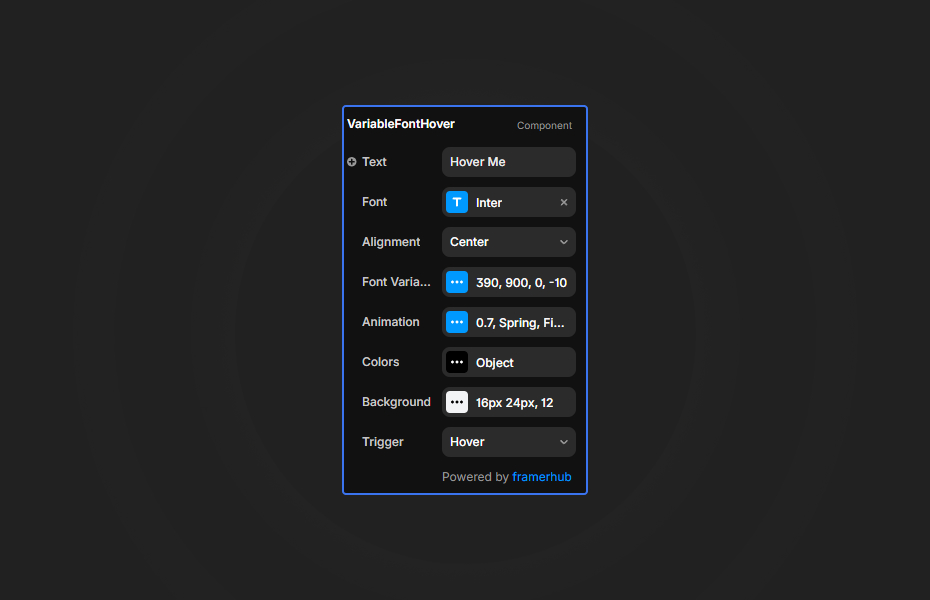
Configure the component through intuitive grouped controls:
Font Variation
- Set default and hover font weights
- Enable slant axis for italic-style effects
- Configure slant values for both states
Animation
- Adjust transition speed
- Choose spring or ease timing
- Configure stagger direction and delay
Colors
- Set default text color
- Enable color change on hover
- Choose hover text color
Background
- Enable optional background
- Set color, padding, and border radius
Quick Tips
Weight Contrast — For maximum impact, use a weight range of at least 300 (e.g., 400 to 700 or 300 to 900). Subtle changes (like 400 to 500) may not be noticeable.
Stagger Timing — A 0.03s delay creates smooth waves. Increase to 0.05-0.08s for more dramatic sequential effects.
Toggle Mode — Use "Click to Toggle" for mobile-friendly interactions where hover isn't available.
Accessibility — The component includes screen reader text for accessibility. The animated text is marked aria-hidden.
License
Single Use License — Use in one client project with full commercial rights. No redistribution. 1 license = 1 client.
Refund Policy
Due to the nature of our digital products, we are unable to offer refunds, but we're here to assist you with any questions or concerns!
Why Designers Love This
Variable Font Hover brings micro-interactions to typography in a way that feels natural and premium. The letter-by-letter animation creates an engaging experience that encourages exploration while the variable font technology ensures buttery-smooth transitions.
Variable Font Hover - $9
Interactive letter-by-letter hover animation with variable fonts
You might also like
Why Choose Framer Hub Components
Loved by Framer teams
Used by Framer professionals who need premium, no-code experiences.
"The Best Framer CMS Filtering Plugin I've Found — Truly a Game-Changer. I've tested a lot of Framer CMS filtering and sorting components — both free and paid — and this is by far the best one I've come across."
"He really helped me out when I needed assistance adding it to my Framer project. Super fast customer support highly recommend!"
"We had tried a couple of other Framer CMS filter components but they were buggy, hard to use and support was slow or non-existent. FramerCMSFilter is easier to use and has a lot of added functionality."
Got questions? We've the answers
Got questions? We've the answers
Everything you need to know about FramerHub.