The Digital Horizon
3D digital landscape with matrix-style particles and waves.
Overview
3D digital landscape with matrix-style particles and waves.
- 6 Character Sets (Binary, Hex, Glyphs, etc.)
- Interactive wave deformation
- Customizable grid density and spacing
- Beautiful bloom and color grading
- Transparent background option for layering
The Digital Horizon
Create a stunning, infinite digital landscape. This component renders a 3D terrain made of code and particles that undulates like a digital ocean.
Features
Matrix-Inspired Aesthetics Choose from 6 different character sets including Binary, Hex, and Glyphs to render your terrain.
Interactive Wave The terrain ripples with an automated wave animation and reacts to mouse movement, creating ripples where the user hovers.
Cinematic Quality Includes built-in bloom and depth-of-field effects to give the scene a polished, high-end look.
Use Cases
Hero Backgrounds — Perfect for tech-focused landing pages or futuristic web designs that need an eye-catching animated background.
Presentation Slides — Ideal backdrop for slides about data, AI, cybersecurity, or digital transformation topics.
Creative Portfolio — Add dynamic visual interest to developer or designer portfolios with a modern, tech-inspired aesthetic.
Loading Screens — Create engaging loading or transition screens that keep users entertained with mesmerizing wave patterns.
How to Use
Installation
VIDEO PLACEHOLDER: Installation Tutorial
- Log in to your account at framerhub.io
- Navigate to framerhub.io/dashboard
- Find The Digital Horizon in your Recent Purchases
- Click the "Copy" button
- Open your Framer project
- Paste the component anywhere on your canvas (Cmd/Ctrl + V)
Customization
Grid Settings
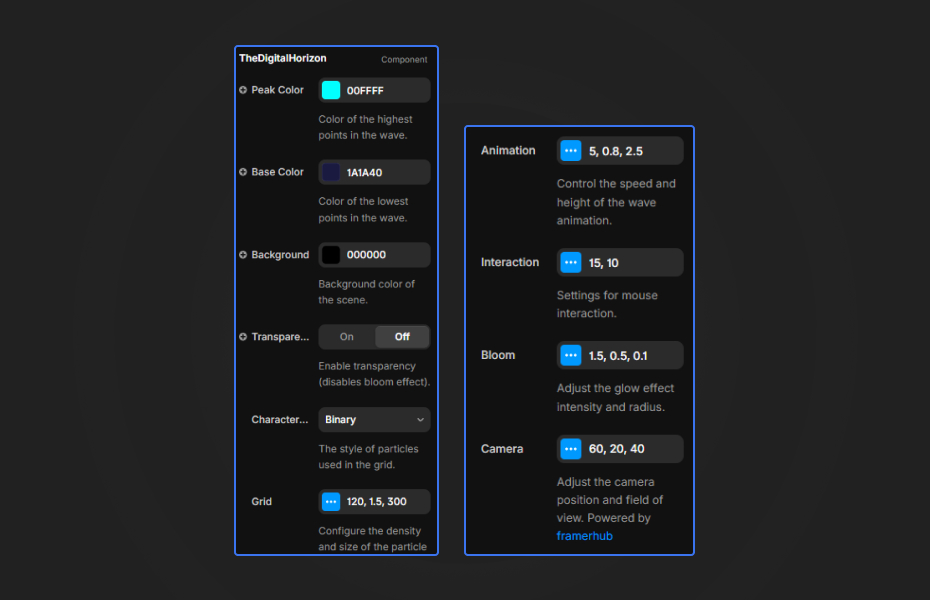
- Density: Control the number of particles (50-200). Higher density creates a more detailed landscape but may impact performance.
- Spacing: Adjust the distance between particles for a closer or more spread-out grid.
- Scale: Control the visual size of the particles. Larger scale makes them more prominent.
Animation Controls
- Scroll Speed: How fast the terrain moves toward you (0-20). Higher values create a faster-moving effect.
- Wave Speed: Controls the speed of the undulating wave motion.
- Wave Height: Adjust how tall the waves get. More dramatic waves create more visual impact.
- Pause: Toggle animation on/off for static screenshots or performance testing.
Colors
- Peak Color: The color at the highest points of the wave.
- Base Color: The color at the lowest points of the wave. Creates a gradient effect.
- Background: Scene background color. Works best with dark colors.
- Transparent BG: Toggle to enable transparent background for layering over other content (disables bloom effect).
Character Sets
- Choose from 6 different particle styles: Dots, Circles, Squares, Binary, Hex, or Glyphs for different visual aesthetics.
Bloom Effects
- Strength: Controls the intensity of the glow effect (0-3).
- Radius: How far the glow spreads.
- Threshold: Minimum brightness required to create bloom.
- Note: Bloom is disabled when Transparent BG is enabled.
Camera
- FOV: Field of view (30-120). Wider FOV shows more of the landscape.
- Height (Y): How high the camera is positioned above the grid.
- Distance (Z): How far back the camera is positioned.
Interaction
- Enabled: Toggle mouse interaction on/off.
- Radius: How large the ripple effect area is when hovering.
- Strength: How intense the mouse-based deformation is.
Quick Tips
Best Performance — Use density between 80-120 for smooth animation on most devices. Reduce to 60-80 on mobile for optimal performance.
Color Combinations — Dark backgrounds (#020204 or deep blue) work best with bright peak colors (#00ffff, #ff00ff). The gradient between peak and base colors creates depth.
Character Sets — Binary and Hex give a classic "Matrix" feel, while Dots and Circles are more subtle and modern. Experiment to match your design aesthetic.
Bloom for Drama — Increase bloom strength (1.5-2.0) on dark backgrounds for a dreamy, cinematic effect. Reduce to 0 for clean, crisp visuals on light backgrounds.
Camera Angles — Lower camera height (10-15) creates a more immersive "flying through" effect. Higher positions (25-35) give a bird's-eye view of the landscape.
Interaction — Mouse interaction adds engaging polish. If performance is a concern, disable it or reduce the radius/strength.
Transparent Background — Enable "Transparent BG" to layer the component over images, videos, or other content. Note that bloom effects are disabled in transparent mode.
License
Single Use License — Use in one client project with full commercial rights. No redistribution. 1 license = 1 client.
Refund Policy
Due to the nature of our digital products, we are unable to offer refunds, but we're here to assist you with any questions or concerns!
Why Designers Love This
Transform your designs with a captivating digital landscape that brings depth and motion to any project. The Digital Horizon combines stunning 3D visuals with smooth WebGL performance, offering six unique character sets and extensive customization options. Whether you're building a tech portfolio, a data visualization dashboard, or a futuristic landing page, this component delivers that "wow" factor that keeps users engaged.
The Digital Horizon - $12
3D digital landscape with matrix-style particles and waves.
You might also like
Why Choose Framer Hub Components
Loved by Framer teams
Used by Framer professionals who need premium, no-code experiences.
"The Best Framer CMS Filtering Plugin I've Found — Truly a Game-Changer. I've tested a lot of Framer CMS filtering and sorting components — both free and paid — and this is by far the best one I've come across."
"He really helped me out when I needed assistance adding it to my Framer project. Super fast customer support highly recommend!"
"We had tried a couple of other Framer CMS filter components but they were buggy, hard to use and support was slow or non-existent. FramerCMSFilter is easier to use and has a lot of added functionality."
Got questions? We've the answers
Got questions? We've the answers
Everything you need to know about FramerHub.