Text Rotate
Animated text rotation with creative effects for hero sections.
Overview
Animated text rotation with creative effects for hero sections.
- 7 animation effects (Slide, Blur Slide, Scale Rotate, Wave, Glitch, Bounce, Flip)
- Character-by-character or word-by-word animations
- 2 color modes (Solid, Gradient)
- Customizable stagger direction and timing
TextRotate
Create stunning animated text rotations for hero sections, landing pages, and creative displays. Drop in a list of words or phrases and watch them cycle with beautiful motion effects.
Features
Multiple Animation Effects Choose from 7 unique effects: Slide, Blur Slide, Scale Rotate, Wave, Glitch, Bounce, and Flip. Each creates a distinct personality for your text.
Staggered Character Animation Animate each character or word individually with customizable stagger direction (first, last, center, or random).
Dynamic Color Modes Apply solid colors or smooth gradients across characters.
Background Styling Optional background with customizable color, padding, and border radius for a polished look.
Use Cases
Hero Sections — Rotate through your key value propositions with eye-catching animations.
Landing Pages — Highlight product features or benefits that cycle automatically.
Creative Headers — Add motion and personality to static headlines.
How to Use
Installation
VIDEO PLACEHOLDER: Installation Tutorial
- Log in to your account at framerhub.io
- Navigate to framerhub.io/dashboard
- Find TextRotate in your Recent Purchases
- Click the "Copy" button
- Open your Framer project
- Paste the component anywhere on your canvas (Cmd/Ctrl + V)
Customization
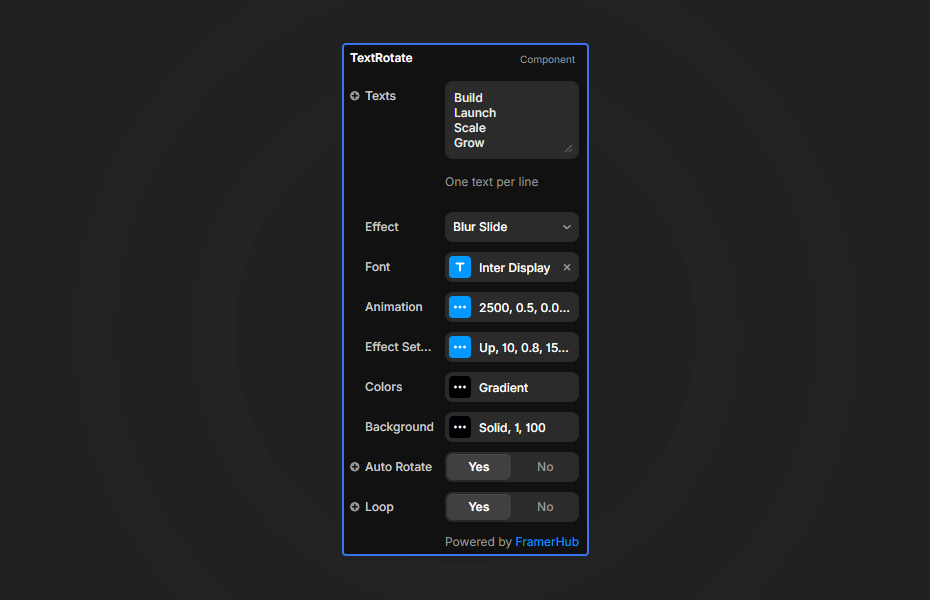
Add your rotating texts (one per line) and choose your animation effect:
Animation
- Interval between rotations
- Animation speed
- Stagger direction (First, Last, Center, Random) & duration
- Split text by characters or words
Effects
- 7 unique styles: Slide, Blur Slide, Scale Rotate, Wave, Glitch, Bounce, Flip
- Customize direction, blur amount, scale, rotation, and intensity
Appearance
- Color modes: Solid or Gradient
- Typography settings (Font family, size, weight, etc.)
Background
- Type: None, Solid, Gradient, or Image
- Full control over colors, gradient angles, and opacity
- Adjustable padding and border radius
Quick Tips
Smooth Animations — Start with default animation speed (0.5s). Slower speeds create elegance, faster speeds add energy.
Character Split — Use character animation for single words, word animation for longer phrases.
Stagger Direction — "Last" creates a satisfying cascade effect. "Center" works well for centered headings.
Color Gradients — Gradient mode looks best with contrasting start and end colors.
License
Single Use License — Use in one client project with full commercial rights. No redistribution. 1 license = 1 client.
Refund Policy
Due to the nature of our digital products, we are unable to offer refunds, but we're here to assist you with any questions or concerns!
Why Designers Love This
TextRotate brings life to static hero sections with zero coding. Just paste your words and watch the magic happen—it's the fastest way to add premium motion typography to any Framer site.
Text Rotate - $9
Animated text rotation with creative effects for hero sections.
You might also like
Why Choose Framer Hub Components
Loved by Framer teams
Used by Framer professionals who need premium, no-code experiences.
"The Best Framer CMS Filtering Plugin I've Found — Truly a Game-Changer. I've tested a lot of Framer CMS filtering and sorting components — both free and paid — and this is by far the best one I've come across."
"He really helped me out when I needed assistance adding it to my Framer project. Super fast customer support highly recommend!"
"We had tried a couple of other Framer CMS filter components but they were buggy, hard to use and support was slow or non-existent. FramerCMSFilter is easier to use and has a lot of added functionality."
Got questions? We've the answers
Got questions? We've the answers
Everything you need to know about FramerHub.