Text Pressure FREE
Interactive variable font text that responds to cursor proximity with dynamic weight, width, and style variations.
Overview
Interactive variable font text that responds to cursor proximity with dynamic weight, width, and style variations.
- Cursor-responsive variable font effects
- Width, weight, and italic variations
- Alpha and stroke effects
- Custom font URL support
- Flex layout option
- Scale to fit container
Interactive Variable Font Typography
Create stunning cursor-responsive text effects with TextPressure. Each character dynamically adjusts its font weight, width, and style based on cursor proximity, creating an engaging and interactive typographic experience.
Features
Cursor Proximity Detection Characters respond to mouse/touch position with smooth interpolation. The closer the cursor, the more dramatic the effect on each letter.
Variable Font Variations Support for multiple font axes including weight (wght), width (wdth), and italic (ital). Toggle each variation independently for complete control.
Alpha & Stroke Effects Add depth with opacity variation based on cursor distance. Enable stroke effects for a distinctive outlined look with customizable colors.
Flexible Layout Choose between flex layout (justified spacing) or standard inline display. Scale to fit option fills the container height.
Use Cases
Hero Sections — Create memorable first impressions with interactive headlines that respond to user movement.
Portfolio Headers — Stand out with typography that captures attention and showcases creativity.
Landing Pages — Increase engagement with dynamic text that encourages cursor exploration.
Brand Websites — Reinforce brand identity with custom variable fonts and unique interactions.
How to Use
Installation
VIDEO PLACEHOLDER: Installation Tutorial
- Log in to your account at framerhub.io
- Navigate to framerhub.io/dashboard
- Find Text Pressure in your Recent Purchases
- Click the "Copy" button
- Open your Framer project
- Paste the component anywhere on your canvas (Cmd/Ctrl + V)
Customization
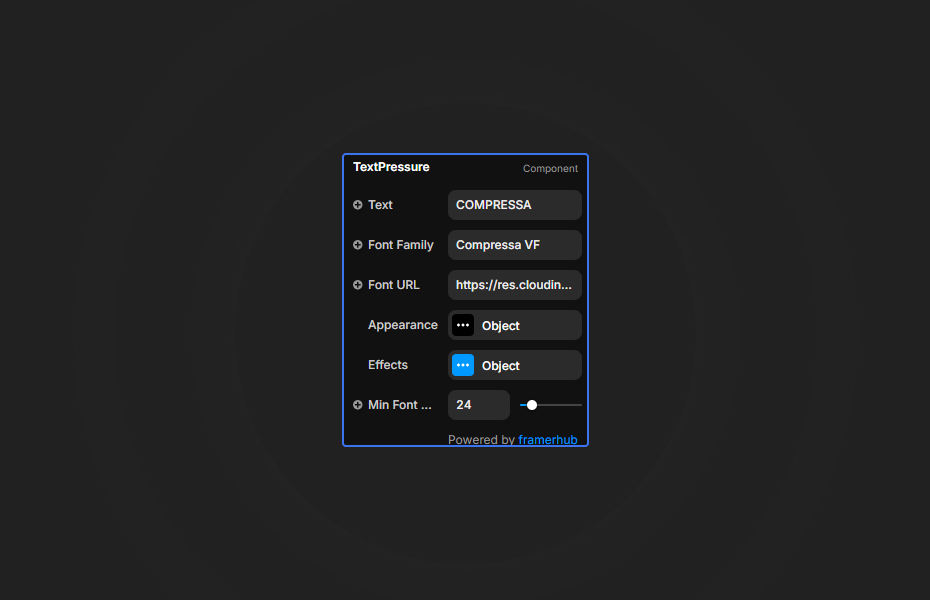
Configure your text and font settings, then enable the effects you want.
Text Settings
- Text: The display text
- Font Family: Variable font family name
- Font URL: URL to your variable font file (.woff2)
- Min Font Size: Minimum font size in pixels
Appearance
- Text Color: Main text color
- Stroke Color: Color for stroke effect (when enabled)
Effects
- Width Variation: Animate font width axis
- Weight Variation: Animate font weight axis
- Italic Variation: Animate italic axis
- Alpha Variation: Animate opacity based on distance
- Flex Layout: Use flexbox for justified spacing
- Stroke Effect: Add colored outline behind text
- Scale to Fit: Scale text to fill container height
Quick Tips
Use Variable Fonts — This component requires a variable font with wght, wdth, and ital axes. The default Compressa VF font works great, or use Google Variable Fonts.
Dark Backgrounds — Light text on dark backgrounds creates the most dramatic effect. Try white text with subtle stroke colors.
Container Size — The text automatically sizes to fit the container width. Use Scale to Fit for full container coverage.
Performance — The animation runs at 60fps using requestAnimationFrame. Longer texts with many characters may impact performance on mobile devices.
License
Free Component — Use in unlimited personal and commercial projects. No attribution required.
Refund Policy
This is a free component. No purchase required!
Why Designers Love This
TextPressure transforms static headlines into living typography. The smooth, physics-based interpolation creates a satisfying interaction that users can't resist exploring. Perfect for modern websites that prioritize user engagement and memorable experiences.
Text Pressure - FREE
Interactive variable font text that responds to cursor proximity with dynamic weight, width, and style variations.
You might also like
Why Choose Framer Hub Components
Loved by Framer teams
Used by Framer professionals who need premium, no-code experiences.
"The Best Framer CMS Filtering Plugin I've Found — Truly a Game-Changer. I've tested a lot of Framer CMS filtering and sorting components — both free and paid — and this is by far the best one I've come across."
"He really helped me out when I needed assistance adding it to my Framer project. Super fast customer support highly recommend!"
"We had tried a couple of other Framer CMS filter components but they were buggy, hard to use and support was slow or non-existent. FramerCMSFilter is easier to use and has a lot of added functionality."
Got questions? We've the answers
Got questions? We've the answers
Everything you need to know about FramerHub.