Tag Splitter
Turn any comma-separated list into stylish tag pills instantly.
Overview
Turn any comma-separated list into stylish tag pills instantly.
- Auto-split text into tags
- Wrap or Scroll layouts
- Custom separator support
- Full styling control
Tag Splitter
Turn any comma-separated list into stylish tag pills instantly. Perfect for displaying categories, skills, or features without manually creating dozens of text layers.
Features
Auto-Split Logic Simply type your tags separated by commas (e.g., "Design, Code, Art") and watch them transform into individual pills.
Flexible Layouts Choose between a wrapping layout that flows naturally or a horizontal scroll layout for compact spaces.
Custom Styling Full control over colors, typography, spacing, and hover effects to match your brand perfectly.
Use Cases
Blog Categories — Display post categories or tags.
Skill Lists — Showcase skills on a portfolio or resume.
Feature Lists — List product features in a compact, readable format.
How to Use
Installation
VIDEO PLACEHOLDER: Installation Tutorial
- Log in to your account at framerhub.io
- Navigate to framerhub.io/dashboard
- Find Tag Splitter in your Recent Purchases
- Click the "Copy" button
- Open your Framer project
- Paste the component anywhere on your canvas (Cmd/Ctrl + V)
Customization
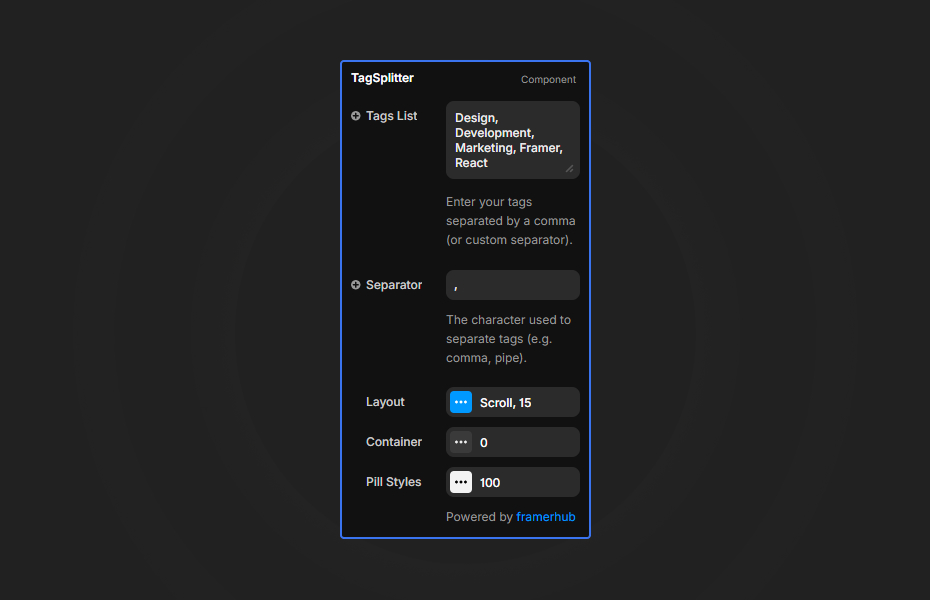
Tags List Enter your tags here. By default, use commas to separate them. You can change the separator if needed.
Layout
- Wrap: Tags will flow to the next line when they run out of space.
- Scroll: Tags will stay in a single line and scroll horizontally if they overflow.
Styling Customize the gap, padding, border radius, and colors. Enable "Hover Effect" to add interactivity.
Quick Tips
Custom Separator — You can use any character as a separator, such as "|" or ";". Just update the "Separator" control.
License
Single Use License — Use in one client project with full commercial rights. No redistribution. 1 license = 1 client.
Refund Policy
Due to the nature of our digital products, we are unable to offer refunds, but we're here to assist you with any questions or concerns!
Why Designers Love This
It saves time! Instead of creating 10 separate text layers and auto-layout frames, just drop this component and type your list. It's that simple.
Need Help? Visit framerhub.io/support for documentation and video tutorials.
Tag Splitter - $9
Turn any comma-separated list into stylish tag pills instantly.
You might also like
Why Choose Framer Hub Components
Loved by Framer teams
Used by Framer professionals who need premium, no-code experiences.
"The Best Framer CMS Filtering Plugin I've Found — Truly a Game-Changer. I've tested a lot of Framer CMS filtering and sorting components — both free and paid — and this is by far the best one I've come across."
"He really helped me out when I needed assistance adding it to my Framer project. Super fast customer support highly recommend!"
"We had tried a couple of other Framer CMS filter components but they were buggy, hard to use and support was slow or non-existent. FramerCMSFilter is easier to use and has a lot of added functionality."
Got questions? We've the answers
Got questions? We've the answers
Everything you need to know about FramerHub.