Snow Overlay
Add realistic falling snow particles to create stunning winter and seasonal effects.
Overview
Add realistic falling snow particles to create stunning winter and seasonal effects.
- Realistic falling snow animation with canvas rendering
- Multiple particle shapes (Circle, Square, Star, Snowflake)
- Adjustable particle count and fall speed
- Wind direction control for natural movement
- Customizable snow color and size range
- Variable opacity for depth perception
- Optional background color overlay
- Performance-optimized 60fps animation
- No coding required
Create a Winter Wonderland
Add a magical snow effect to your Framer website with the Snow Overlay component. Perfect for seasonal campaigns, holiday themes, or any winter-inspired design.
Features
Multiple Shapes Choose from circles, squares, stars, or detailed snowflakes for your particles.
Full Control Adjust particle count, fall speed, wind direction, and more with intuitive controls.
Smooth Animation Optimized canvas rendering for buttery-smooth 60fps animation.
Overlay Mode Automatically covers the entire viewport in preview/live mode.
Use Cases
Holiday Websites — Add festive charm to landing pages during winter holidays.
Seasonal Promotions — Create atmosphere for winter sales and campaigns.
Portfolio Pieces — Showcase creative, dynamic design capabilities.
How to Use
Installation
- Log in to your account at framerhub.io
- Navigate to framerhub.io/dashboard
- Find Snow Overlay in your Recent Purchases
- Click the "Copy" button
- Open your Framer project
- Paste the component anywhere on your canvas (Cmd/Ctrl + V)
Customization
Particle Settings
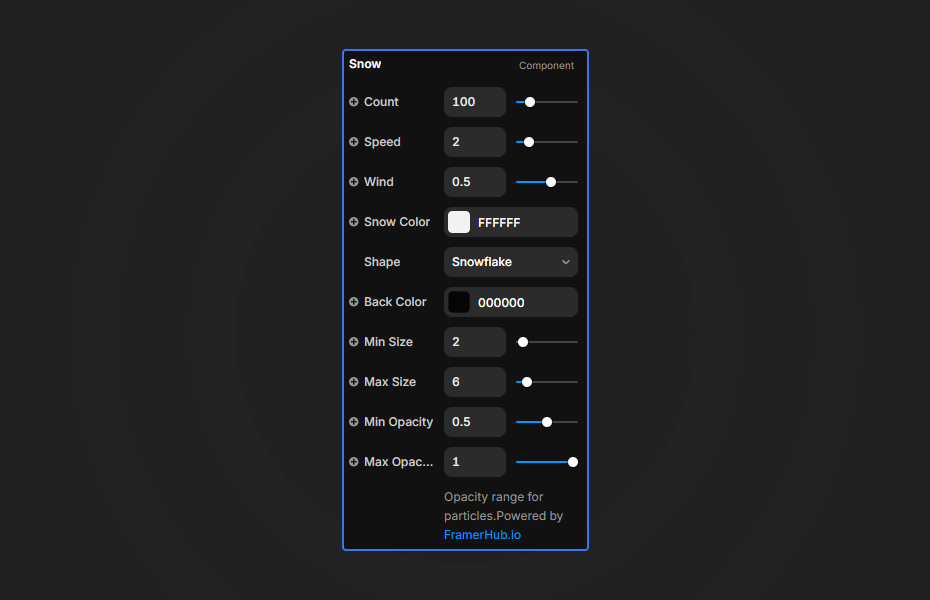
- Count: Number of snow particles (20-500)
- Speed: Fall speed (0.5-10)
- Wind: Horizontal drift (-3 to 3)
Appearance
- Shape: Circle, Square, Star, or Snowflake
- Snow Color: Any color for particles
- Back Color: Background overlay color
- Min/Max Size: Particle size range (0.1-50)
- Min/Max Opacity: Transparency range (0-1)
Quick Tips
Best Performance — Use 100-200 particles for optimal performance. Reduce count on mobile.
Shape Selection — Snowflake shapes are more detailed but use slightly more resources.
Layering — Place your content above the Snow component for best effect.
License
Single Use License — Use in one client project with full commercial rights. No redistribution. 1 license = 1 client.
Refund Policy
Due to the nature of our digital products, we are unable to offer refunds, but we're here to assist you with any questions or concerns!
Why Designers Love This
Add instant visual magic to any project. The Snow Overlay transforms ordinary pages into immersive winter experiences with zero coding required.
Snow Overlay - $5
Add realistic falling snow particles to create stunning winter and seasonal effects.
You might also like
Why Choose Framer Hub Components
Loved by Framer teams
Used by Framer professionals who need premium, no-code experiences.
"The Best Framer CMS Filtering Plugin I've Found — Truly a Game-Changer. I've tested a lot of Framer CMS filtering and sorting components — both free and paid — and this is by far the best one I've come across."
"He really helped me out when I needed assistance adding it to my Framer project. Super fast customer support highly recommend!"
"We had tried a couple of other Framer CMS filter components but they were buggy, hard to use and support was slow or non-existent. FramerCMSFilter is easier to use and has a lot of added functionality."
Got questions? We've the answers
Got questions? We've the answers
Everything you need to know about FramerHub.