Smart Breadcrumbs
SEO-optimized breadcrumbs with automatic schema injection and flexible styling.
Overview
SEO-optimized breadcrumbs with automatic schema injection and flexible styling.
- Auto-generated paths or Manual mode
- JSON-LD Structured Data injection (SEO)
- Custom separators (Icon, Slash, Chevron)
- Interactive hover states
- Per-side padding controls
Smart Breadcrumbs
A powerful breadcrumb component that improves both user navigation and SEO. It automatically generates breadcrumbs based on your Framer project structure or allows manual overrides, while silently injecting JSON-LD schema data to help Google understand your site structure.
Features
SEO Optimized
Automatically injects BreadcrumbList Schema.org structured data into the head of your page, improving search engine visibility.
Auto or Manual Modes Let the component generate links automatically based on the URL path, or switch to Manual mode to define custom labels and links.
Flexible Styling Customize every aspect: spacing, colors, fonts, separators (Chevron, Slash, Arrow, or Custom SVG), and hover states. Supports per-side padding for precise control.
Use Cases
Blog Navigation — Help readers understand their position in your content hierarchy while boosting article SEO.
E-commerce Sites — Guide shoppers through product categories with clear, clickable paths.
Documentation Sites — Provide context in multi-level documentation structures.
Portfolio Sites — Navigate between project categories and case studies seamlessly.
How to Use
Installation
VIDEO PLACEHOLDER: Installation Tutorial
- Log in to your account at framerhub.io
- Navigate to framerhub.io/dashboard
- Find Smart Breadcrumbs in your Recent Purchases
- Click the "Copy" button
- Open your Framer project
- Paste the component anywhere on your canvas (Cmd/Ctrl + V)
Customization
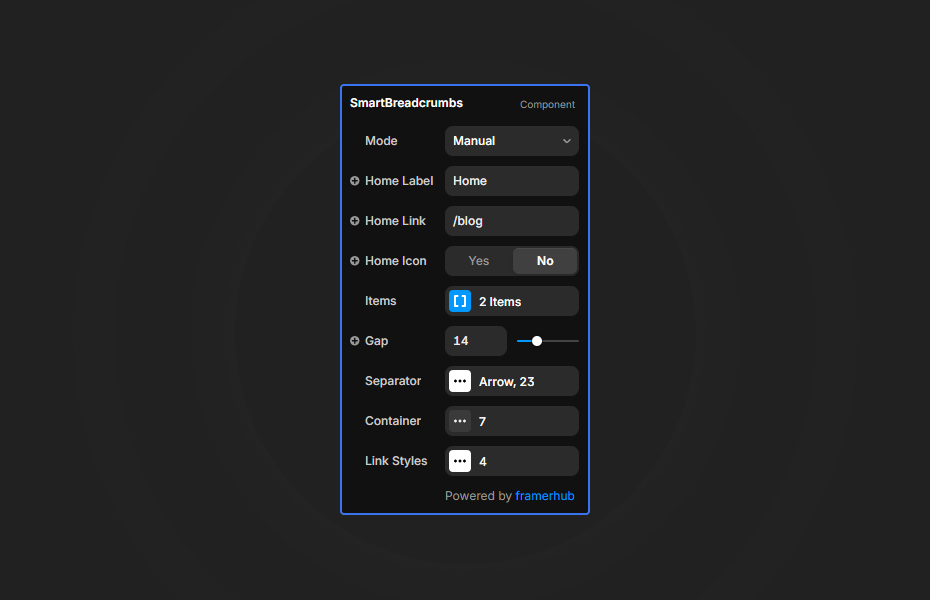
Configure the component through the properties panel:
Mode Settings
- Auto: Automatically generates breadcrumbs from URL path
- Manual: Define custom labels and links
Separator Options
- Chevron, Slash, Arrow, or Custom SVG
- Adjustable size and color
Styling
- Container: padding (per-side support), background, border, shadow
- Links: font, padding (per-side support), colors, hover/active states
Quick Tips
Canvas Preview — In Auto mode, use the "Preview Path" setting to simulate different URL paths while designing.
Custom Separators — Paste any SVG code into the Custom option for unique separator icons.
Hover States — Configure distinct hover colors to improve interactivity and user feedback.
Performance — The JSON-LD schema is only injected in Preview/Live mode, not on the canvas.
Per-Side Padding — Toggle padding controls to set individual values for top, right, bottom, and left sides.
License
Single Use License — Use in one client project with full commercial rights. No redistribution. 1 license = 1 client.
Refund Policy
Due to the nature of our digital products, we are unable to offer refunds, but we're here to assist you with any questions or concerns!
Why Designers Love This
Smart Breadcrumbs combines beautiful, customizable navigation with built-in SEO benefits. No need for separate schema plugins or manual JSON-LD coding—just drop it in and your breadcrumbs work for both users and search engines.
Smart Breadcrumbs - $9
SEO-optimized breadcrumbs with automatic schema injection and flexible styling.
You might also like
Why Choose Framer Hub Components
Loved by Framer teams
Used by Framer professionals who need premium, no-code experiences.
"The Best Framer CMS Filtering Plugin I've Found — Truly a Game-Changer. I've tested a lot of Framer CMS filtering and sorting components — both free and paid — and this is by far the best one I've come across."
"He really helped me out when I needed assistance adding it to my Framer project. Super fast customer support highly recommend!"
"We had tried a couple of other Framer CMS filter components but they were buggy, hard to use and support was slow or non-existent. FramerCMSFilter is easier to use and has a lot of added functionality."
Got questions? We've the answers
Got questions? We've the answers
Everything you need to know about FramerHub.