Shooting Stars FREE
Diagonal shooting star lines streaking across 3D space with dynamic animations.
Overview
Diagonal shooting star lines streaking across 3D space with dynamic animations.
- Diagonal shooting star lines with dynamic dash animations
- Background starfield with twinkling stars for depth
- Mouse interaction for camera orbit control
Create Stunning Cosmic Experiences
A stunning 3D animation component featuring diagonal shooting star lines that streak across space with dynamic dash animations and optional background starfield.
Features
Diagonal Shooting Stars Mesmerizing diagonal lines that streak across 3D space with customizable colors and dash animations.
Background Starfield Optional twinkling stars in the background add depth and atmosphere to your scene.
Mouse Interaction Enable camera orbit control with mouse movement for an interactive experience.
Customizable Colors Choose up to 3 vibrant colors for your shooting stars. Stars will randomly use these colors for variety.
Use Cases
Hero Sections — Perfect for space/cosmic themed hero sections and landing pages
Loading Screens — Create engaging loading experiences with dynamic star animations
Decorative Backgrounds — Add visual interest to sci-fi or tech-themed websites
Product Launches — Eye-catching visual effects that grab attention
How to Use
Installation
VIDEO PLACEHOLDER: Installation Tutorial
- Log in to your account at framerhub.io
- Navigate to framerhub.io/dashboard
- Find Shooting Stars in your Recent Purchases
- Click the "Copy" button
- Open your Framer project
- Paste the component anywhere on your canvas (Cmd/Ctrl + V)
Use the property controls to customize your shooting stars effect.
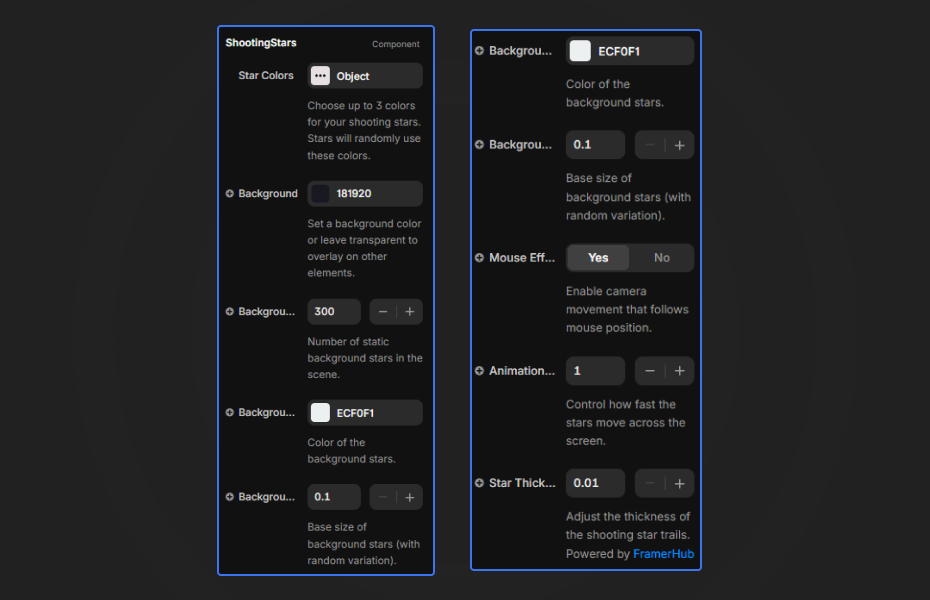
Star Colors
- Color 1, 2, 3 — Customize up to 3 colors for the shooting stars
Background
- Background Color — Set a background color for the entire canvas
- Star Count — Number of background stars (0-2000)
- Star Color — Color of the background stars
- Star Size — Size of the background stars (0.01-0.2)
Animation
- Speed — Control how fast the stars streak (0.1-5)
- Line Width — Thickness of the star trails (0.01-0.2)
Interaction
- Enable Mouse Effect — Toggle camera orbit based on mouse movement
Quick Tips
Best Contrast — Use darker background colors (black or deep blue) for better contrast with bright star colors. Try transparent backgrounds to layer over other content.
Speed & Mood — Adjust speed and line width together for different moods: slow + thin = elegant and atmospheric, fast + thick = energetic and dynamic.
Background Stars — The background starfield adds depth. Try different counts: 500-1000 for sparse elegant looks, 1500-2000 for dense cosmic atmospheres.
Mouse Interaction — Enable mouse effect for interactive hero sections and banners. Disable for cleaner, non-distracting backgrounds.
Credits
Built upon Animated Mesh Lines by Jeremboo for Codrops.
Why Designers Love This
Transform any website into a cosmic experience with stunning 3D shooting stars. Built with Three.js for smooth 60fps performance, this component adds professional-grade visual effects to your Framer projects without any code.
Need Help? Visit framerhub.io/support for documentation and video tutorials.
Shooting Stars - FREE
Diagonal shooting star lines streaking across 3D space with dynamic animations.
You might also like
Why Choose Framer Hub Components
Loved by Framer teams
Used by Framer professionals who need premium, no-code experiences.
"The Best Framer CMS Filtering Plugin I've Found — Truly a Game-Changer. I've tested a lot of Framer CMS filtering and sorting components — both free and paid — and this is by far the best one I've come across."
"He really helped me out when I needed assistance adding it to my Framer project. Super fast customer support highly recommend!"
"We had tried a couple of other Framer CMS filter components but they were buggy, hard to use and support was slow or non-existent. FramerCMSFilter is easier to use and has a lot of added functionality."
Got questions? We've the answers
Got questions? We've the answers
Everything you need to know about FramerHub.