Scroll Text Reveal
Transform headlines into captivating scroll animations with 29 ready-to-use text reveal effects.
Overview
Transform headlines into captivating scroll animations with 29 ready-to-use text reveal effects.
- 29 professionally crafted scroll text animations
- Smooth scroll-scrubbing with character-level control
- Full typography customization (font, size, weight, spacing)
- Variable font support for precise weight control
- Works with any text length or language
- Responsive and performance-optimized
- Works in any section or layout
- No coding required
Animated Text Reveals for Framer
Demo 1: Set 1
Demo 2: Set 2
Turn ordinary headlines into scroll-triggered experiences. 29 animation effects that bring text to life as visitors scroll—no code needed.
Designed for designers who want to add premium typography animations to landing pages, hero sections, and feature areas.
Features
29 Animation Effects Scale, bounce, rotate, blur, 3D flips, glitch, wave, elastic—every effect designed for maximum impact. From subtle to dramatic, choose the perfect animation for your message.
Smooth Scroll Control Animations sync perfectly with scroll position. Visitors can scrub through animations by scrolling up and down for a polished, interactive feel.
Full Typography Control Customize font family, size, weight, letter spacing, line height, and alignment. Works with Google Fonts, custom fonts, and variable fonts.
Character-Level Animation Each letter animates individually for sophisticated, staggered effects that feel premium and intentional.
Responsive Design Automatically adapts to any screen size while maintaining smooth animation performance on desktop and mobile.
Use Cases
Hero Headlines — Make your main message unforgettable with dramatic scroll reveals that command attention
Feature Sections — Introduce key features with animated text that reveals as visitors explore your page
Landing Pages — Increase engagement with interactive typography that rewards scrolling
Agency Portfolios — Showcase design expertise with sophisticated text animations that demonstrate attention to detail
Product Launches — Build anticipation with dynamic reveals that make every word feel important
How to Use
Installation
After purchasing from FramerHub:
- Log in to your account at framerhub.io
- Navigate to framerhub.io/dashboard
- Find Scroll Text Reveal in your Recent Purchases
- Click the "Copy" button
- Open your Framer project
- Paste the component anywhere on your canvas (Cmd/Ctrl + V)
Customization
Control everything from Framer's properties panel:
Text & Animation
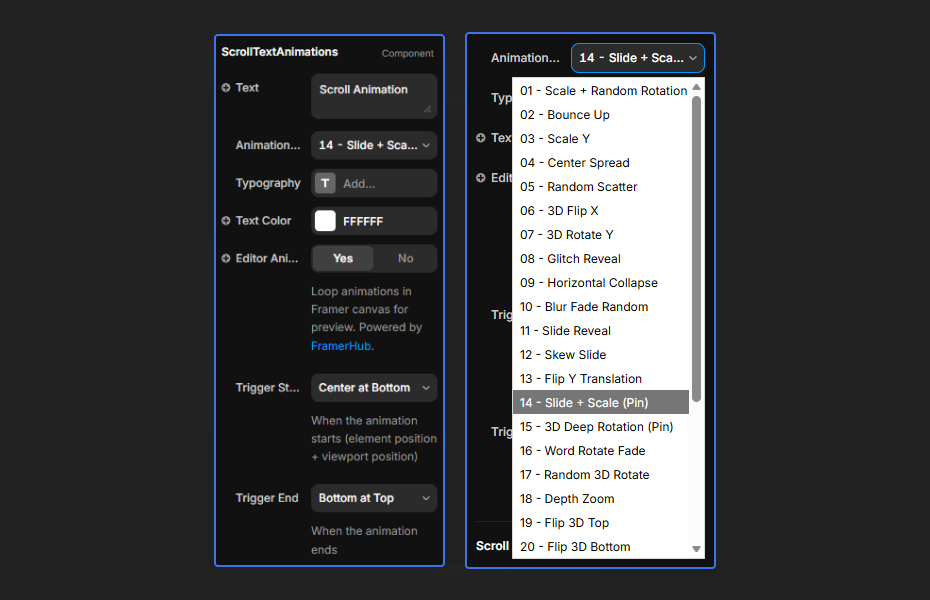
- Enter your headline or message
- Choose from 29 animation effects
- Each effect has a descriptive name (e.g., "Bounce Up", "3D Flip", "Glitch Reveal")
Typography
- Font family, size, weight
- Letter spacing, line height, text alignment
- Variable font weight control for fonts that support it
Colors
- Set text color to match your design system
Quick Tips
Best Results — Use short, impactful headlines (2-8 words) for maximum effect
Effect Selection — Preview each effect by scrolling. More dramatic effects work best for hero sections, subtle effects for body content
Color Contrast — High contrast between text and background ensures animations are visible throughout the scroll
Placement — Add vertical spacing above and below the component to give animations room to trigger properly
License
Single Use License — Use in one client project with full commercial rights. No redistribution. 1 license = 1 client.
Refund Policy
Due to the nature of our digital products, we are unable to offer refunds, but we're here to assist you with any questions or concerns!
Why Designers Love This
29 effects means endless creative possibilities. Transform ordinary text into scroll-stopping visual experiences that keep visitors engaged.
Scroll Text Reveal - $12
Transform headlines into captivating scroll animations with 29 ready-to-use text reveal effects.
You might also like
Why Choose Framer Hub Components
Loved by Framer teams
Used by Framer professionals who need premium, no-code experiences.
"The Best Framer CMS Filtering Plugin I've Found — Truly a Game-Changer. I've tested a lot of Framer CMS filtering and sorting components — both free and paid — and this is by far the best one I've come across."
"He really helped me out when I needed assistance adding it to my Framer project. Super fast customer support highly recommend!"
"We had tried a couple of other Framer CMS filter components but they were buggy, hard to use and support was slow or non-existent. FramerCMSFilter is easier to use and has a lot of added functionality."
Got questions? We've the answers
Got questions? We've the answers
Everything you need to know about FramerHub.