Scroll 3D Grid
Stunning 3D grid animations triggered by scroll
Overview
Stunning 3D grid animations triggered by scroll
- 6 unique 3D animation styles
- GSAP-powered scroll animations
- Customizable grid layout
- Responsive design
- SSR-safe implementation
Scroll 3D Grid
Create stunning 3D grid animations that respond to scroll. Choose from 6 unique animation styles, each creating a different dramatic 3D effect as users scroll through your gallery.
Features
6 Animation Styles Choose from Perspective Slide, Rotation Fade, Zoom In, Pop Out, Row Slide, and Spin Up effects.
GSAP Scroll Integration Smooth, performant animations powered by GSAP and ScrollTrigger.
Flexible Grid Layout Customize columns, spacing, and image aspect ratios to fit your design.
3D Perspective Control Adjust the 3D depth intensity for subtle or dramatic visual effects.
Use Cases
Portfolio Galleries — Showcase creative work with eye-catching scroll animations.
Product Showcases — Display product images with engaging 3D transitions.
Hero Sections — Create immersive landing page experiences.
Image Collections — Transform standard galleries into interactive experiences.
How to Use
Installation
VIDEO PLACEHOLDER: Installation Tutorial
- Log in to your account at framerhub.io
- Navigate to framerhub.io/dashboard
- Find Scroll 3D Grid in your Recent Purchases
- Click the "Copy" button
- Open your Framer project
- Paste the component anywhere on your canvas (Cmd/Ctrl + V)
Customization
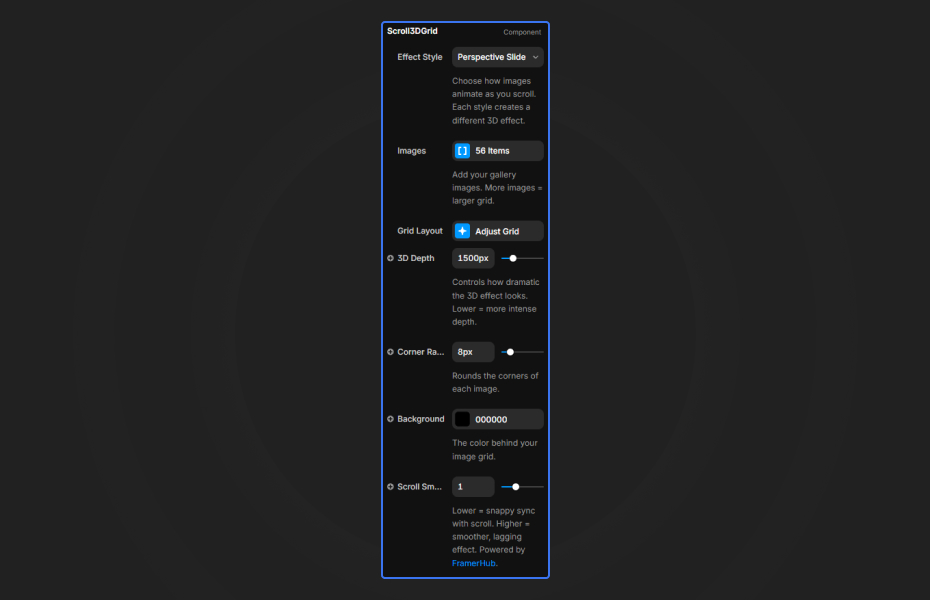
Effect Style Choose from 6 unique animation types. Each creates a different 3D transformation as users scroll.
Grid Layout
- Columns: Set the number of grid columns (1-12)
- Spacing: Adjust gap between images
- Image Ratio: Control height/width ratio (1 = square, 1.5 = portrait)
Appearance
- 3D Depth: Control perspective intensity (lower = more dramatic)
- Corner Radius: Round image corners
- Background: Set the color behind the grid
Scroll Behavior
- Scroll Smoothness: Lower = snappy, Higher = smoother lag effect
Quick Tips
For Best Performance — Use 12-24 images for optimal visual impact without performance issues.
Effect Selection — Type 1 (Perspective Slide) works great for portfolios. Type 5 (Row Slide) is perfect for horizontal emphasis.
3D Intensity — Lower perspective values (500-1000) create more dramatic depth. Higher values (2000+) are more subtle.
Grid Sizing — The component requires sufficient height to trigger scroll animations. Ensure it's placed in a scrollable container.
License
Single Use License — Use in one client project with full commercial rights. No redistribution. 1 license = 1 client.
Refund Policy
Due to the nature of our digital products, we are unable to offer refunds, but we're here to assist you with any questions or concerns!
Why Designers Love This
Transform ordinary image galleries into immersive 3D experiences. Based on the acclaimed Codrops implementation, this component brings high-end web animation to Framer with zero coding required.
Scroll 3D Grid - $19
Stunning 3D grid animations triggered by scroll
You might also like
Why Choose Framer Hub Components
Loved by Framer teams
Used by Framer professionals who need premium, no-code experiences.
"The Best Framer CMS Filtering Plugin I've Found — Truly a Game-Changer. I've tested a lot of Framer CMS filtering and sorting components — both free and paid — and this is by far the best one I've come across."
"He really helped me out when I needed assistance adding it to my Framer project. Super fast customer support highly recommend!"
"We had tried a couple of other Framer CMS filter components but they were buggy, hard to use and support was slow or non-existent. FramerCMSFilter is easier to use and has a lot of added functionality."
Got questions? We've the answers
Got questions? We've the answers
Everything you need to know about FramerHub.