Neural Grid
Connected node background simulating AI or data networks.
Overview
Connected node background simulating AI or data networks.
- Mouse-reactive floating nodes
- Procedural grid background overlay
- GPU-accelerated WebGL shader
- Customizable colors and spread
- Canvas mode optimization
Neural Grid
Visualize intelligence with Neural Grid. This shader-based background simulates a grid of connected nodes that react to mouse movement, perfect for AI startups, data platforms, or tech documentation.
Features
Interactive Nodes Nodes gently float and pulse, reacting to your mouse cursor's position to create a sense of responsiveness and intelligence.
Tech Aesthetic The combination of a structured grid and organic node movement strikes the perfect balance for modern tech branding.
Shader Performance Running entirely on the GPU via WebGL, this effect is buttery smooth even on large screens. Includes canvas mode optimization for the Framer editor.
Full Customization Control node colors, grid opacity, animation speed, and spread distance to match your brand.
Use Cases
AI & Machine Learning — Perfect background for AI startups, data science platforms, and ML documentation.
Tech Dashboards — Add depth to analytics dashboards and data visualization interfaces.
Cybersecurity — Create a sense of digital networks and connected systems.
SaaS Landing Pages — Modern tech aesthetic for software product pages.
How to Use
Installation
VIDEO PLACEHOLDER: Installation Tutorial
- Log in to your account at framerhub.io
- Navigate to framerhub.io/dashboard
- Find Neural Grid in your Recent Purchases
- Click the "Copy" button
- Open your Framer project
- Paste the component anywhere on your canvas (Cmd/Ctrl + V)
Customization
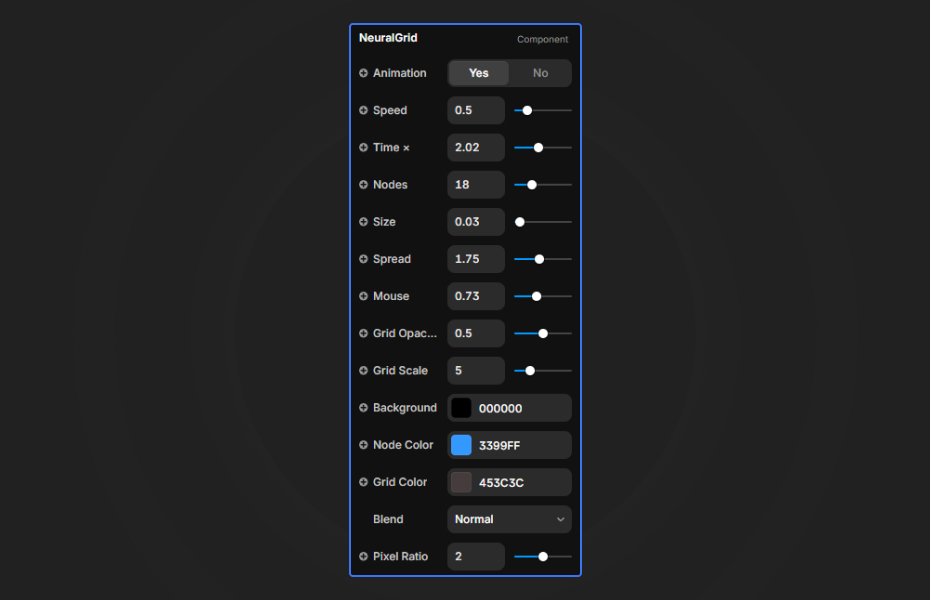
Animation Toggle the animation on or off (default: Yes).
Speed Control animation speed of the floating nodes (0-3, default: 0.5).
Time Multiplier Adjust the time scale for the simulation (0-5, default: 2.02).
Nodes Number of nodes in the simulation (1-64, default: 18).
Size Size of the nodes (0.01-1, default: 0.03).
Spread How far nodes drift from their center position (0.1-4, default: 1.75).
Mouse Influence Strength of the mouse attraction effect (0-2, default: 0.73).
Grid Opacity Visibility of the background grid lines (0-1, default: 0.5).
Grid Scale Scale of the background grid (0.5-20, default: 5).
Colors Customize the Background, Node Color, and Grid Color.
Blend Mode Choose between Normal and Additive blending.
Pixel Ratio Adjust rendering resolution (1-3, default: 2).
Quick Tips
Best Colors — Bright blues and cyans work well for tech aesthetics. Use contrasting grid colors.
Dark Backgrounds — The glow effect shows best on dark backgrounds.
Spread Settings — Lower spread (0.5-1.0) for tight clusters, higher (2.0+) for scattered nodes.
Performance — GPU-accelerated shader ensures smooth 60fps animation.
License
Single Use License — Use in one client project with full commercial rights. No redistribution. 1 license = 1 client.
Refund Policy
Due to the nature of our digital products, we are unable to offer refunds, but we're here to assist you with any questions or concerns!
Why Designers Love This
Neural Grid instantly communicates "cutting-edge technology" with its flowing nodes and structured grid. The WebGL shader ensures smooth performance while the mouse interaction adds a layer of engagement that static backgrounds can't match. Perfect for any project that needs a modern, intelligent aesthetic.
Neural Grid - $5
Connected node background simulating AI or data networks.
You might also like
Why Choose Framer Hub Components
Loved by Framer teams
Used by Framer professionals who need premium, no-code experiences.
"The Best Framer CMS Filtering Plugin I've Found — Truly a Game-Changer. I've tested a lot of Framer CMS filtering and sorting components — both free and paid — and this is by far the best one I've come across."
"He really helped me out when I needed assistance adding it to my Framer project. Super fast customer support highly recommend!"
"We had tried a couple of other Framer CMS filter components but they were buggy, hard to use and support was slow or non-existent. FramerCMSFilter is easier to use and has a lot of added functionality."
Got questions? We've the answers
Got questions? We've the answers
Everything you need to know about FramerHub.