Liquid Chrome
A mesmerizing, interactive liquid chrome shader with multiple render modes.
Overview
A mesmerizing, interactive liquid chrome shader with multiple render modes.
- Interactive Fluid Simulation
- 3 Unique Render Modes
- Custom Color Palettes
Making Your Site Fluid
Add a touch of mesmerizing interactivity to your Framer projects with Liquid Chrome. This component brings a high-end, shader-based fluid simulation that reacts to user mouse movement, creating a deeply engaging visual experience.
Features
Interactive Fluid Simulation The surface reacts to mouse movements, creating ripples, swirls, and distortions that feel natural and responsive.
3 Unique Render Modes Choose between Classic Chrome, Fire Colormap, or a Hybrid mode to perfectly match your brand's aesthetic.
Custom Color Palettes Fully customizable base and highlight colors allow you to integrate the effect seamlessly into any design system.
Use Cases
Hero Backgrounds — Create an unforgettable first impression with a full-screen liquid background.
Interactive Cards — Use as a background for cards or sections to draw attention to key content.
Brand Visuals — precise control over colors and complexity makes it perfect for abstract brand motion graphics.
How to Use
Installation
VIDEO PLACEHOLDER: Installation Tutorial
- Log in to your account at framerhub.io
- Navigate to framerhub.io/dashboard
- Find Liquid Chrome in your Recent Purchases
- Click the "Copy" button
- Open your Framer project
- Paste the component anywhere on your canvas (Cmd/Ctrl + V)
Customization
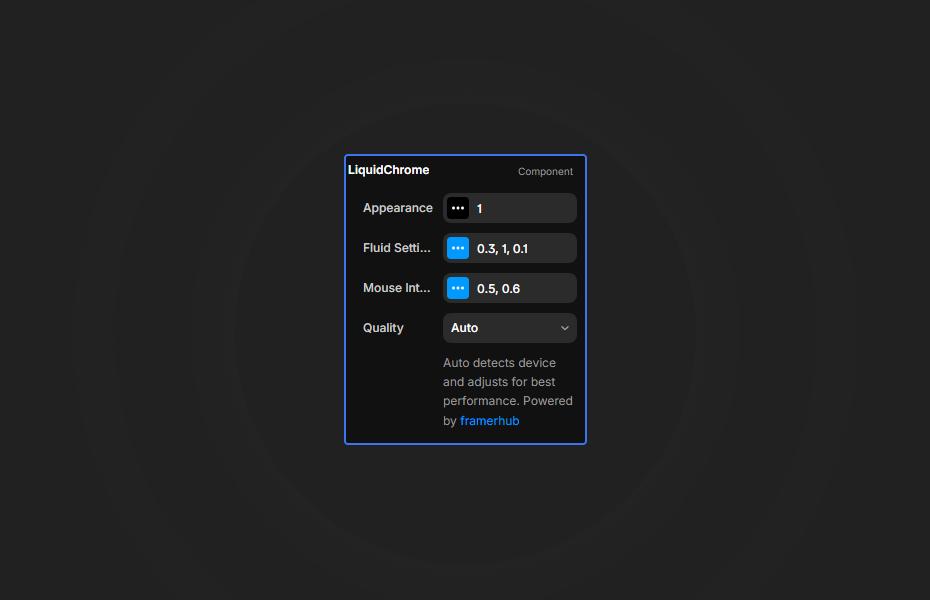
Customize the look and feel through the property controls right in Framer.
Appearance
- Render Mode: Switch between Chrome, Fire, and Hybrid.
- Base & Highlight Colors: Define the core look of your fluid.
- Color Shift: Adjust the iridescent oil-slick intensity.
Fluid Settings
- Flow Speed: Control how fast the detailed noise moves.
- Distortion Scale: Zoom in or out of the fluid pattern.
- Complexity: Adjust the detail level of the simulation.
Mouse Interaction
- Effect Intensity: How strongly the mouse affects the fluid.
- Effect Radius: The size of the interaction area.
Quick Tips
Best Performance — Keep the complexity moderate on mobile devices to ensure 60fps performance.
Layering — Place text or other content on top of the liquid layer with good contrast for a striking effect.
Subtle Motion — Use lower speed settings for a calm, premium feel, or crank it up for high-energy visuals.
License
Single Use License — Use in one client project with full commercial rights. No redistribution. 1 license = 1 client.
Refund Policy
Due to the nature of our digital products, we are unable to offer refunds, but we're here to assist you with any questions or concerns!
Why Designers Love This
Liquid Chrome offers that "awwwards" look with zero coding required. It's performant, beautiful, and endlessly customizable, giving you the power of WebGL shaders in a simple drag-and-drop package.
Liquid Chrome - $9
A mesmerizing, interactive liquid chrome shader with multiple render modes.
You might also like
Why Choose Framer Hub Components
Loved by Framer teams
Used by Framer professionals who need premium, no-code experiences.
"The Best Framer CMS Filtering Plugin I've Found — Truly a Game-Changer. I've tested a lot of Framer CMS filtering and sorting components — both free and paid — and this is by far the best one I've come across."
"He really helped me out when I needed assistance adding it to my Framer project. Super fast customer support highly recommend!"
"We had tried a couple of other Framer CMS filter components but they were buggy, hard to use and support was slow or non-existent. FramerCMSFilter is easier to use and has a lot of added functionality."
Got questions? We've the answers
Got questions? We've the answers
Everything you need to know about FramerHub.