Lens Zoom Gallery
Add a professional magnifying lens effect to showcase product details and image galleries.
Overview
Add a professional magnifying lens effect to showcase product details and image galleries.
- Smooth magnifying lens that follows mouse movement
- Adjustable lens size and zoom level
- Optional high-resolution image for crisp zoom details
- Works with any image format or size
- Zero performance impact with canvas rendering
- Responsive and mobile-friendly
- No coding required
Lens Zoom Gallery
A sophisticated image viewer that adds a magnifying glass effect to your images, perfect for product showcases or detailed photography.
Features
Magnifying Lens Hover over the image to reveal a magnifying lens that zooms into the details.
High-Res Support Seamlessly switch to a higher resolution image within the lens for crystal clear zooming without loading heavy assets for the main view.
Customizable Design Adjust the lens size, shape (circle/square), borders, and shadows to match your brand.
Smooth Experience Enable smooth movement for a premium, weighted feel as the lens follows the cursor.
Flexible Sizing Control how your image fits within the container (Cover, Fit/Contain, or Stretch), ensuring varied aspect ratios work perfectly.
Use Cases
Product Details Allow customers to inspect product textures and details closely.
Photography Portfolios Showcase high-resolution photos without compromising initial page load impact.
How to Use
Installation
- Copy the component from the marketplace.
- Paste it into your Framer project.
Customization
Image Settings
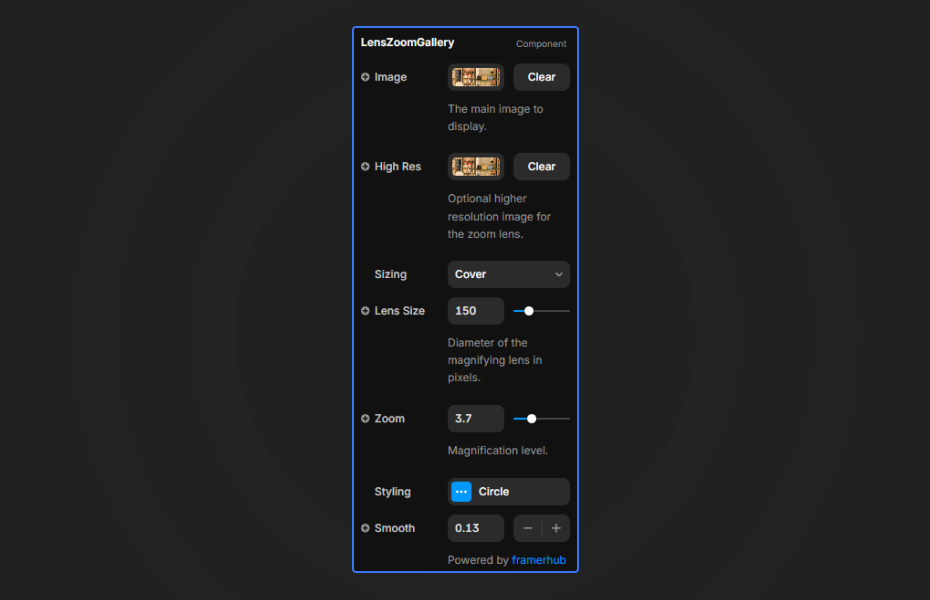
- Image: Set the main display image.
- High Res: Upload a higher resolution version specifically for the zoomed view (optional).
- Sizing: Choose between Cover, Fit, or Stretch.
Lens Settings
- Lens Size: Control how large the magnifying glass appears (50px - 500px).
- Zoom: Set the magnification level (1.1x - 10x).
- Shape: Choose between Circle or Square lens.
- Smoothness: Add physics lag for a premium feel.
- Styling: Customize borders, shadows, and glass reflection effects.
License
Single Use License — Use in one client project with full commercial rights. No redistribution. 1 license = 1 client.
Refund Policy
Due to the nature of our digital products, we are unable to offer refunds, but we're here to assist you with any questions or concerns!
Lens Zoom Gallery - $9
Add a professional magnifying lens effect to showcase product details and image galleries.
You might also like
Why Choose Framer Hub Components
Loved by Framer teams
Used by Framer professionals who need premium, no-code experiences.
"The Best Framer CMS Filtering Plugin I've Found — Truly a Game-Changer. I've tested a lot of Framer CMS filtering and sorting components — both free and paid — and this is by far the best one I've come across."
"He really helped me out when I needed assistance adding it to my Framer project. Super fast customer support highly recommend!"
"We had tried a couple of other Framer CMS filter components but they were buggy, hard to use and support was slow or non-existent. FramerCMSFilter is easier to use and has a lot of added functionality."
Got questions? We've the answers
Got questions? We've the answers
Everything you need to know about FramerHub.