Kinetic ASCII
Transform shapes and images into mesmerizing dot-matrix ASCII art with real-time 3D animation.
Overview
Transform shapes and images into mesmerizing dot-matrix ASCII art with real-time 3D animation.
- Animated 3D Torus Knot shape
- Custom image to ASCII conversion
- Transparent background support
- True Color mode for original colors
- Retro CRT scanline overlay
- Real-time dot-matrix rendering
Kinetic ASCII — Dynamic Dot-Matrix Visual Effects
Transform any 3D shape or image into stunning dot-matrix ASCII art with real-time animation. Built with Three.js for smooth, GPU-accelerated rendering, this component creates a unique retro-futuristic aesthetic that's perfect for creative portfolios, landing pages, and experimental web projects.
Features
3D Torus Knot Animation A beautifully animated 3D Torus Knot shape that rotates continuously, rendered entirely as ASCII dots. The shape is lit with multiple directional lights for depth and dimension.
Image to ASCII Conversion Upload any image and watch it transform into a dot-matrix representation. Perfect for hero backgrounds or artistic image treatments.
Transparent Background Full transparency support allows the ASCII effect to layer seamlessly over any content, enabling creative compositions and overlays.
True Color Mode Enable True Color to preserve the original colors from your source image or 3D shape, creating a colorful ASCII interpretation rather than monochrome.
CRT Scanline Effect Add authentic retro vibes with an optional scanline overlay that mimics vintage CRT monitors.
Use Cases
Creative Portfolios — Stand out with a unique visual effect that showcases technical creativity and artistic vision.
Hero Sections — Create eye-catching landing page headers with animated ASCII art that draws attention.
Tech & Gaming Sites — Perfect for projects with a retro, cyberpunk, or hacker aesthetic.
Art Installations — Use as a digital art piece or interactive installation element.
Music & Entertainment — Add dynamic visual interest to artist pages, album promotions, or event sites.
How to Use
Installation
VIDEO PLACEHOLDER: Installation Tutorial
- Log in to your account at framerhub.io
- Navigate to framerhub.io/dashboard
- Find Kinetic ASCII in your Recent Purchases
- Click the "Copy" button
- Open your Framer project
- Paste the component anywhere on your canvas (Cmd/Ctrl + V)
Customization
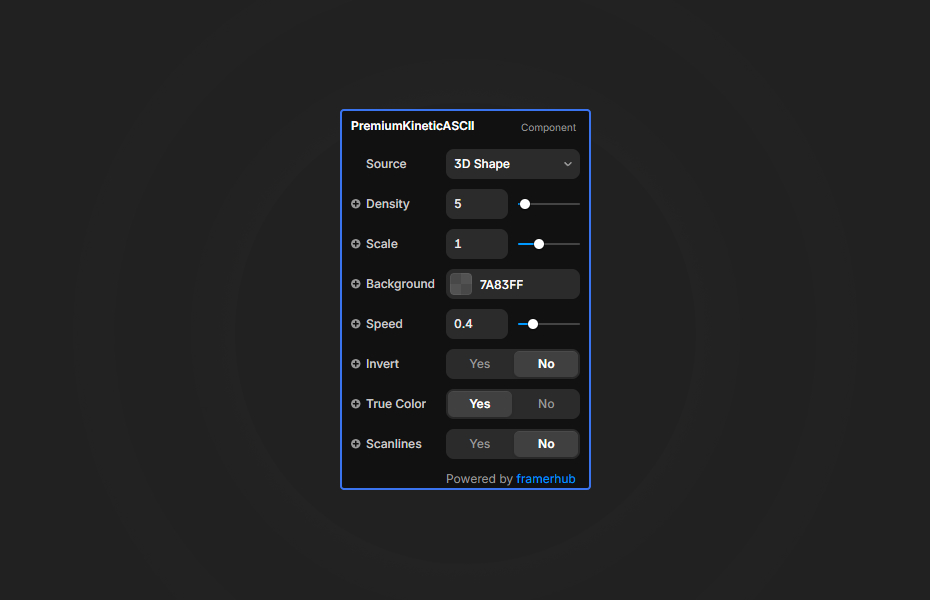
Configure the component through the Properties panel:
Source Selection
- 3D Shape: Animated Torus Knot (default)
- Image: Upload your own image
Visual Controls
- Density: Adjust dot size (4 = large dots, 32 = fine detail)
- Scale: Resize the content (0.1 - 3.0, default 1.0)
- Color: Set the ASCII dot color (hidden when True Color is on)
- Background: Set background color or keep transparent
- Invert: Flip the brightness mapping
Animation Controls
- Speed: Control rotation speed (0 = static, 2 = fast)
Effects
- True Color: Use source colors instead of single color
- Scanlines: Toggle retro CRT effect (Default: No)
Quick Tips
Best Performance — Higher density values (smaller dots) render faster. Start with 10-12 for a good balance of detail and performance.
Scale it Up — Use the Scale property to perfectly fit the 3D shape or image within your frame without resizing the component itself.
Transparent Layering — Set Background to transparent and layer the component over images or gradients for creative compositions.
True Color Magic — Enable True Color when using colorful source images to create vibrant ASCII interpretations.
Scanline Subtlety — The scanline effect is intentionally subtle. It works best on larger component sizes.
Mobile Considerations — Reduce density to 16-24 on mobile for smoother performance.
License
Single Use License — Use in one client project with full commercial rights. No redistribution. 1 license = 1 client.
Refund Policy
Due to the nature of our digital products, we are unable to offer refunds, but we're here to assist you with any questions or concerns!
Why Designers Love This
Kinetic ASCII bridges the gap between retro aesthetics and modern web technology. With just a few clicks, you can add a unique, animated visual element that's impossible to replicate with static images or CSS. The transparent background support and True Color mode give you complete creative freedom to integrate this effect into any design. Whether you're building a portfolio, landing page, or artistic project, Kinetic ASCII delivers that "wow" factor that makes visitors stop and look twice.
Kinetic ASCII - $9
Transform shapes and images into mesmerizing dot-matrix ASCII art with real-time 3D animation.
You might also like
Why Choose Framer Hub Components
Loved by Framer teams
Used by Framer professionals who need premium, no-code experiences.
"The Best Framer CMS Filtering Plugin I've Found — Truly a Game-Changer. I've tested a lot of Framer CMS filtering and sorting components — both free and paid — and this is by far the best one I've come across."
"He really helped me out when I needed assistance adding it to my Framer project. Super fast customer support highly recommend!"
"We had tried a couple of other Framer CMS filter components but they were buggy, hard to use and support was slow or non-existent. FramerCMSFilter is easier to use and has a lot of added functionality."
Got questions? We've the answers
Got questions? We've the answers
Everything you need to know about FramerHub.