Fluid Noise FREE
Organic fluid noise textures with customizable colors, animation modes, and effects.
Overview
Organic fluid noise textures with customizable colors, animation modes, and effects.
- Procedural Simplex noise with FBM
- 4 animation modes (Continuous, Wave, Pulse, Spiral)
- 4 direction options (Horizontal, Vertical, Diagonal, Radial)
- 3 color gradient controls
- Effects panel (contrast, brightness, saturation)
- Performance optimized for Framer canvas
Fluid Noise
Add organic, animated textures to your site with Fluid Noise. This component uses WebGL shaders to generate smooth, flowing noise patterns with extensive customization options for colors, animation, and visual effects.
Features
Rich Color Control Define three gradient colors and choose from smooth, hard, or gradient blending modes for unique visual styles.
Multiple Animation Modes Choose from Continuous flow, rhythmic Wave/Pulse effects, or hypnotic Spiral patterns. Control direction and speed independently.
Visual Effects Fine-tune your visuals with contrast, brightness, and saturation controls. Adjust noise complexity, turbulence, and FBM octaves for endless variations.
Performance Optimized Runs entirely on the GPU via custom shaders. Auto-optimizes on Framer canvas with reduced pixel ratio and low-power mode.
Use Cases
Hero Backgrounds — Create eye-catching animated backgrounds that draw attention without distracting from content.
Section Dividers — Use as subtle animated separators between content sections.
Loading States — Perfect for mesmerizing loading or transition screens.
Artistic Effects — Combine with overlays for unique artistic website themes.
How to Use
Installation
- Log in to your account at framerhub.io
- Navigate to framerhub.io/dashboard
- Find Fluid Noise in your Recent Purchases
- Click the "Copy" button
- Open your Framer project
- Paste the component anywhere on your canvas (Cmd/Ctrl + V)
Customization
Colors
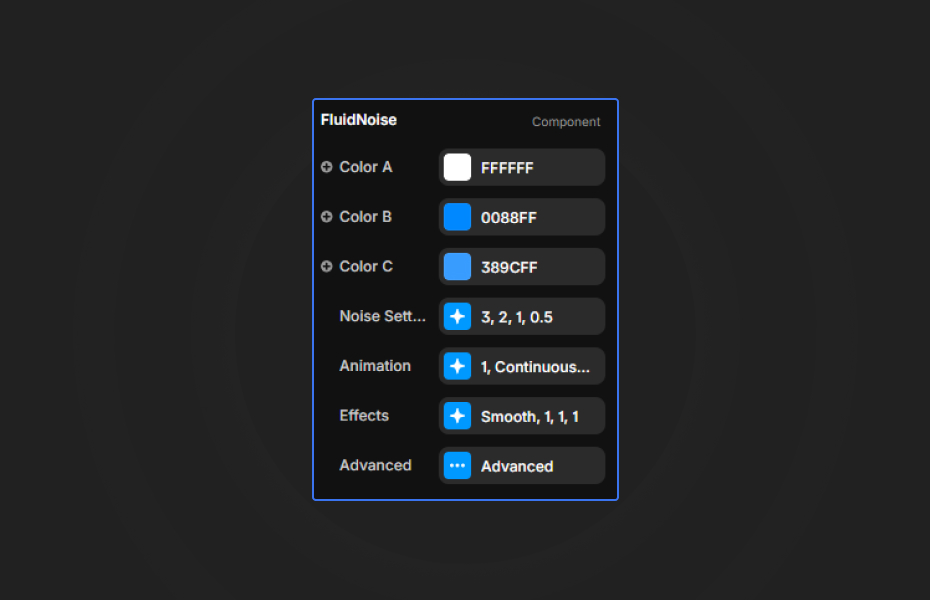
- Color A, B, C: Set your three-color gradient palette
- Color Blend: Choose blending style (Smooth for gradual transitions, Hard for distinct bands, Gradient for mixed)
Noise Settings
- Scale: Larger values = smaller patterns
- Complexity: Higher values = more intricate details
- Distortion: Controls warping intensity
- Turbulence: Adds chaotic movement
Animation
- Speed: 0.5–1.5 for subtle, 2.0+ for energetic
- Mode: Continuous (default), Wave (pulsating), Pulse (rhythmic), Spiral (hypnotic)
- Direction: Control flow direction
Effects
- Contrast/Brightness/Saturation: Fine-tune the final look
Quick Tips
Best Performance — Use 2-4 Octaves for smooth animation on most devices. Lower on mobile for optimal performance.
Color Combinations — Complementary colors (opposite on color wheel) create vibrant effects. Analogous colors (adjacent) feel more harmonious.
Layering — Place content above with white text and subtle shadows for best readability.
Speed Settings — Start with speed 1.0. Slower (0.5–0.8) feels relaxing, faster (2.0+) adds energy.
License
Single Use License — Use in one client project with full commercial rights. No redistribution. 1 license = 1 client.
Refund Policy
Due to the nature of our digital products, we are unable to offer refunds, but we're here to assist you with any questions or concerns!
Why Designers Love This
Fluid Noise brings life to static designs with organic, never-repeating motion. With extensive controls for colors, animation modes, and effects, you can create unique backgrounds that perfectly match your brand—all with zero coding required.
Fluid Noise - FREE
Organic fluid noise textures with customizable colors, animation modes, and effects.
You might also like
Why Choose Framer Hub Components
Loved by Framer teams
Used by Framer professionals who need premium, no-code experiences.
"The Best Framer CMS Filtering Plugin I've Found — Truly a Game-Changer. I've tested a lot of Framer CMS filtering and sorting components — both free and paid — and this is by far the best one I've come across."
"He really helped me out when I needed assistance adding it to my Framer project. Super fast customer support highly recommend!"
"We had tried a couple of other Framer CMS filter components but they were buggy, hard to use and support was slow or non-existent. FramerCMSFilter is easier to use and has a lot of added functionality."
Got questions? We've the answers
Got questions? We've the answers
Everything you need to know about FramerHub.