Fluid Distortion
Add mesmerizing fluid distortion effects that react to mouse movement for interactive image displays.
Overview
Add mesmerizing fluid distortion effects that react to mouse movement for interactive image displays.
- Smooth fluid distortion that follows cursor movement
- Works with any image (includes default demo image)
- Adjustable distortion strength and sensitivity
- Smooth mouse tracking with adjustable smoothness
- Image Fit options (Cover, Contain, Fill)
- Performance-optimized rendering
- Responsive and works on all screen sizes
- No coding required
Interactive Fluid Effects for Images and Backgrounds
Add liquid-like distortion effects that respond to mouse movement in real-time. Perfect for hero sections, image galleries, and interactive showcases where you want to create an immersive, tactile experience.
Designed for designers who want to add premium interactive effects that feel organic and alive.
Features
Mouse-Reactive Distortion Fluid ripples follow your cursor naturally with smooth interpolation, creating depth and movement that responds to every interaction.
Smooth Cursor Tracking Adjustable smoothness lets you control how fluidly the effect follows the cursor — from responsive tracking to elegant trailing effects.
Image Fit Options Choose how your image fills the container: Cover (fills and crops), Contain (fits entirely), or Fill (stretches to fit).
Full Visual Control Adjust distortion strength, mouse sensitivity, smoothness, dissipation speed—all from Framer's properties panel.
Performance First Smooth rendering that maintains 60fps while creating complex fluid simulations. Works seamlessly across devices.
Use Cases
Hero Sections — Create memorable first impressions with interactive backgrounds that respond to visitor movement
Portfolio Showcases — Add fluid distortion to photography or artwork for a premium, gallery-quality presentation
Product Pages — Showcase products with interactive effects that communicate innovation and attention to detail
Agency Websites — Demonstrate creative technical excellence with effects that feel expensive and custom-built
Landing Pages — Increase engagement with interactive elements that encourage exploration and cursor movement
How to Use
Installation
After purchasing from FramerHub:
- Log in to your account at framerhub.io
- Navigate to framerhub.io/dashboard
- Find Fluid Distortion in your Recent Purchases
- Click the "Copy" button
- Open your Framer project
- Paste the component anywhere on your canvas (Cmd/Ctrl + V)
Customization
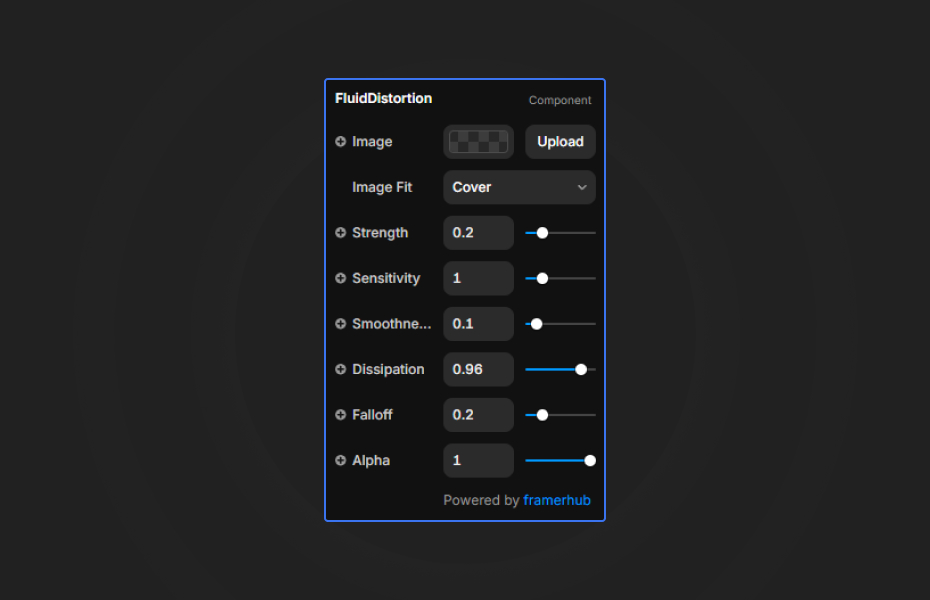
Everything you need is in Framer's properties panel:
Image Settings
- Image: Upload any image (uses demo portrait if empty)
- Image Fit: Cover, Contain, or Fill
Distortion Settings
- Strength: Intensity of the fluid effect (0-1)
- Sensitivity: How strongly mouse movement affects distortion (0.1-5)
- Smoothness: How fluidly the effect follows the cursor (0.01-1)
- Dissipation: How fast the distortion fades (0.8-0.99)
- Falloff: Softness of distortion edges (0-1)
- Alpha: Overall opacity of the effect (0-1)
Quick Tips
Best Results — Start with Strength at 0.2 and Sensitivity at 1.0, then adjust to taste
Smooth Effect — Lower Smoothness values (0.03-0.08) create elegant trailing effects; higher values (0.3+) make it more responsive
With Images — Use high-contrast images for more visible distortion. The effect works beautifully with portraits and product shots
Subtle vs Dramatic — Lower Strength (0.1-0.2) for elegant refinement, higher (0.4-0.6) for bold interactive statements
Performance — Higher Dissipation values (0.95+) create longer-lasting trails but may impact performance on older devices
License
Single Use License — Use in one client project with full commercial rights. No redistribution. 1 license = 1 client.
Refund Policy
Due to the nature of our digital products, we are unable to offer refunds, but we're here to assist you with any questions or concerns!
Why Designers Love This
Drop it in, upload an image, adjust a few sliders—done. The fluid effect runs automatically with smooth cursor tracking and no setup complexity. Perfect for creating those "wow" moments that make client presentations memorable.
Ideal for agencies delivering high-end interactive work and freelancers who want to add premium effects without the premium development time.
Fluid Distortion - $9
Add mesmerizing fluid distortion effects that react to mouse movement for interactive image displays.
You might also like
Why Choose Framer Hub Components
Loved by Framer teams
Used by Framer professionals who need premium, no-code experiences.
"The Best Framer CMS Filtering Plugin I've Found — Truly a Game-Changer. I've tested a lot of Framer CMS filtering and sorting components — both free and paid — and this is by far the best one I've come across."
"He really helped me out when I needed assistance adding it to my Framer project. Super fast customer support highly recommend!"
"We had tried a couple of other Framer CMS filter components but they were buggy, hard to use and support was slow or non-existent. FramerCMSFilter is easier to use and has a lot of added functionality."
Got questions? We've the answers
Got questions? We've the answers
Everything you need to know about FramerHub.