Emerging Image
Stunning scroll-based image reveal animations powered by WebGL.
Overview
Stunning scroll-based image reveal animations powered by WebGL.
- 5 unique WebGL reveal effects
- Scroll-triggered animations
- Customizable duration and easing
- Responsive image support with fit modes
- Performance optimized with context management
Reveal Your Images with Stunning WebGL Animations
Transform ordinary images into captivating visual experiences with EmergingImage. This powerful component uses WebGL shaders to create eye-catching reveal effects that trigger as users scroll, perfect for hero sections, portfolios, and product showcases.
Features
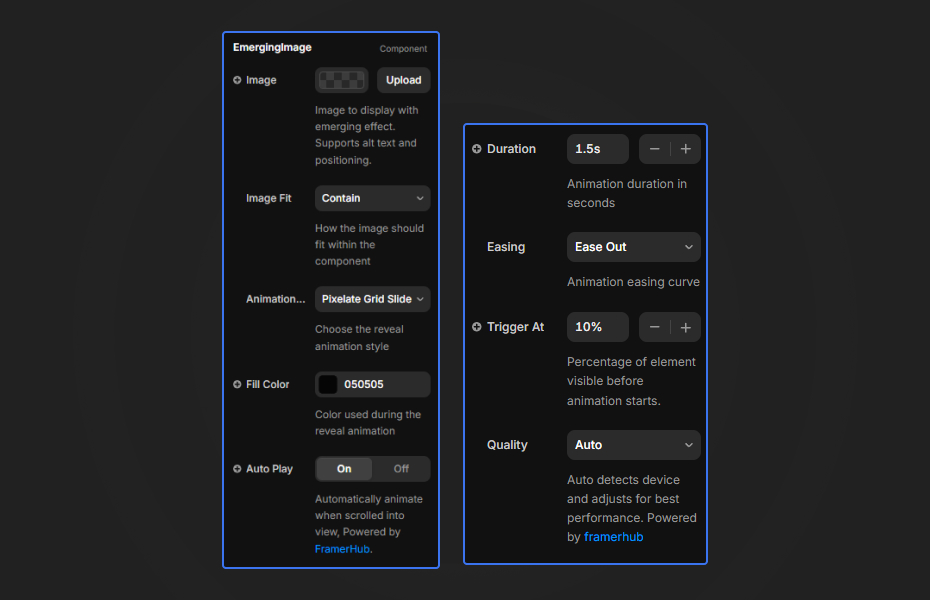
5 Animation Types Choose from Pixelate Grid Slide, Noise Curtain, Dissolve Pattern, Wave Curtain, or Simple Pixelate—each offering a distinct visual style.
Scroll-Triggered Animations Automatically animates when the element scrolls into view with configurable trigger threshold.
Full Image Control Supports all CSS object-fit modes (cover, contain, fill, none, scale-down), alt text, and srcSet for responsive images.
Performance Optimized Built-in WebGL context management, adaptive frame skipping, and performance monitoring for smooth animations.
Use Cases
Hero Sections — Create memorable first impressions with animated image reveals.
Portfolio Galleries — Showcase work with elegant scroll-based transitions.
Product Images — Add visual interest to e-commerce product displays.
Landing Pages — Capture attention with dynamic visual effects.
How to Use
Installation
VIDEO PLACEHOLDER: Installation Tutorial
- Log in to your account at framerhub.io
- Navigate to framerhub.io/dashboard
- Find Emerging Image in your Recent Purchases
- Click the "Copy" button
- Open your Framer project
- Paste the component anywhere on your canvas (Cmd/Ctrl + V)
Customization
Image Settings
- Select an image using the ResponsiveImage picker
- Choose how the image fits within the container (Cover, Contain, Fill, None, Scale-down)
Animation Settings
- Pick from 5 unique animation styles
- Customize duration (0.3s - 5s)
- Choose from 6 easing options
- Set trigger threshold for scroll activation
Appearance
- Set fill color for reveal transition
- Toggle transparent background
- Select quality preset (Auto, Performance, Balanced, Quality)
Quick Tips
Best Performance — Use optimized images (< 2MB). The component automatically manages WebGL contexts to prevent memory issues.
Animation Selection — "Pixelate Grid Slide" works great for tech themes, while "Wave Curtain" suits organic/creative brands.
Fill Color — Match the fill color to your background for seamless reveal transitions.
Trigger Threshold — Lower values (0-20%) trigger earlier as the element enters view. Higher values (80-100%) wait until mostly visible.
License
Single Use License — Use in one client project with full commercial rights. No redistribution. 1 license = 1 client.
Refund Policy
Due to the nature of our digital products, we are unable to offer refunds, but we're here to assist you with any questions or concerns!
Why Designers Love This
EmergingImage brings cinematic-quality reveal effects to Framer without any coding. The WebGL-powered animations run smoothly across devices, and the intuitive controls make customization effortless. Perfect for designers who want premium visual impact with minimal effort.
Emerging Image - $12
Stunning scroll-based image reveal animations powered by WebGL.
You might also like
Why Choose Framer Hub Components
Loved by Framer teams
Used by Framer professionals who need premium, no-code experiences.
"The Best Framer CMS Filtering Plugin I've Found — Truly a Game-Changer. I've tested a lot of Framer CMS filtering and sorting components — both free and paid — and this is by far the best one I've come across."
"He really helped me out when I needed assistance adding it to my Framer project. Super fast customer support highly recommend!"
"We had tried a couple of other Framer CMS filter components but they were buggy, hard to use and support was slow or non-existent. FramerCMSFilter is easier to use and has a lot of added functionality."
Got questions? We've the answers
Got questions? We've the answers
Everything you need to know about FramerHub.