Dot Globe
Interactive particle globe with Dots, Matrix, and ASCII rendering styles.
Overview
Interactive particle globe with Dots, Matrix, and ASCII rendering styles.
- 3 Rendering Styles (Dots, Matrix, ASCII)
- 3 Shapes (Sphere, Cube, Plane)
- Transparent background for layering
- Interactive mouse repulsion and tilt
- Advanced effects (Scanline, Wave, Glitch, Halo)
- Rainbow color animation mode
Interactive Particle Globe
A highly versatile 3D particle component that can render a globe, cube, or plane using various artistic styles. From a classic dot-matrix earth to a cyberpunk ASCII cube, Dot Globe is a powerhouse of visual effects with a transparent background for seamless integration.
Features
Multiple Styles Switch between Dots for a clean look, Matrix for digital rain vibes, or ASCII for a retro-terminal aesthetic.
Transparent Background The background is fully transparent, allowing you to layer the globe over any content, images, or gradients.
Interactive The object rotates automatically but responds to mouse movement with tilt and particle repulsion effects, making it fun to play with.
Rich Effects Layer on additional visual flair with built-in Scanlines, Wave pulses, Glitch distortion, and Halo glows.
Use Cases
Hero Sections — Create stunning landing pages with an interactive globe as the centerpiece.
Tech Websites — Perfect for AI, crypto, or SaaS sites with the Matrix or ASCII style.
Portfolio — Add visual interest with subtle animation that responds to user interaction.
Data Visualization — Represent global data or network connections with the sphere shape.
How to Use
Installation
VIDEO PLACEHOLDER: Installation Tutorial
- Log in to your account at framerhub.io
- Navigate to framerhub.io/dashboard
- Find Dot Globe in your Recent Purchases
- Click the "Copy" button
- Open your Framer project
- Paste the component anywhere on your canvas (Cmd/Ctrl + V)
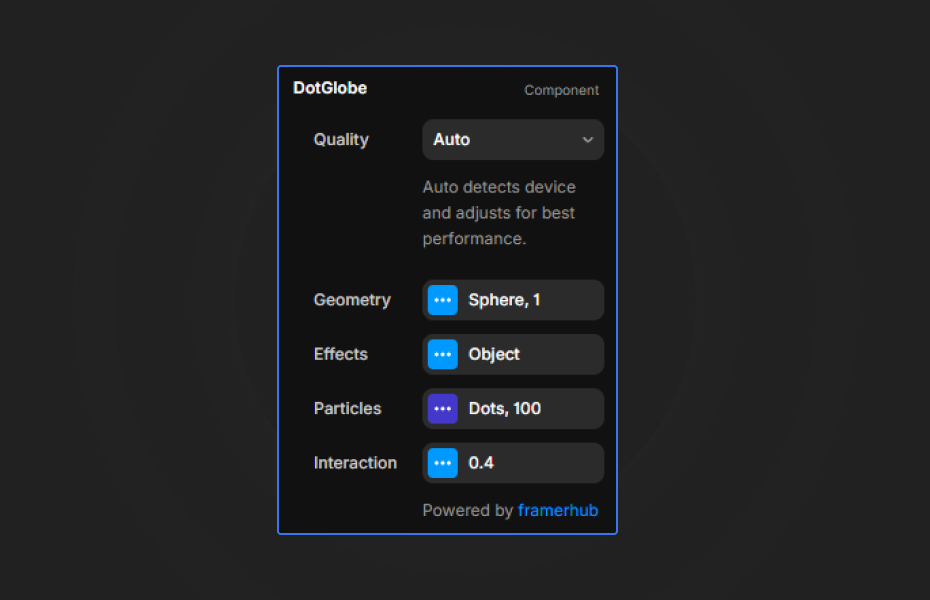
Customization
Geometry Settings
- Shape: Choose between Sphere, Cube, or Plane
- Scale: Adjust the size of the object
Particle Settings
- Style: Dots, Matrix, or ASCII rendering
- Density: Control the number of particles
- Color: Set the particle color
- Rainbow Mode: Enable animated rainbow colors
Effects
- Scanline: Horizontal scanning effect
- Wave Pulse: Circular wave animation
- Glitch: Digital distortion effect
- Halo: Atmospheric glow around the object
Interaction
- Auto Rotation: Enable continuous rotation
- Mouse Effect: Tilt and particle repulsion on mouse movement
Quick Tips
Best Performance — Use density between 40-80 for smooth animation on most devices. Reduce to 30-40 on mobile.
Style Combinations — Matrix style looks great with green color and scanline effect. ASCII pairs well with amber/orange colors.
Layering — Since the background is transparent, place your own gradient or image behind the component for custom backgrounds.
Halo Glow — Works best with the Sphere shape for an atmospheric Earth effect.
License
Single Use License — Use in one client project with full commercial rights. No redistribution. 1 license = 1 client.
Refund Policy
Due to the nature of our digital products, we are unable to offer refunds, but we're here to assist you with any questions or concerns!
Why Designers Love This
Dot Globe transforms any hero section into an interactive experience. The combination of multiple styles, shapes, and effects gives you endless creative possibilities, while the transparent background makes it easy to integrate into any design system.
Dot Globe - $14
Interactive particle globe with Dots, Matrix, and ASCII rendering styles.
You might also like
Why Choose Framer Hub Components
Loved by Framer teams
Used by Framer professionals who need premium, no-code experiences.
"The Best Framer CMS Filtering Plugin I've Found — Truly a Game-Changer. I've tested a lot of Framer CMS filtering and sorting components — both free and paid — and this is by far the best one I've come across."
"He really helped me out when I needed assistance adding it to my Framer project. Super fast customer support highly recommend!"
"We had tried a couple of other Framer CMS filter components but they were buggy, hard to use and support was slow or non-existent. FramerCMSFilter is easier to use and has a lot of added functionality."
Got questions? We've the answers
Got questions? We've the answers
Everything you need to know about FramerHub.