Dither Shader FREE
A high-performance, interactive dithering effect with retro-style pixelated aesthetics.
Overview
A high-performance, interactive dithering effect with retro-style pixelated aesthetics.
- Dynamic dithering with customizable shapes
- Interactive ripple effects on click
- Gradient and glow post-processing
- Smart performance auto-scaling
Dither Shader
A high-performance, interactive dithering effect component for Framer. This component creates a retro-style pixelated aesthetic with dynamic patterns, shapes, and interactive ripple effects.
Features
Dynamic Dithering Customizable pixel size, pattern density, and noise amount for the perfect retro look.
Shape Variants Choose between Square, Circle, Triangle, and Diamond patterns.
Interactive Ripples Reacts to clicks/taps with customizable ripple animations.
Gradient Support Optional dual-color vertical gradient (bottom to top).
Glow Effect Integrated post-processing glow for a stunning neon look.
Performance Optimized Auto-scaling resolution and offscreen pausing maintain high FPS on all devices.
Use Cases
Hero Backgrounds — Create striking, interactive hero sections with retro vibes.
Portfolio Sites — Add a creative, artistic touch to design portfolios.
Landing Pages — Engage visitors with dynamic, responsive backgrounds.
Music & Art Sites — Perfect for creative industries needing bold aesthetics.
How to Use
Installation
- Log in to your account at framerhub.io
- Navigate to framerhub.io/dashboard
- Find Dither Shader in your Recent Purchases
- Click the "Copy" button
- Open your Framer project
- Paste the component anywhere on your canvas (Cmd/Ctrl + V)
Customization
Appearance Section
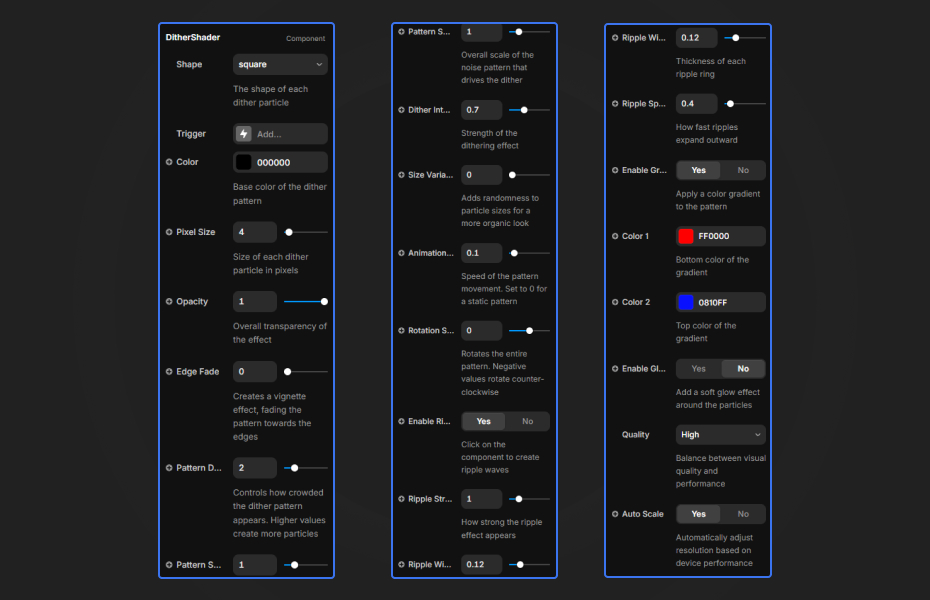
- Shape: Square, Circle, Triangle, Diamond
- Color: Primary pattern color
- Pixel Size: Larger = blockier retro look
- Opacity: Overall transparency
- Edge Fade: Vignette effect
Pattern Section
- Pattern Density: How "full" the pattern looks
- Pattern Scale: Underlying noise texture scale
- Dither Intensity: Amount of noise/dithering
- Size Variation: Random size variation
Animation Section
- Animation Speed: Pattern evolution speed
- Rotation Speed: Pattern rotation
- Color Pulse: Enable pulsating color animation
- Pulse Speed: Color pulse animation speed
- Pulse Intensity: Strength of pulse effect
Ripples Section
- Enable Ripples: Toggle click/tap ripples
- Ripple Strength: Distortion intensity
- Ripple Width: Wave thickness
- Ripple Speed: Expansion speed
Gradient Section
- Enable Gradient: Switch to 2-color gradient
- Color 1: Bottom color of the gradient
- Color 2: Top color of the gradient
Glow Section
- Enable Glow: Add bloom/glow effect
- Glow Strength: Intensity
- Glow Size: Blur radius
Performance Section
- Performance Mode: High / Balanced / Low
- Auto Scale: Dynamic resolution adjustment
- Pause Offscreen: Save battery when hidden
- Target FPS: Framerate target (default: 60)
Quick Tips
Best Performance — Use "Balanced" mode for most devices. Switch to "Low" on mobile for optimal performance.
Retro Look — Increase Pixel Size (8-16) and use muted colors for authentic retro aesthetics.
Interactive Elements — Enable Ripples and place over clickable areas for engaging user feedback.
Canvas Editing — The component auto-detects Framer Canvas and uses high quality mode so you always see accurate previews.
License
Single Use License — Use in one client project with full commercial rights. No redistribution. 1 license = 1 client.
Refund Policy
Due to the nature of our digital products, we are unable to offer refunds, but we're here to assist you with any questions or concerns!
Why Designers Love This
Dither Shader brings retro computing aesthetics to modern web design with zero performance compromises. The interactive ripples and smart optimization make it perfect for both eye-catching hero sections and subtle background effects.
Dither Shader - FREE
A high-performance, interactive dithering effect with retro-style pixelated aesthetics.
You might also like
Why Choose Framer Hub Components
Loved by Framer teams
Used by Framer professionals who need premium, no-code experiences.
"The Best Framer CMS Filtering Plugin I've Found — Truly a Game-Changer. I've tested a lot of Framer CMS filtering and sorting components — both free and paid — and this is by far the best one I've come across."
"He really helped me out when I needed assistance adding it to my Framer project. Super fast customer support highly recommend!"
"We had tried a couple of other Framer CMS filter components but they were buggy, hard to use and support was slow or non-existent. FramerCMSFilter is easier to use and has a lot of added functionality."
Got questions? We've the answers
Got questions? We've the answers
Everything you need to know about FramerHub.