Cyberpunk City FREE
Immersive WebGL cyberpunk cityscape with neon-lit buildings flying through space.
Overview
Immersive WebGL cyberpunk cityscape with neon-lit buildings flying through space.
- Real-time WebGL shader animation
- Customizable neon colors and fog
- Adjustable building scale and height variation
- Smooth continuous animation loop
- Performance optimized
Immersive Cyberpunk Experience
Transform your Framer projects with this stunning WebGL-powered cyberpunk cityscape. Watch as infinite neon-lit buildings fly through space, creating a mesmerizing sci-fi atmosphere perfect for landing pages, hero sections, or background animations.
Features
Real-time WebGL Rendering Powered by Three.js and custom shaders for smooth, high-performance 3D animation that runs seamlessly in the browser.
Fully Customizable Colors Control fog color, dual neon colors, and color mixing to match your brand or create unique cyberpunk aesthetics.
Dynamic Building Generation Adjust building scale and height variation to create different cityscape densities and architectural styles.
Performance Optimized Efficient shader-based rendering with automatic pixel ratio management ensures smooth animation across all devices.
Seamless Animation Loop Continuous, smooth animation with no jarring restarts or jumps—perfect for background elements.
Use Cases
Hero Sections — Create an eye-catching animated background for landing pages and hero sections that immediately capture attention.
Tech & Gaming Sites — Perfect for technology, gaming, or sci-fi themed websites that need a futuristic aesthetic.
Loading Screens — Use as an engaging loading animation or transition element in your web applications.
Event Pages — Ideal for virtual events, hackathons, or tech conferences that want a cutting-edge visual presence.
How to Use
Installation
VIDEO PLACEHOLDER: Installation Tutorial
- Log in to your account at framerhub.io
- Navigate to framerhub.io/dashboard
- Find Cyberpunk City in your Recent Purchases
- Click the "Copy" button
- Open your Framer project
- Paste the component anywhere on your canvas (Cmd/Ctrl + V)
Customization
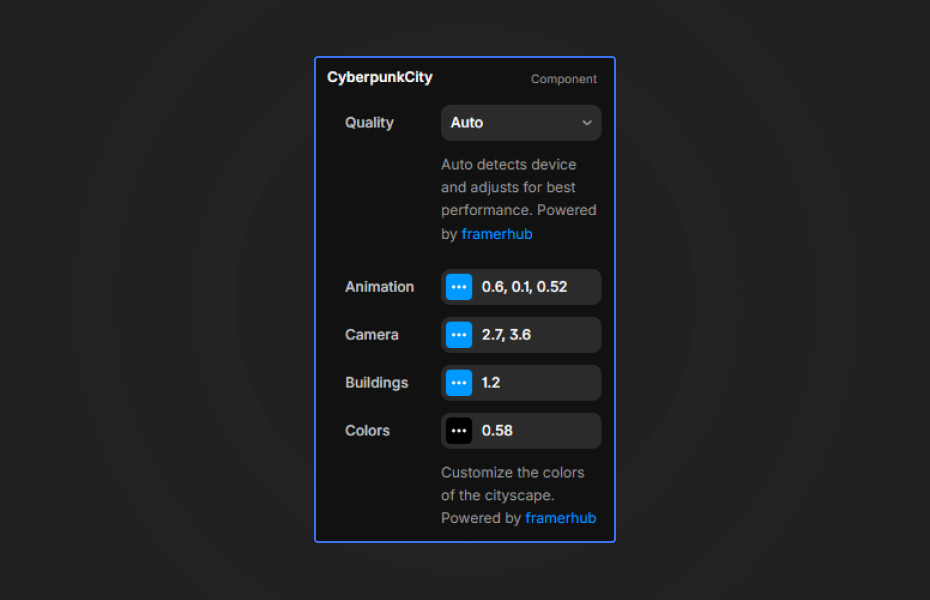
The component provides three main control groups for easy customization:
Animation
- Speed — Control the animation speed (0-2x). Lower values create a slow, dreamy flythrough while higher values add energy and dynamism.
- Height Variation — Adjust how much building heights vary (0-1). Lower values create uniform buildings, higher values create dramatic skyscrapers.
Buildings
- Scale — Change the overall size of buildings (0.5-2x). Larger scale creates massive structures, smaller scale creates distant cityscape.
Colors
- Fog Color — Set the background fog/space color. Black creates deep space, while colors create atmospheric effects.
- Neon A — First neon color (default: hot pink). This is the primary building light color.
- Neon B — Second neon color (default: cyan). Creates color variety across buildings.
- Neon Mix — Blend between Neon A and Neon B (0-1). Animate this value for color-shifting effects.
- Background — Set the background color (supports transparency).
- Transparent — One-click toggle to make the background completely transparent.
Quality
- Quality — Choose between Auto (recommended), Performance, Balanced, or Quality modes to optimize for your use case and target devices.
Quick Tips
Performance — The component automatically adjusts pixel ratio for optimal performance. It renders at full quality but caps at 2x pixel ratio.
Canvas vs Preview — The component shows a static frame in Framer's canvas mode and animates smoothly in preview/live mode.
Responsive Design — Automatically adapts to any container size. Use it as a full-screen background or contained element.
Color Combinations — Try classic cyberpunk (pink + cyan), matrix (two greens), or synthwave (purple + orange) color schemes.
Background Transparency — Toggle "Transparent" to remove the background color, allowing you to layer the city over videos, images, or gradients.
Auto Quality — "Auto" mode automatically detects device performance to ensure smooth playback on all devices. You can also force "Performance" or "Quality" modes.
Technical Details
- Built with Three.js — Industry-standard WebGL library
- Custom GLSL Shaders — Hand-crafted fragment and vertex shaders for optimal performance
- Ray Marching Technique — Advanced 3D rendering using signed distance fields
- SSR Safe — Properly handles server-side rendering for Framer sites
- Memory Efficient — Proper cleanup prevents memory leaks
License
Single Use License — Use in one client project with full commercial rights. No redistribution. 1 license = 1 client.
Refund Policy
Due to the nature of our digital products, we are unable to offer refunds, but we're here to assist you with any questions or concerns!
Why Designers Love This
Stop settling for flat, static backgrounds. Cyberpunk City brings professional-grade 3D animation to your Framer projects without writing a single line of code. Whether you're building a tech startup landing page, a gaming portfolio, or a futuristic brand experience, this component delivers instant sci-fi atmosphere that keeps visitors engaged.
The intuitive controls mean you can customize every aspect—from the neon glow colors to the building density—while the optimized WebGL rendering ensures butter-smooth performance on all devices.
Need Help? Visit framerhub.io/support for documentation and video tutorials.
Cyberpunk City - FREE
Immersive WebGL cyberpunk cityscape with neon-lit buildings flying through space.
You might also like
Why Choose Framer Hub Components
Loved by Framer teams
Used by Framer professionals who need premium, no-code experiences.
"The Best Framer CMS Filtering Plugin I've Found — Truly a Game-Changer. I've tested a lot of Framer CMS filtering and sorting components — both free and paid — and this is by far the best one I've come across."
"He really helped me out when I needed assistance adding it to my Framer project. Super fast customer support highly recommend!"
"We had tried a couple of other Framer CMS filter components but they were buggy, hard to use and support was slow or non-existent. FramerCMSFilter is easier to use and has a lot of added functionality."
Got questions? We've the answers
Got questions? We've the answers
Everything you need to know about FramerHub.