Counter Number
Animated number counter with custom formatting and easing.
Overview
Animated number counter with custom formatting and easing.
- Smooth counting animation
- Custom prefixes, suffixes, separators
- Auto-start or scroll trigger
- Responsive sizing
Counter Number
An animated counter component perfect for displaying statistics, milestones, or pricing. It smoothly counts up from a start value to your target with customizable duration and easing.
Features
Precise Formatting Handle currency, percentages, and large numbers easily. Add custom prefixes (e.g., "$"), suffixes (e.g., "M+"), and control decimal places and thousands separators.
Animation Control Choose linear or eased animations, control duration, and toggle auto-start.
Responsive Typography Fully customizable font styles that adapt to your layout.
Use Cases
Statistics Dashboard — Display growing user metrics or revenue numbers that catch the eye.
Milestones — Showcase company achievements or project stats on landing pages.
How to Use
Installation
VIDEO PLACEHOLDER: Installation Tutorial
- Log in to your account at framerhub.io
- Navigate to framerhub.io/dashboard
- Find Counter Number in your Recent Purchases
- Click the "Copy" button
- Open your Framer project
- Paste the component anywhere on your canvas (Cmd/Ctrl + V)
Customization
Counter Settings
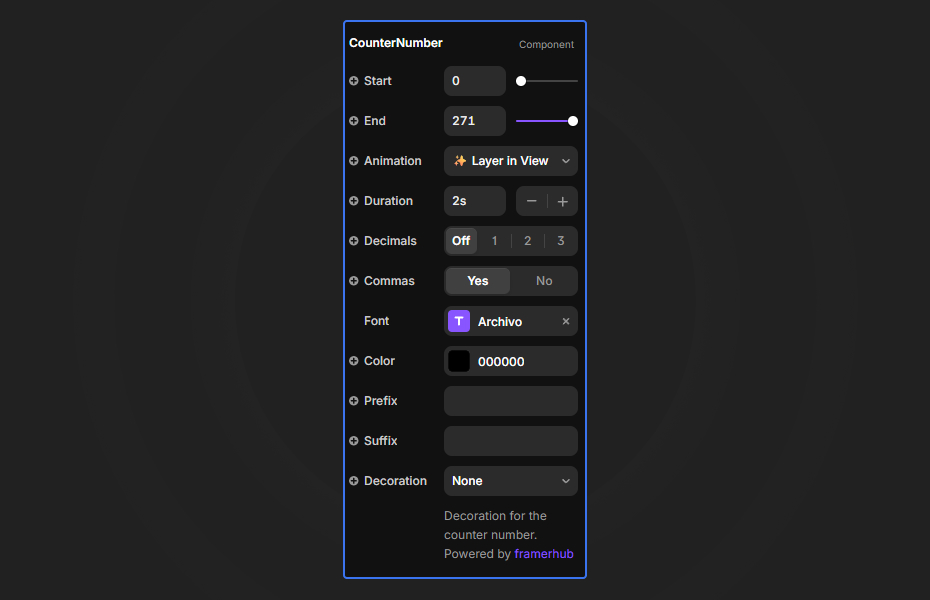
- Start: The initial number you want to start counting from.
- End: The final target number to display.
- Animation: Choose when the animation triggers—either when the layer is in view (✨ Layer in View) or immediately when it appears (⚡ On Appear).
- Duration: How many seconds the animation should last (0.1s to 10s).
Formatting & Style
- Decimals: Quickly select 0-3 decimal places using the preset toggle.
- Commas: Enable or disable the thousands separator.
- Color: Set the exact color for your numbers and text.
- Prefix / Suffix: Add symbols like "$" or text like "kg" or "+".
- Decoration: Add an underline or strikethrough for specialized styles.
Quick Tips
Best Performance — Uncheck "Auto Start" and use "View Trigger" to only animate when the user scrolls the component into view. This saves resources when the component is off-screen.
Visual Hierarchy — Use a large font size and bold weight to make key metrics stand out against your page content.
Contextual Data — Use the Prefix and Suffix fields to give context to your numbers without needing extra text layers.
License
Single Use License — Use in one client project with full commercial rights. No redistribution. 1 license = 1 client.
Refund Policy
Due to the nature of our digital products, we are unable to offer refunds, but we're here to assist you with any questions or concerns!
Why Designers Love This
It's a simple yet essential element for any data-driven design, adding life and movement to static numbers with minimal setup.
Counter Number - $14
Animated number counter with custom formatting and easing.
You might also like
Why Choose Framer Hub Components
Loved by Framer teams
Used by Framer professionals who need premium, no-code experiences.
"The Best Framer CMS Filtering Plugin I've Found — Truly a Game-Changer. I've tested a lot of Framer CMS filtering and sorting components — both free and paid — and this is by far the best one I've come across."
"He really helped me out when I needed assistance adding it to my Framer project. Super fast customer support highly recommend!"
"We had tried a couple of other Framer CMS filter components but they were buggy, hard to use and support was slow or non-existent. FramerCMSFilter is easier to use and has a lot of added functionality."
Got questions? We've the answers
Got questions? We've the answers
Everything you need to know about FramerHub.