Coalesce FREE
Abstract geometric particles spiraling into a cohesive form.
Overview
Abstract geometric particles spiraling into a cohesive form.
- Rotated square particles
- Spiral motion toward center
- Dual blur compositing
- Fully customizable colors and speed
- Transparent background support
Coalesce
Create a hypnotic visual center with Coalesce. This effect features thousands of geometric particles spiraling inward, creating a sense of depth and focus that draws the user's eye to the center of your screen.
Features
Geometric Spirals Particles aren't just dots—they are rotated squares that leave trails, creating a unique structure to the chaos.
Focus Inducing The inward motion naturally guides viewer attention to the center, making it perfect for framing key messages or logos.
Rich Compositing Uses multiple blur layers and additive blending to create a glowing, ethereal look that feels organic and high-tech.
Use Cases
Hero Backgrounds — Create a mesmerizing focal point that draws attention.
Landing Pages — Guide users visually toward your call-to-action.
Loading States — Keep users engaged with hypnotic particle animation.
Product Showcases — Frame your product with dynamic energy.
How to Use
Installation
VIDEO PLACEHOLDER: Installation Tutorial
- Log in to your account at framerhub.io
- Navigate to framerhub.io/dashboard
- Find Coalesce in your Recent Purchases
- Click the "Copy" button
- Open your Framer project
- Paste the component anywhere on your canvas (Cmd/Ctrl + V)
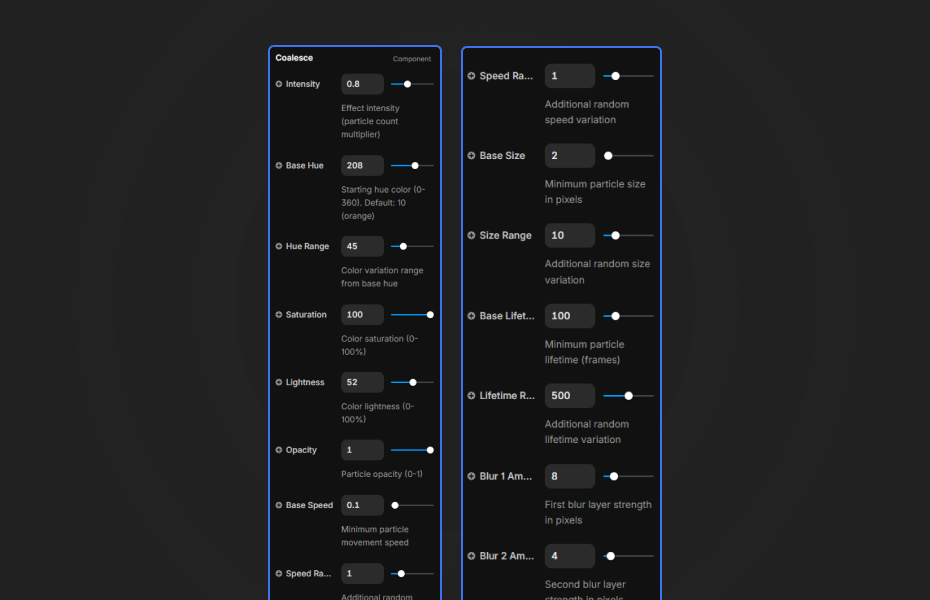
Customization
Customize the appearance and behavior using Framer's property controls.
Color Settings
- Base Hue: Starting hue color (0-360)
- Hue Range: Color variation from base
- Saturation: Color intensity (0-100%)
- Lightness: Color brightness (0-100%)
Particle Settings
- Intensity: Particle count multiplier
- Base Size / Size Range: Particle dimensions
- Base Speed / Speed Range: Movement speed
Effects
- Blur 1 & 2 Amount: Dual glow layer strengths
- Opacity: Overall transparency
Quick Tips
Best Performance — Keep intensity at 1 or below for smooth animation.
Color Combinations — Orange/red hues (10-30) with wide range create fire-like effect. Blue hues (200-240) feel more cosmic.
Layering — Place content above the component. Center your logo or CTA for maximum impact.
Blur Settings — Higher blur creates softer glow, lower blur creates sharper particles.
License
Free Component — Use freely in personal and commercial projects.
Refund Policy
Due to the nature of our digital products, we are unable to offer refunds, but we're here to assist you with any questions or concerns!
Credits
Ambient Canvas Backgrounds by Sean Free for Codrops.
Coalesce - FREE
Abstract geometric particles spiraling into a cohesive form.
You might also like
Why Choose Framer Hub Components
Loved by Framer teams
Used by Framer professionals who need premium, no-code experiences.
"The Best Framer CMS Filtering Plugin I've Found — Truly a Game-Changer. I've tested a lot of Framer CMS filtering and sorting components — both free and paid — and this is by far the best one I've come across."
"He really helped me out when I needed assistance adding it to my Framer project. Super fast customer support highly recommend!"
"We had tried a couple of other Framer CMS filter components but they were buggy, hard to use and support was slow or non-existent. FramerCMSFilter is easier to use and has a lot of added functionality."
Got questions? We've the answers
Got questions? We've the answers
Everything you need to know about FramerHub.