Chromatic Aberration
Apply customizable chromatic aberration effects to any content.
Overview
Apply customizable chromatic aberration effects to any content.
- Animated RGB channel separation
- Customizable offset and duration
- Full font customization with extended controls
- Independent channel color control
Chromatic Aberration Text Effect
Transform your text into a stunning visual experience with the Chromatic Aberration component. This effect splits text into separate RGB color channels that animate independently, creating that iconic glitch-style look popular in modern web design.
Features
Animated RGB Channels Watch as the red, green, and blue color channels shift and separate in a smooth, continuous animation. The effect creates depth and visual interest that draws the eye.
Customizable Animation Control the offset distance (how far channels separate) and duration (animation speed) to achieve exactly the look you want—from subtle shifts to dramatic separations.
Full Typography Control Use extended font controls to customize every aspect of your text: family, size, weight, alignment, line height, letter spacing, and more.
Custom Channel Colors Go beyond traditional RGB. Customize each of the three color channels to match your brand or create unique color combinations.
Use Cases
Hero Headlines — Create impactful landing page headlines that immediately grab attention.
Gaming & Tech Sites — Perfect for esports, gaming, and technology websites looking for that edgy, digital aesthetic.
Event Promotions — Add excitement to music festival, concert, or tech conference promotions.
Creative Portfolios — Stand out with eye-catching typography that showcases your design sensibility.
How to Use
Installation
- Copy the component URL
- Open your Framer project
- Paste the component anywhere on your canvas (Cmd/Ctrl + V)
Customization
Content Settings
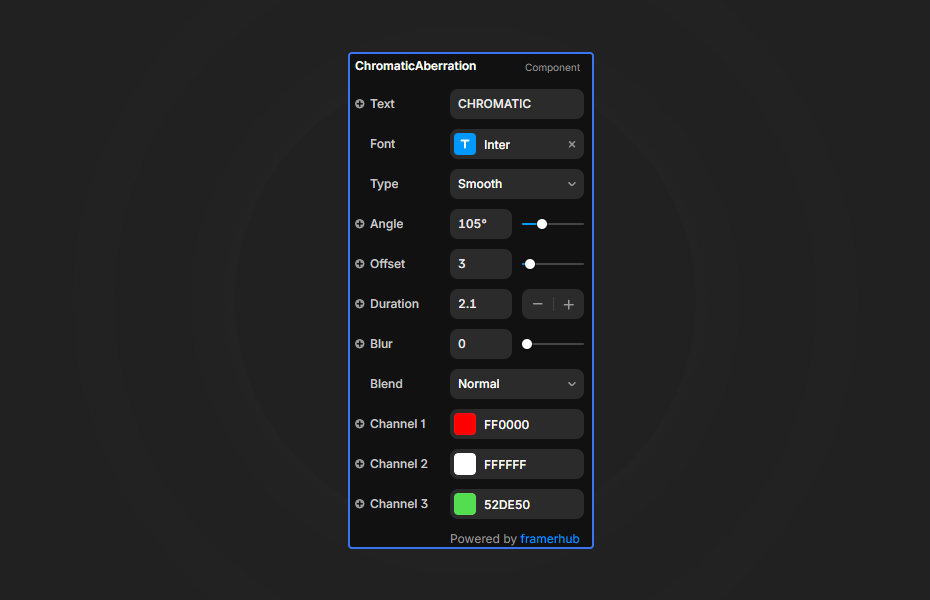
- Text: Enter your headline or text content
- Font: Full typography controls including family, size, weight, and alignment
Animation Settings
- Offset: Control how far the RGB channels separate (0-50px)
- Duration: Set the animation cycle speed (0.1-10 seconds)
Color Settings
- Channel 1: First color layer (default: red)
- Channel 2: Center color layer (default: green)
- Channel 3: Third color layer (default: blue)
Quick Tips
Best Performance — Keep offset values between 2-10 for smooth, readable text. Higher values create more dramatic but harder-to-read effects.
Color Harmony — While RGB is classic, try complementary colors or your brand palette for unique results.
Background Matters — Dark backgrounds make the screen blend mode pop. Light backgrounds may require adjusting colors.
Static Preview — The canvas shows a static offset preview. Use Preview mode to see the full animation.
License
Single Use License — Use in one client project with full commercial rights. No redistribution. 1 license = 1 client.
Refund Policy
Due to the nature of our digital products, we are unable to offer refunds, but we're here to assist you with any questions or concerns!
Why Designers Love This
The Chromatic Aberration effect instantly adds a premium, modern feel to any project. It's the perfect way to make headlines stand out without complex animation setups—just drop it in, customize, and go.
Chromatic Aberration - $9
Apply customizable chromatic aberration effects to any content.
You might also like
Why Choose Framer Hub Components
Loved by Framer teams
Used by Framer professionals who need premium, no-code experiences.
"The Best Framer CMS Filtering Plugin I've Found — Truly a Game-Changer. I've tested a lot of Framer CMS filtering and sorting components — both free and paid — and this is by far the best one I've come across."
"He really helped me out when I needed assistance adding it to my Framer project. Super fast customer support highly recommend!"
"We had tried a couple of other Framer CMS filter components but they were buggy, hard to use and support was slow or non-existent. FramerCMSFilter is easier to use and has a lot of added functionality."
Got questions? We've the answers
Got questions? We've the answers
Everything you need to know about FramerHub.