Chroma Flux
Mesmerizing 3D twisted torus shader effect with interactive hover controls and color customization.
Overview
Mesmerizing 3D twisted torus shader effect with interactive hover controls and color customization.
- Interactive hover mode with smooth mouse tracking
- Auto-spin mode with customizable rotation speed
- Full color control (background and base tones)
- Adjustable twist, radius, thickness, and scale
- Customizable glow, bloom, and saturation
- Optional wobble animation effect
- Performance-optimized WebGL rendering
- Works in any section or layout
- Zero coding required
Stunning 3D Torus Shader for Framer
Transform your Framer projects with ChromaFlux – a mesmerizing twisted torus shader that responds to mouse movement with smooth, fluid animations. Perfect for hero sections, loading screens, and creative backgrounds.
Features
Interactive Hover Mode The torus follows your cursor with buttery-smooth inertia, creating an engaging and responsive experience that captivates visitors.
Auto-Spin Animation Enable continuous rotation with customizable speed for a hypnotic, hands-free animation that works perfectly for background elements.
Fully Customizable Geometry Fine-tune every aspect of the torus shape – from twist intensity and radius to thickness and scale – to match your design vision.
Rich Visual Effects Apply glow, bloom, saturation adjustments, and hue shifting to create vibrant, eye-catching color schemes that pop.
Always Transparent The component renders with a transparent background, making it easy to layer over any content or background.
Use Cases
Hero Sections — Create an unforgettable first impression with an interactive 3D element that responds to visitor movement.
Loading States — Transform boring loading screens into mesmerizing visual experiences.
Background Elements — Add depth and movement to any page with a subtle, animated background.
Creative Portfolios — Showcase your design skills with a modern, interactive component.
How to Use
Installation
VIDEO PLACEHOLDER: Installation Tutorial
- Log in to your account at framerhub.io
- Navigate to framerhub.io/dashboard
- Find ChromaFlux in your Recent Purchases
- Click the "Copy" button
- Open your Framer project
- Paste the component anywhere on your canvas (Cmd/Ctrl + V)
Customization
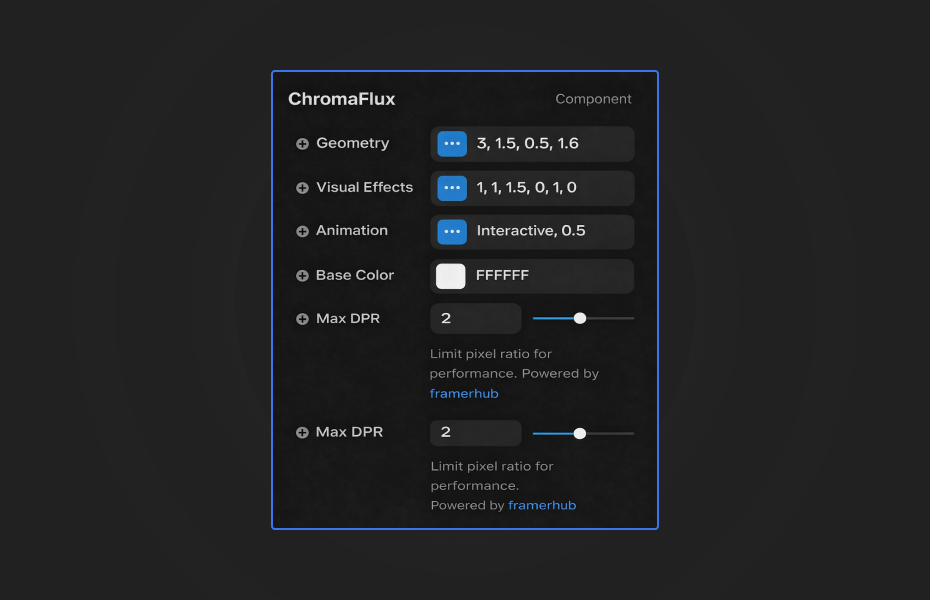
ChromaFlux offers extensive customization through organized property groups:
Geometry
- Twist: Control the spiral intensity (0-10)
- Radius: Adjust the torus size
- Thickness: Change the tube thickness
- Scale: Overall size multiplier
Visual Effects
- Glow: Light emission intensity
- Bloom: Post-processing bloom effect
- Saturation: Color vibrancy
- Hue Shift: Rotate the color spectrum
- Color Frequency: Pattern complexity
- Noise: Add grain texture
Animation
- Mode: Switch between Interactive (hover) and Auto Spin
- Speed: Animation speed multiplier
- Wobble: Enable organic movement
Performance
- Max DPR: Limit pixel density for better performance
Quick Tips
Best Performance — On lower-end devices, reduce Max DPR to 1 for smoother animation.
Color Combinations — Use Base Color with Hue Shift to create dynamic color palettes without manual color picking.
Layering — The transparent background lets you place text or other content directly over the component.
Subtle Effects — For background use, reduce Glow and Bloom for a more understated look.
License
Single Use License — Use in one client project with full commercial rights. No redistribution. 1 license = 1 client.
Refund Policy
Due to the nature of our digital products, we are unable to offer refunds, but we're here to assist you with any questions or concerns!
Why Designers Love This
ChromaFlux brings high-end 3D shader effects to Framer without any coding. The interactive hover mode creates memorable experiences, while the extensive customization options ensure it fits any design style.
Chroma Flux - $9
Mesmerizing 3D twisted torus shader effect with interactive hover controls and color customization.
You might also like
Why Choose Framer Hub Components
Loved by Framer teams
Used by Framer professionals who need premium, no-code experiences.
"The Best Framer CMS Filtering Plugin I've Found — Truly a Game-Changer. I've tested a lot of Framer CMS filtering and sorting components — both free and paid — and this is by far the best one I've come across."
"He really helped me out when I needed assistance adding it to my Framer project. Super fast customer support highly recommend!"
"We had tried a couple of other Framer CMS filter components but they were buggy, hard to use and support was slow or non-existent. FramerCMSFilter is easier to use and has a lot of added functionality."
Got questions? We've the answers
Got questions? We've the answers
Everything you need to know about FramerHub.