Gravity Bouncing Balls FREE
Interactive 2D physics simulation with gravity, collisions, and mouse repulsion.
Overview
Interactive 2D physics simulation with gravity, collisions, and mouse repulsion.
- Real-time 2D physics engine
- Mouse repulsion interaction
- Customizable object sizes
- Multiple color palettes
- Adjustable bounciness and friction
- Responsive canvas
Interactive Physics Playground
Transform your Framer site with a mesmerizing physics simulation. Watch colorful objects fall under gravity, bounce off walls and floors, and scatter when users interact with their mouse. A playful, attention-grabbing element for modern websites.
Features
Realistic Physics Engine Simulates gravity, velocity, restitution (bounciness), and friction. Objects interact with container boundaries naturally, creating lifelike movement.
Mouse Repulsion Enable interactive mode to let users push and scatter objects with their cursor—adding a delightful layer of playfulness to your design.
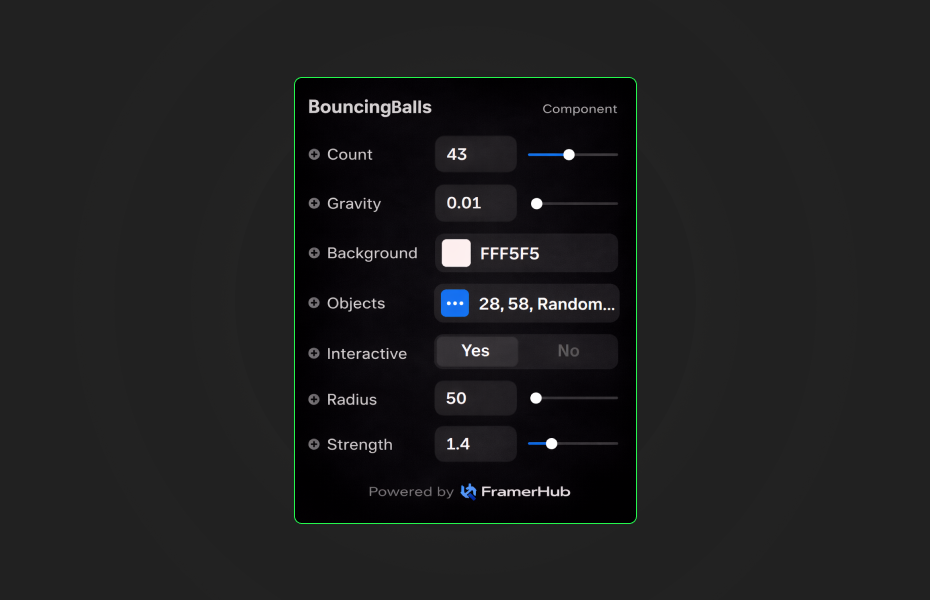
Customizable Objects Control object count, size range (min/max), color palettes, bounciness, and ground friction. Fine-tune every aspect of the simulation.
Color Palette Options Choose from Random, Fixed Color, Warm Tones, Cool Tones, or Pastel modes to perfectly match your brand aesthetic.
Performance Optimized Canvas-aware rendering reduces GPU load on the Framer canvas. Smooth animation loop with efficient collision detection.
Use Cases
Hero Sections — Create an engaging, interactive hero that captures visitor attention instantly.
About Pages — Add personality and playfulness to tell your brand story.
Portfolio Showcase — Stand out with dynamic, physics-driven visual elements.
Loading States — Entertain users while content loads with bouncing animations.
How to Use
Installation
VIDEO PLACEHOLDER: Installation Tutorial
- Log in to your account at framerhub.io
- Navigate to framerhub.io/dashboard
- Find Bouncing Balls in your Recent Purchases
- Click the "Copy" button
- Open your Framer project
- Paste the component anywhere on your canvas (Cmd/Ctrl + V)
Quick Tips
Best Performance — Keep object count between 10-30 for smooth animation. Reduce to 10-15 on mobile.
Color Combinations — Dark backgrounds (black or deep blue) make vibrant objects pop. Try pastel mode for softer aesthetics.
Layering — Place text content above the component. White text with subtle shadows provides best readability.
Physics Feel — Lower bounciness (0.3-0.5) feels more grounded. Higher values (0.8-1.0) create energetic bouncing.
License
Single Use License — Use in one client project with full commercial rights. No redistribution. 1 license = 1 client.
Refund Policy
Due to the nature of our digital products, we are unable to offer refunds, but we're here to assist you with any questions or concerns!
Why Designers Love This
Bouncing Balls brings websites to life with genuine interactivity. It's not just a decoration—it's an experience that invites users to play, explore, and engage. Whether you want a subtle background effect or a bold statement piece, this component adapts to your creative vision with extensive customization options.
Gravity Bouncing Balls - FREE
Interactive 2D physics simulation with gravity, collisions, and mouse repulsion.
You might also like
Why Choose Framer Hub Components
Loved by Framer teams
Used by Framer professionals who need premium, no-code experiences.
"The Best Framer CMS Filtering Plugin I've Found — Truly a Game-Changer. I've tested a lot of Framer CMS filtering and sorting components — both free and paid — and this is by far the best one I've come across."
"He really helped me out when I needed assistance adding it to my Framer project. Super fast customer support highly recommend!"
"We had tried a couple of other Framer CMS filter components but they were buggy, hard to use and support was slow or non-existent. FramerCMSFilter is easier to use and has a lot of added functionality."
Got questions? We've the answers
Got questions? We've the answers
Everything you need to know about FramerHub.