Bokeh Orbs FREE
Smooth, animated bokeh orbs for elegant backgrounds.
Overview
Smooth, animated bokeh orbs for elegant backgrounds.
- Smooth floating animation
- Rainbow or Single color modes
- Adjustable speed and spread
- Performance optimized transparency
- Canvas-optimized rendering
Bokeh Orbs
Create an elegant atmosphere with soft, floating bokeh orbs. Perfect for adding subtle motion to backgrounds without distracting from content.
Features
Elegant Motion Smooth sine-wave based floating animation that feels natural and calming.
Color Modes Choose between a vibrant Rainbow mode where each orb gets a unique hue, or Single mode to match your brand color.
Customizable Adjust the orb count, size, opacity, and animation speed to dial in the perfect look.
Performance Optimized Automatic canvas/preview optimization reduces GPU load during design time.
Use Cases
Hero Sections — Add ambient movement to landing page backgrounds.
About Pages — Create a subtle, calming atmosphere.
Loading States — Provide visual interest while content loads.
Event Pages — Set a festive or elegant mood.
How to Use
Installation
VIDEO PLACEHOLDER: Installation Tutorial
- Log in to your account at framerhub.io
- Navigate to framerhub.io/dashboard
- Find Bokeh Orbs in your Recent Purchases
- Click the "Copy" button
- Open your Framer project
- Paste the component anywhere on your canvas (Cmd/Ctrl + V)
Customization
Colors
- Set the background to match your section
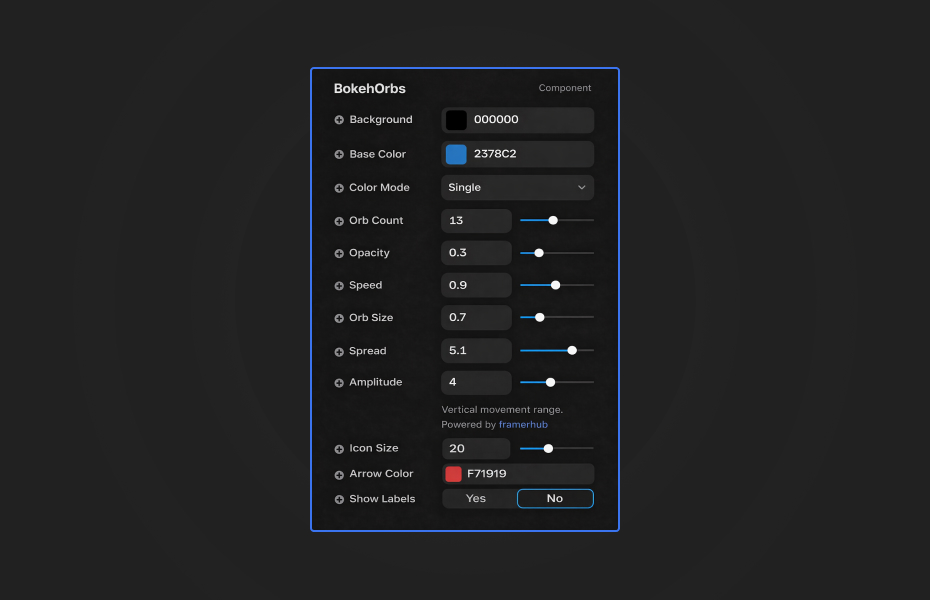
- Choose Rainbow for multi-colored orbs or Single for brand-matched colors
Animation
- Adjust Speed for faster/slower floating
- Modify Amplitude for larger/smaller vertical movement
- Change Spread to control horizontal spacing
Quick Tips
Best Performance — Keep orb count between 5-10 for smooth animation on most devices. Reduce to 3-5 on mobile for optimal performance.
Color Combinations — Dark backgrounds (black or deep blue) make orbs pop. Try matching orb color to your accent color for cohesion.
Layering — Place content above the component. White text with subtle shadows provides best readability.
Speed Settings — Start with default speed (1.0). Slower speeds (0.5-0.8) feel more elegant, faster speeds (2.0+) add energy.
License
Single Use License — Use in one client project with full commercial rights. No redistribution. 1 license = 1 client.
Refund Policy
Due to the nature of our digital products, we are unable to offer refunds, but we're here to assist you with any questions or concerns!
Why Designers Love This
Bokeh Orbs brings that dreamy, out-of-focus light effect seen in professional photography to your web designs—without the complexity of WebGL coding. Just drop it in and customize.
Bokeh Orbs - FREE
Smooth, animated bokeh orbs for elegant backgrounds.
You might also like
Why Choose Framer Hub Components
Loved by Framer teams
Used by Framer professionals who need premium, no-code experiences.
"The Best Framer CMS Filtering Plugin I've Found — Truly a Game-Changer. I've tested a lot of Framer CMS filtering and sorting components — both free and paid — and this is by far the best one I've come across."
"He really helped me out when I needed assistance adding it to my Framer project. Super fast customer support highly recommend!"
"We had tried a couple of other Framer CMS filter components but they were buggy, hard to use and support was slow or non-existent. FramerCMSFilter is easier to use and has a lot of added functionality."
Got questions? We've the answers
Got questions? We've the answers
Everything you need to know about FramerHub.